Free tiers checked October 1, 2026.
Is there a free virtual staging app? Yes, for testing, but not for a whole listing of clean photos you can publish. Free tiers give a few test images, often watermarked, and some cap resolution near 1K or ban commercial use. The likeliest clean free image is a human service’s free first photo, though only Bella says its sample is watermark-free.
There’s no single best free virtual staging app for real estate agents. It depends on the job, so we pick one per situation first.
We make TINTY, an AI staging app with its own free tier, so read this knowing we have a stake. To keep it fair, we compared the free options of 39 apps, services and programs from each vendor’s published terms. Our own limits sit next to everyone else’s.
If you’re new to the topic, start with what virtual staging is and how it works.
On this page: Best pick by job · What “free” means · Every free tier · No watermark · How to stage free · Free downloads · Rules and risks · TINTY’s free plan · FAQ
The best free virtual staging app for each job
These picks are our opinion, based on the published terms below. No one free tier wins every job.
For a photo you’ll publish, the best free virtual staging for real estate is a human service’s free first photo, from VirtualStaging.com or Bella. To test AI on your own photos, try TINTY’s free previews, Pedra or REimagineHome. For full control at no cost, use Blender.
Best free virtual staging app by job (free tiers checked October 1, 2026)
| Your job | Pick | Why | The catch |
|---|---|---|---|
| One free photo made by a person | VirtualStaging.com | First photo free, designer-finished, and you own it | One per account; ask about a watermark |
| A free photo with a written license | Bella Virtual Staging | Sample is “watermark-free,” licensed for marketing the property | Bella must approve you |
| Compare layouts on your own photo | TINTY (ours) | 6 free previews per photo, no card | Watermarked |
| Several AI stagings from one sign-up | Pedra or REimagineHome | 7 credits or 5 designs, no card | License unclear; REimagineHome resizes uploads to 1,024 px |
| Free AI credits every month | Your MLS’s member perks | CRMLS members get REimagineHome’s 30 credits a month | Only some MLSs; CRMLS says each image gets a watermark |
| Free forever, safe for client work | Blender with Poly Haven models | Commercial use allowed, no watermark | Hours per room |
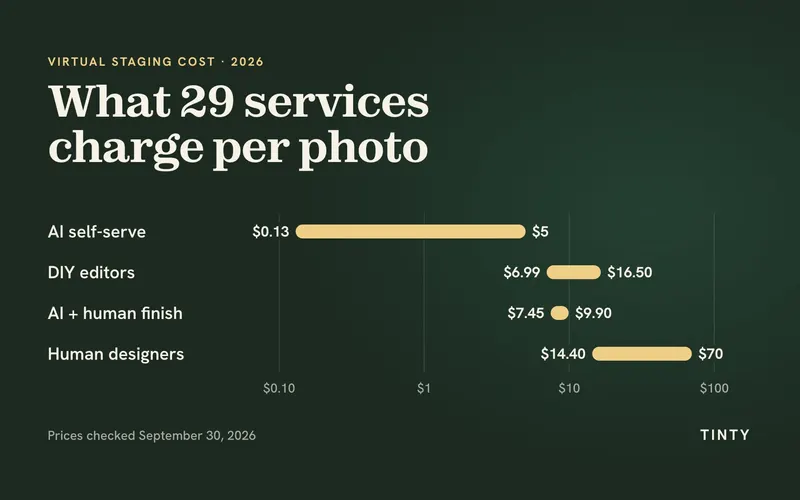
Nothing free covers clean photos for a whole listing. In the list below, one-time clean packs start at $9 for 10 photos; ours is $29 for 10.
To find the best free AI virtual staging app for your listings, try two on your hardest room, using the steps below.
Looking for the best free AI home staging app for your phone? TINTY runs in a phone browser, with nothing to install. REimagineHome has an Android app, Lift My Place has an iPhone app, and Stager AI has both. Collov’s FAQ says it runs in phone browsers.
Is virtual staging free? What “free” usually means
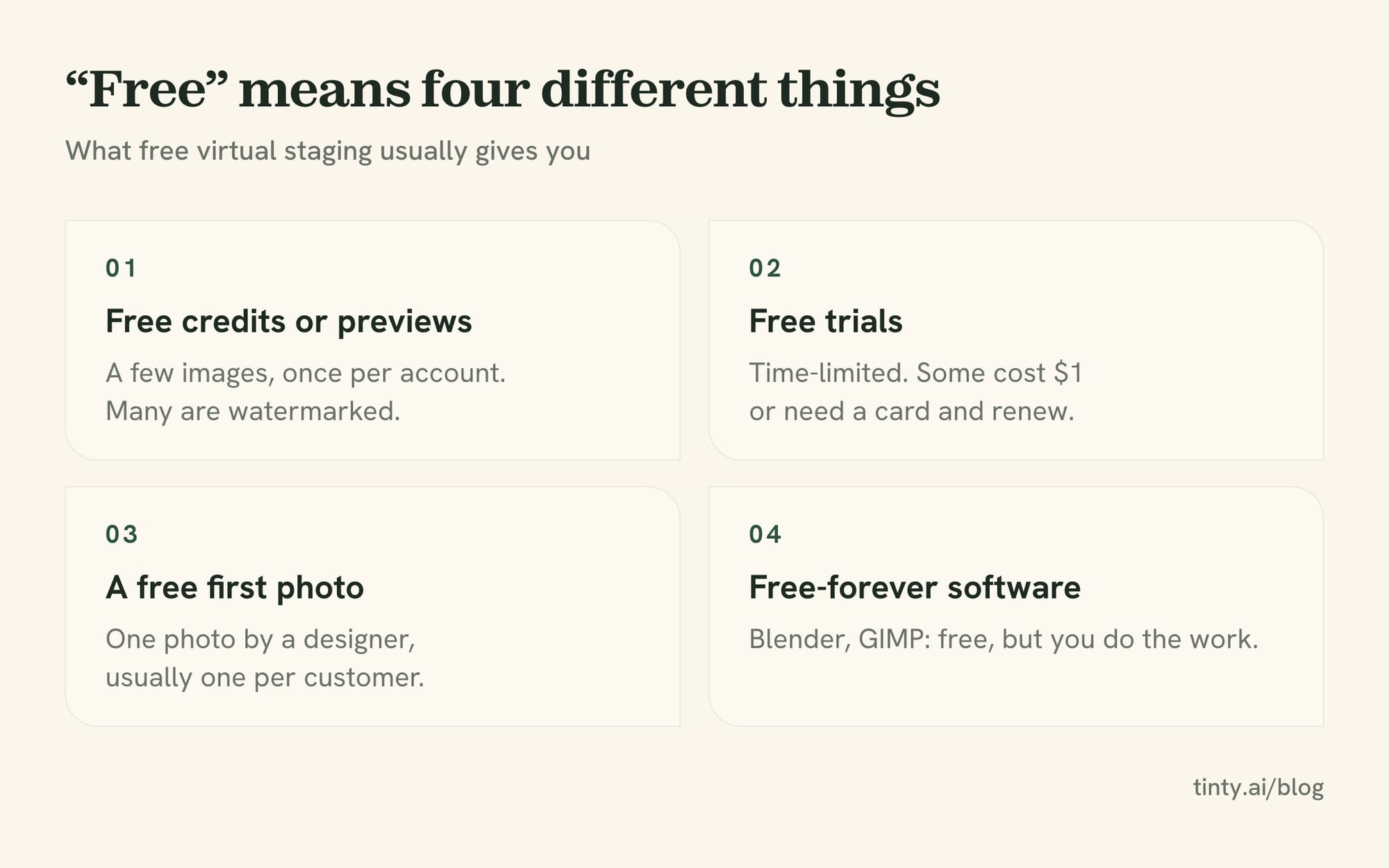
Virtual staging is free to try but rarely free to publish. Free virtual staging sites offer four kinds of “free”:
- Free credits or previews. An AI app gives you a few images, usually once per account. Many are watermarked.
- Free trials. Time-limited access. Some cost $1 or need a card and renew into a paid plan, like RoomStage’s $1 trial. Virtual Staging AI’s terms describe a free trial you must cancel in time to avoid charges; who gets it isn’t clear.
- A free first photo. A human staging service does one photo free to win your business. It’s the likeliest source of a clean free image.
- Free-forever software. Blender, GIMP and general AI apps cost nothing. You do the work, or you accept rougher results.
Five fields decide whether a free result can go on a listing:
- Allowance. How many images, and does it reset? Previews and finished photos aren’t the same thing.
- Watermark. Is it on the free output? Many MLSs reject photos with logos or added text.
- Resolution. Several free tiers stop around 1,024 px. That can look soft full-screen.
- License. Some free tiers are for personal use or “evaluation” only. An MLS upload is commercial use.
- Card. Do you need one? Does a trial renew on its own?
Almost no “best free app” list gives all five for every tool. We do, and we write “not stated” wherever a vendor is silent.
Every free tier compared: apps, services and software
We read each vendor’s pricing page, FAQ and terms on October 1, 2026. We didn’t create accounts or run renders, so nothing here is a test result.
Want a virtual staging app free to test on your own photos? Each entry starts with what’s free. Then come the watermark, top free resolution, license and cheapest clean (watermark-free) image. In this first list, the vendor says no card is needed unless we note otherwise.
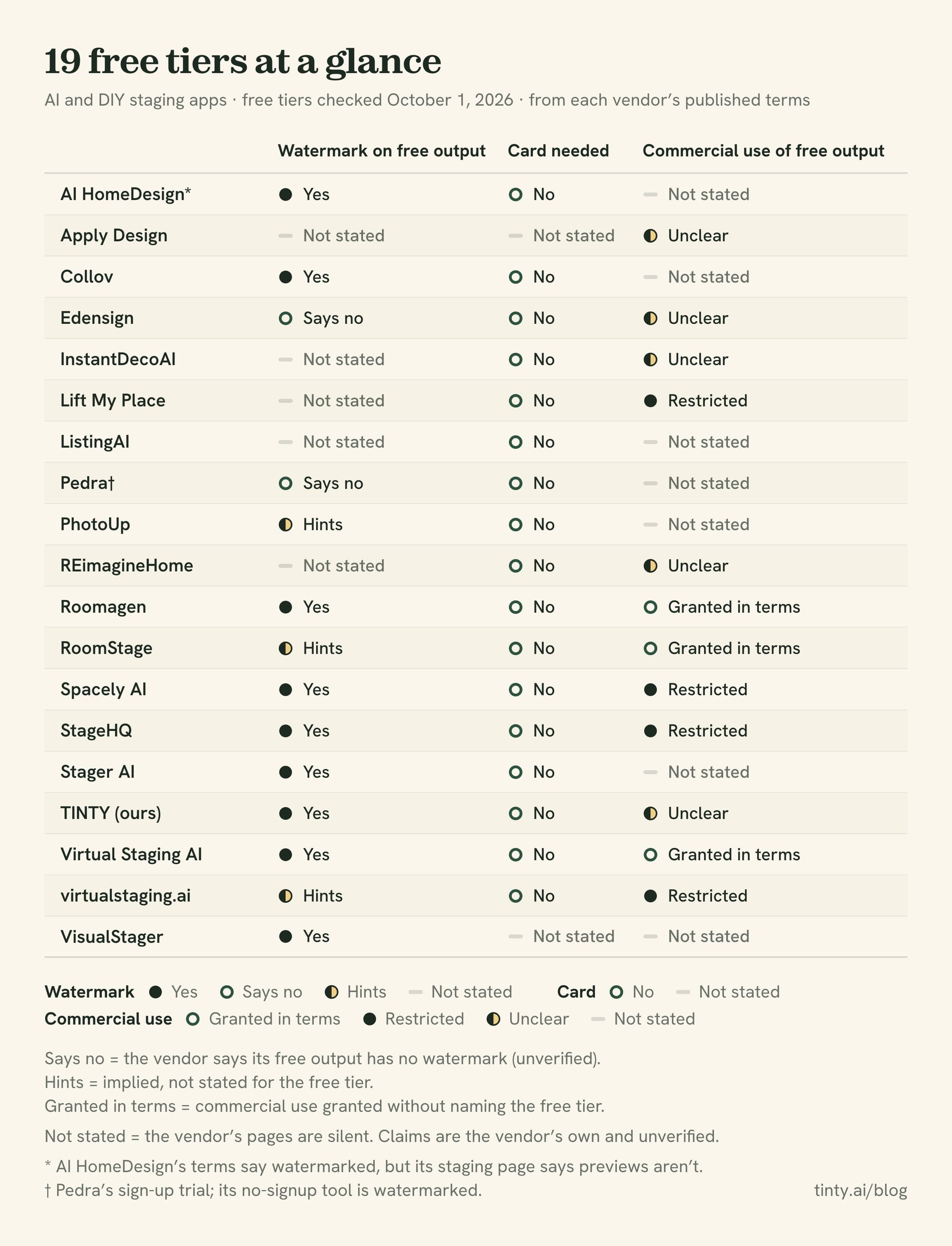
AI and DIY staging apps (A to Z)
- AI HomeDesign: A few free credits (3, per its blog). Its terms say free output is watermarked; its staging page says previews aren’t. Resolution and license not stated. Clean: $35/mo, or $19/mo yearly.
- Apply Design: First image free, per its pricing page; a 2023 help article grants 1 free coin and up to 5 renders after SMS verification. Auto-staging costs 1.5 coins, so whether that covers it isn’t stated. Card, watermark, resolution and output license not stated. Paid: $10 a coin.
- Collov AI: 2 free staging designs at sign-up, plus 5 photo edits and a virtual tour, once. Watermarked: its app tells free users to upgrade to remove it. Free resolution and license not stated. Clean: $27/mo, or $19/mo yearly.
- Edensign: First 2 rooms free, once. Its FAQ says the free photos have no watermark, and its site says exports come “at original resolution,” both unverified. Its terms don’t limit use by plan. Paid: $29/mo, or a $50 pack of 10 that expires in about a month (checked September 30).
- InstantDecoAI: A free trial with no published count. Watermark and resolution not stated. License unclear. A boilerplate terms clause allows “personal use” of site material. Its FAQ, though, says the AI photos “are entirely yours” to use commercially. Clean: $14/mo, or $10/mo yearly, for 8 photos.
- Lift My Place: 3 free credits once at sign-up; watermark and resolution not stated. Its terms say images “belong to you” but bar commercial use “without authorization” on every plan, and don’t say whether paying counts. Clean: a $9 one-time pack of 10 photos in 4K.
- ListingAI: “Free Forever” gives one listing and 9 image credits, but staging is a “limited preview,” and each accepted 2K image costs 6. Staging watermark not stated, and ListingAI may co-publish your AI images unless you opt out. Paid: $36/mo or a $50 pass.
- Pedra: A no-signup tool gives 1 watermarked staging a day, which Pedra says is for “personal exploration.” A sign-up trial gives 7 image credits with “no watermark,” Pedra says. No pixel size or trial terms found. Paid: €29/mo.
- PhotoUp: 5 free credits once; a staged photo uses 3, so you get 1. It describes only an optional “Virtually Staged” watermark. Resolution and license not stated. Paid: $4.50 a photo on demand, plus a 3% card fee.
- REimagineHome: 5 free designs once; its FAQ says larger uploads are resized to 1,024 px. Watermark not stated (rival vendors’ blogs disagree). Its FAQ says royalty-free commercial use, but its terms tie rights to your plan. Clean: $19/mo, without high-res.
- Roomagen: 3 images once, watermarked, at “HD” with no pixel figure. Its terms grant commercial use, listings included, without naming the free tier. Clean: $12/mo, or a $19 pack that never expires.
- RoomStage: One “clean low-res” photo after an email sign-up (the homepage says 2). Its terms grant commercial use without naming the free tier, and its separate $1 trial renews into a paid plan. Paid: $20/mo.
- Spacely AI: 40 trial credits once, with Auto Furnish off. On its pricing page, the Free plan lacks watermark-free output, high-res downloads and a commercial license. Clean: Studio, $50/mo, is the first plan with all three.
- StageHQ: 3 watermarked previews plus a sample-room demo. Preview size isn’t stated, and its terms call free images “for evaluation purposes only.” Clean: $19 once for 20 photos.
- Stager AI: A free preview with no published count. A 2024 Google Play developer reply says trial output is watermarked. Its license doesn’t separate free from paid. Paid: $19.99/mo for iOS Basic.
- TINTY (ours): A free account gets 3 finished photos once, plus 6 previews per photo (up to 20 a month). Without an account, you get watermarked previews on up to 3 photos a day. Everything free is watermarked, and finished photos are 2K. Our terms say watermarked images are for “review and sharing,” and the mark must stay. Clean: $9/mo for 4, or $29 for 10.
- Virtual Staging AI (Zillow-owned): Upload a photo free without signing up; no count is published. Its app code lists “Remove watermark” and “High resolution” as paid features. Its terms allow use “for any lawful purpose” without naming the free tier. Clean: $25/mo, or $16/mo yearly, for 6 photos.
- virtualstaging.ai: 2 free stagings after you confirm your email; it isn’t the Zillow tool. Its plans promise “always watermark-free” without naming the free tier. Its terms keep images its property “until payment is completed,” and resolution isn’t stated. Paid: $25/mo.
- VisualStager: A DIY drag-and-drop editor, free only on sample photos; card not stated. It puts a VisualStager watermark on staged images. Clean: about $30 in credits for your first photo.
No free option: Stageflow’s terms give pay-as-you-go accounts “0 complimentary generations.” Interior AI has no free plan.
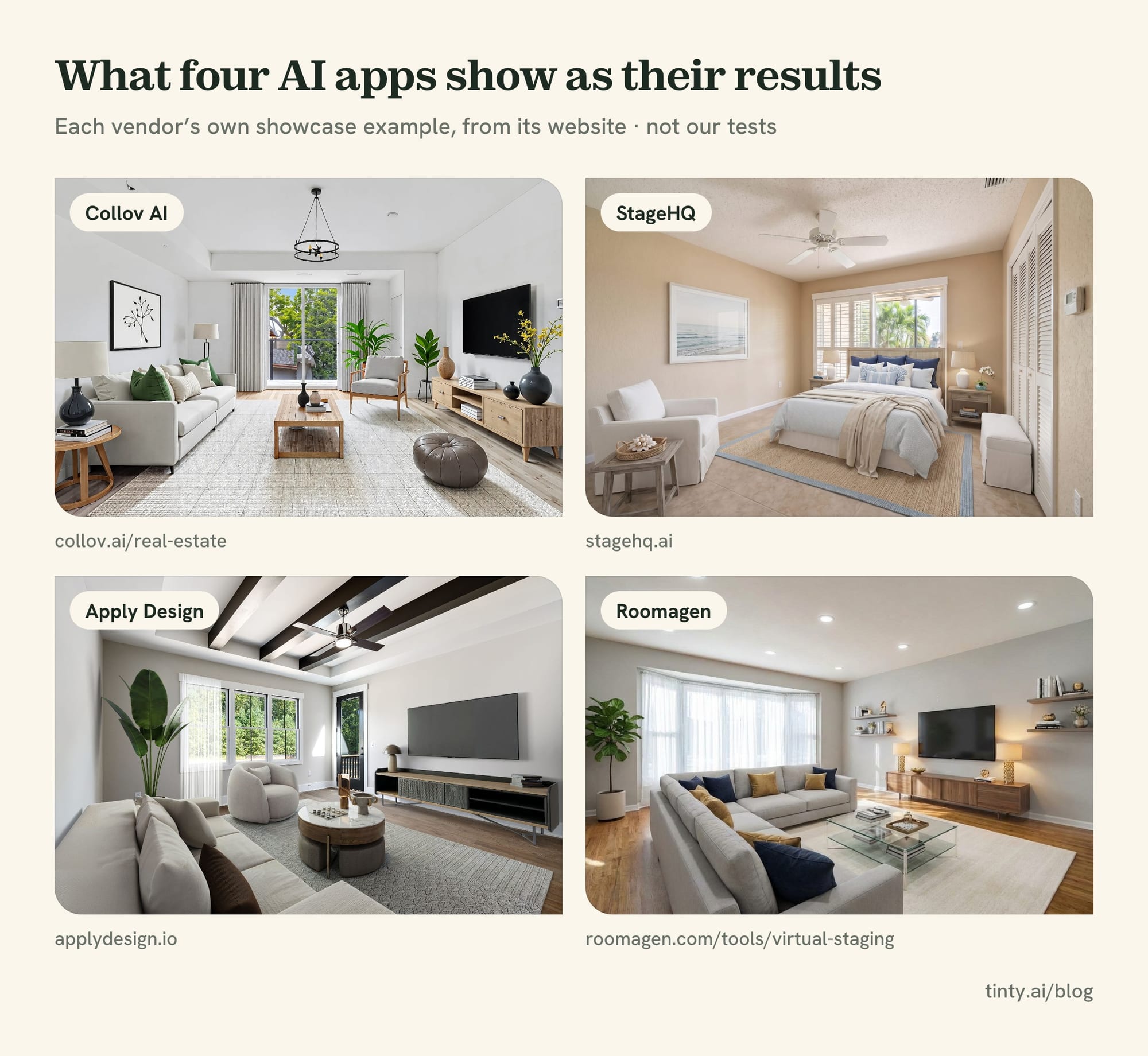
Images: Collov AI · StageHQ · Apply Design · Roomagen, from each vendor’s own site.
Human services with a free first photo
A designer stages your first photo free, hoping you’ll pay for the rest. Styldod’s and Bella’s forms require a phone number, so a sales call may follow.
- VirtualStaging.com: Your first photo on a new account is free, finished by a real interior designer, usually in 4 to 8 hours on weekdays. Revisions are unlimited. Watermark and size not stated; its FAQ says you own the photos. Then $24 a photo.
- Styldod: First image free, but you choose one service: staging, object removal or enhancement. Staging takes 24 to 48 hours, no card. Watermark and size not stated; license unclear. Then $23 an image.
- Bella Virtual Staging: One free sample if Bella approves you, back within 24 hours, no card. Its sign-up widget says “watermark-free,” and its paid files come “at full resolution.” The license covers marketing that one property. Then $37 a photo.
PadStyler and BoxBrownie often show up on free lists. PadStyler’s visible offer is $20 off; a “FREEPIC” free-photo code sits only in hidden page code, and its free AI tool seems to watermark output. BoxBrownie’s free account covers photo edits, not staging.
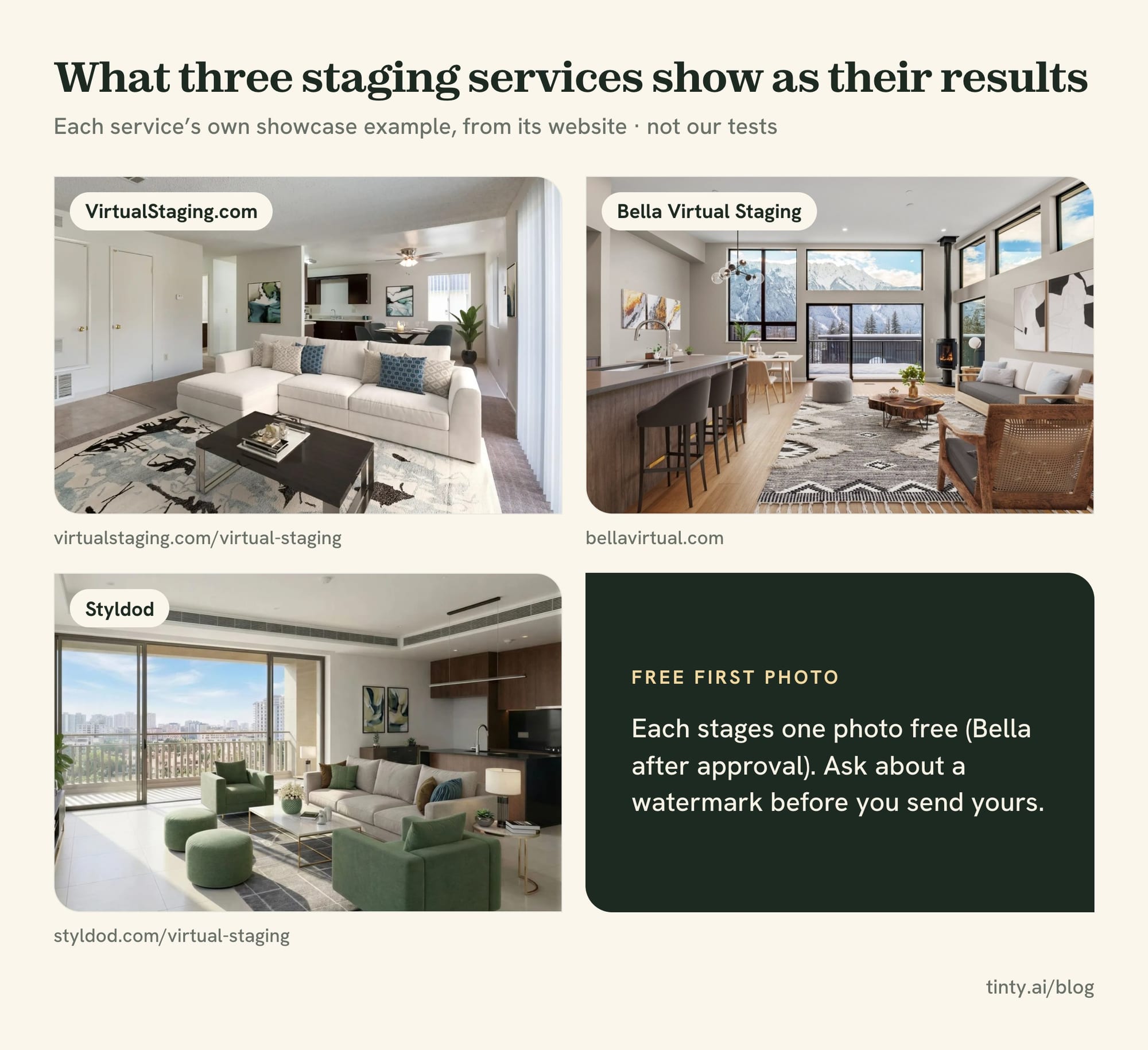
Images: VirtualStaging.com · Bella Virtual Staging · Styldod, from each service’s own site.
General AI apps and room planners
These aren’t built for listing photos. They can furnish a room for free, but they can also move a window or swap a floor.
- ChatGPT Free: Image creation is included, with stricter limits than paid plans and no published number. No visible watermark, but hidden data marks the file as AI-made. Free resolution isn’t published. OpenAI’s terms say you own the output; no card needed.
- Google Gemini: Free image generation with Nano Banana 2, under an unpublished quota. You must be 18 or older to edit photos, and free downloads are 1K. A Media Watermark setting turns off the visible mark, but the hidden SynthID mark stays. Google says it won’t claim ownership.
- Canva Free: Up to 20 AI uses a month, reset on the 1st. You own AI output unless it builds on Canva library content. We couldn’t confirm which photo-editing AI tools the Free plan includes.
- Adobe Firefly: Limited free daily generations in Firefly, Express and Photoshop on the web, with no published count. Adobe says non-beta output from its own Firefly models is safe for commercial use. It doesn’t address partner models in the free plan, like Nano Banana. Visible watermark on free not stated. Paid: $9.99/mo.
- Microsoft Copilot: Free image creation, but its terms allow only “your own personal use,” which rules out listing photos.
- RoomGPT: 1 free generation at its older “Basic” quality. Its terms page returns an error, so the license isn’t stated.
- Homestyler: Free 1K renders, watermarked. Its 3 free AI credits can’t cover one AI Stager image, which costs 10.
- Planner 5D: The Free plan lists no renders, and its terms keep personal accounts non-commercial.
- IKEA Kreativ: Free, IKEA products only, and IKEA’s terms say planning tools are “for personal, noncommercial use only.”
- DecorAI: Its terms limit images to “your personal use.”
Free DIY software
All free, and only SketchUp Free says it adds a watermark. You stage by hand, so budget hours per room and find free furniture models.
- Blender: Free for any use, commercial included, and what you make is yours. Desktop only.
- SketchUp Free: Runs in a browser. “Not for commercial use,” and PNG downloads carry a watermark.
- Sweet Home 3D: Free for personal or commercial use. Only the desktop app makes images.
- GIMP and Krita: Free image editors with no limits on commercial work.
- Photopea: A free browser editor with ads. Its terms mention no watermark and say your work is yours to sell.
Free virtual staging with no watermark: what’s actually clean
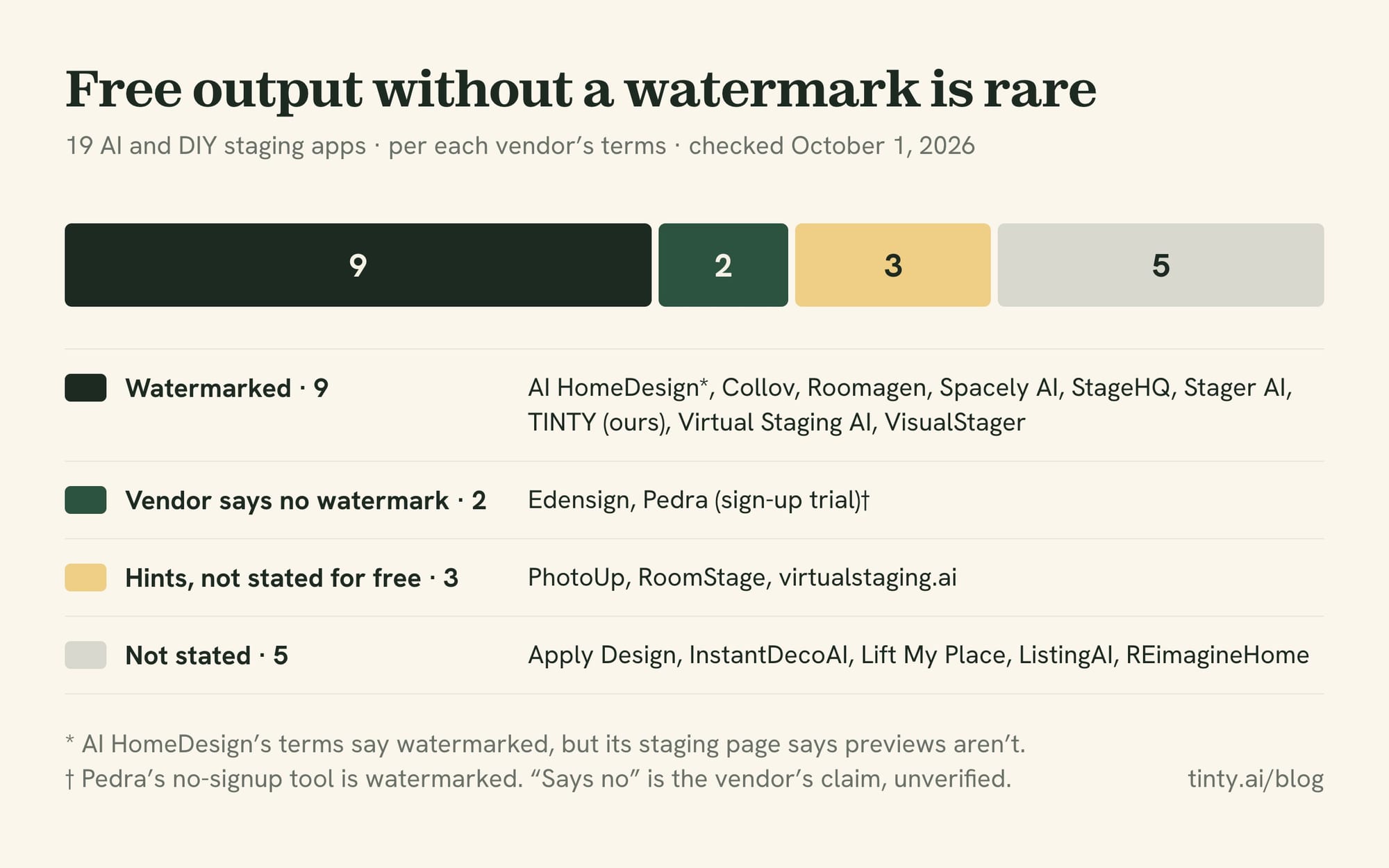
Clean free output exists, but it’s rare. Of the 19 AI and DIY staging apps above, 9 watermark free output, going by their own terms, pages, app code or developer replies. Two say their free output has no watermark (Edensign and Pedra’s sign-up trial), unverified. Three hint at it without saying so for the free tier (virtualstaging.ai, RoomStage and PhotoUp), and 5 don’t say.
- Human free first photos: only Bella’s sign-up widget says “watermark-free.” Ask VirtualStaging.com and Styldod before you send the photo.
- General AI apps: ChatGPT adds no visible mark, and Gemini lets you switch its mark off, though both embed invisible markers.
- DIY software: Blender, GIMP, Krita, Photopea and Sweet Home 3D’s desktop app add no watermark we could find, but you do all the work.
Watermarked on free, per the vendor: TINTY (ours), Virtual Staging AI, Collov, Roomagen, StageHQ, Spacely, AI HomeDesign and VisualStager. Stager AI too, per a 2024 developer reply. Pedra’s no-signup tool, Homestyler and SketchUp Free are watermarked too.
Not stated by the vendor: REimagineHome, Lift My Place, InstantDecoAI, Apply Design and ListingAI.
No watermark doesn’t make a photo listing-ready. A clean file can still be 1K, licensed for personal use only, or missing a window the AI erased.
How to virtually stage a room for free
Here’s how to virtually stage a home free. Shoot each room empty and bright. Then run the photo through a free app tier, a general AI app or free DIY software. Last, check the result against the original and label it.
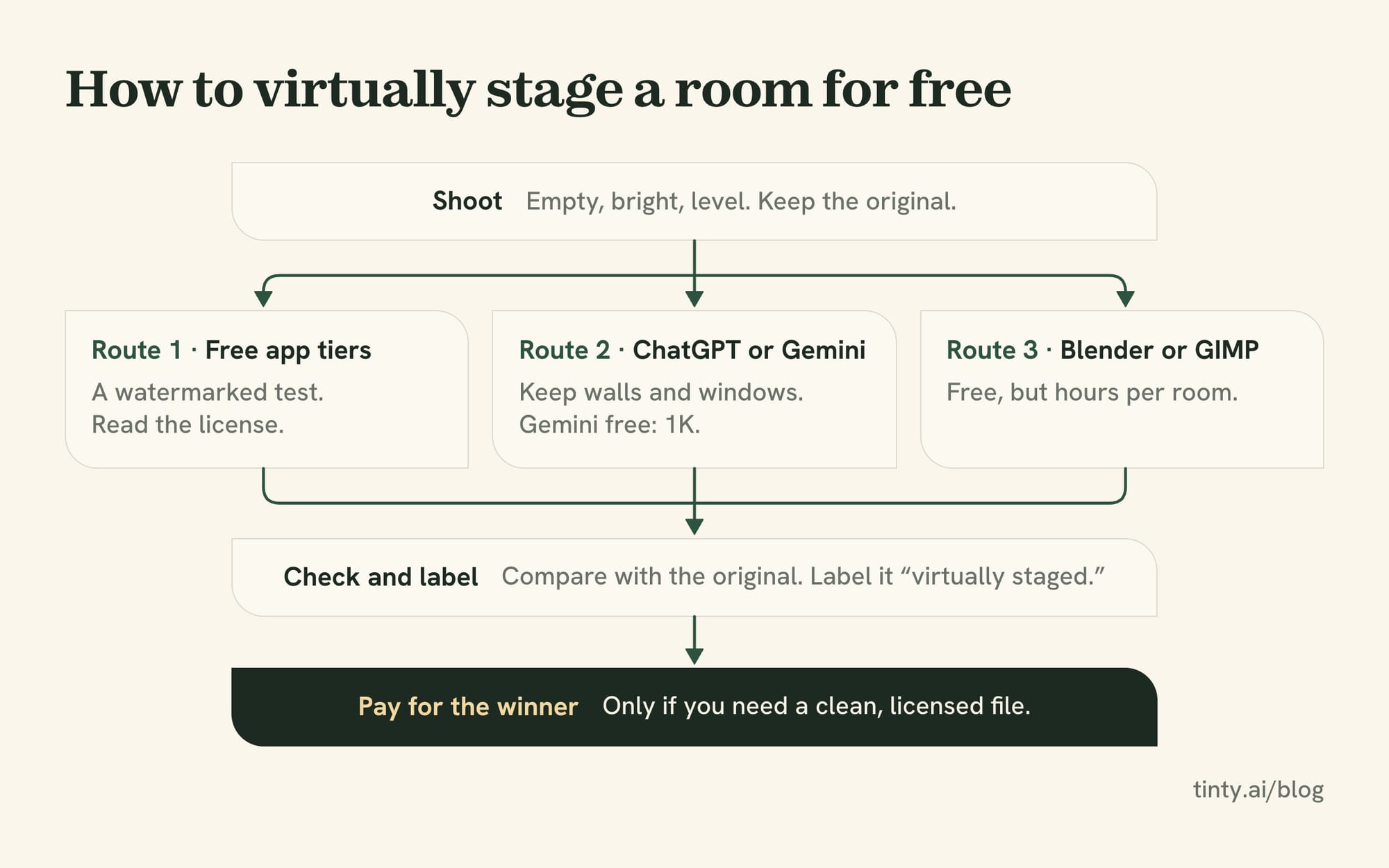
Step 1 for every route: shoot for staging
- Shoot the room empty, bright and level, from a corner, so the floor and two walls show.
- Turn on the lights and open the blinds. Dark, cramped frames give any tool less to work with.
- Keep the untouched original. California’s AB 723 requires a link or QR code to it on altered listing images.
Route 1: free tiers of staging apps
- Start with your hardest photo. Pick a wide room with big windows and a visible door. If a tool handles that, the easier rooms should be fine.
- Run it through two free tiers. Pick ones with no card from the list above.
- Generate a few options. Count what’s free: at some tools, previews and finished photos come from separate allowances.
- Read the license before you download. Watermarked or “for evaluation” output is a test. It’s never the listing photo.
- Pay for the winner, or mix. Buy the winning tool’s smallest clean option. Or use a human service’s free first photo for your lead image.
Route 2: general AI apps like ChatGPT and Gemini
Upload the photo to the free plan and describe the furniture and style you want. Tell it to leave walls, windows, doors and floors alone. Then check the result against the original, because these models can change structure anyway.
On Gemini’s free plan, downloads are 1K, and you can turn off the visible watermark in settings. ChatGPT adds none. Neither publishes its free image limit.
Route 3: free DIY software
DIY virtual staging is free if your time isn’t.
- Download Blender from blender.org, or use GIMP or Photopea for 2D cut-and-paste.
- Match the camera to your photo. fSpy is a free tool for this. Its Blender importer dates from 2019, and support for Blender 5 isn’t stated.
- Add free furniture models from Poly Haven or Blendkit’s free plan.
- Light it to match the window light. Blender’s Shadow Catcher helps 3D furniture cast shadows onto the floor in your photo.
- Render, composite and export. Expect hours per room, not minutes.
Last step for every route: check and label
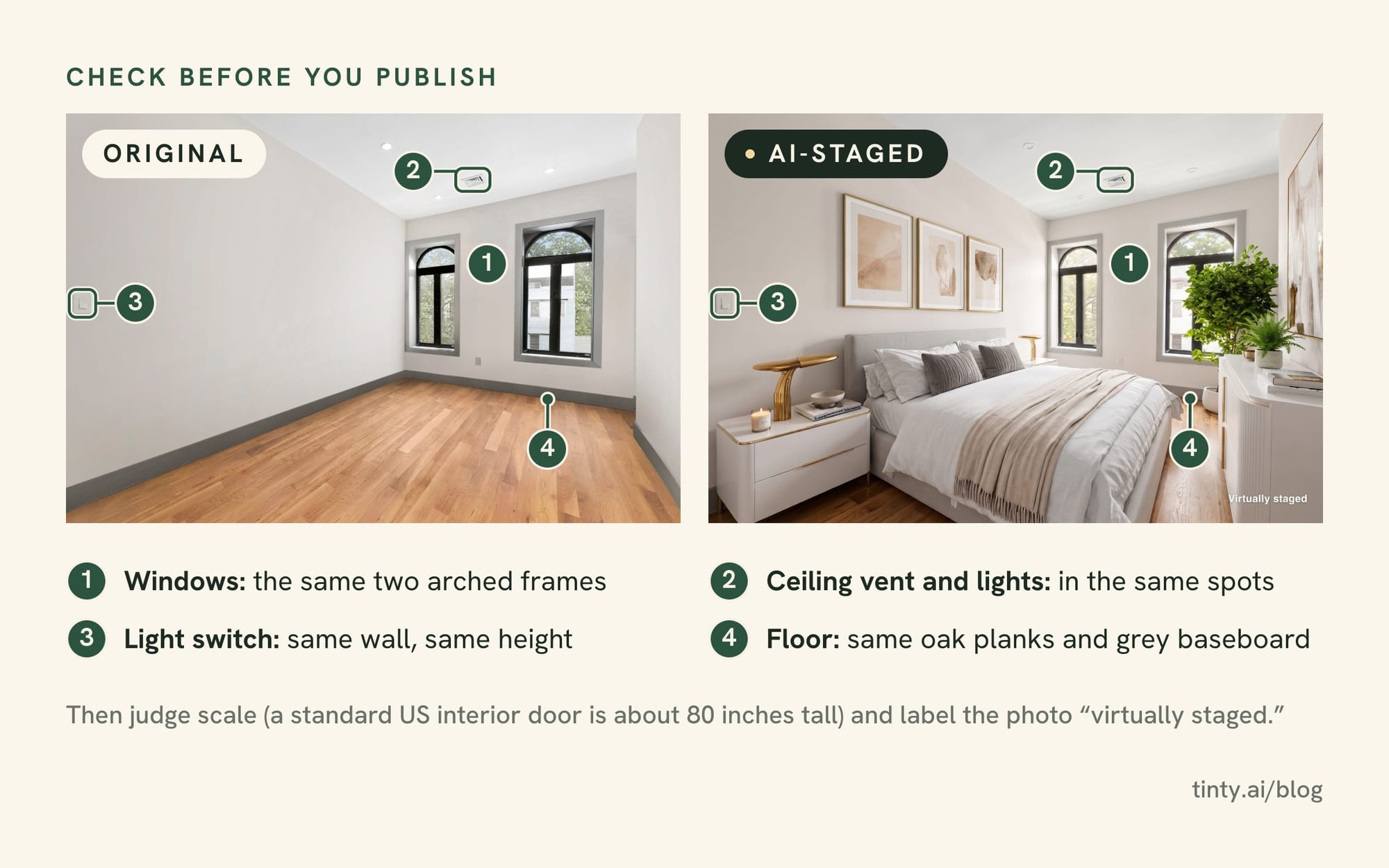
- Compare with the original. Count the windows, then check doors, outlets, vents, flooring and wall color.
- Check the scale. A standard US interior door is about 80 inches tall. Use it to judge sofas and beds.
- Label it. Write “virtually staged” wherever your MLS requires, and keep the original next to it.
- Leave any watermark alone. We explain why below.
Virtual staging software free download: what you actually get
No free virtual staging program you download will stage your photo for you. Most free virtual staging software is really 3D design software, and the AI apps above run in a browser.
Blender is the most capable option: free, open source and fine for commercial work. Version 5.2.2 LTS came out September 15, 2026. Current Mac builds need Apple Silicon, and Blender recommends 32 GB of RAM (8 GB minimum).
The time cost is real. One AI staging vendor, virtualstaging.art, estimates 4 to 8 hours per room for experienced users and 10 to 20+ hours while you’re learning. Its own figures vary, and it sells the faster option, so treat that as a rough guide.
SketchUp Free is non-commercial and watermarks PNG exports, and a forum moderator said in 2022 that the web version lacks Match Photo. It’s not a listing tool.
Sweet Home 3D (version 7.5) builds a 3D model of a room rather than staging your photo. App Store listings under that name come from a different seller, and we couldn’t confirm they’re official.
GIMP, Photopea and Krita handle 2D cut-and-paste staging. You’ll need furniture images you have the rights to use. IKEA’s site doesn’t offer its 3D models for download, and its terms prohibit using its images without permission. Photopea’s ads go away with Premium.
Free furniture models and their licenses
- Poly Haven: Any use, commercial included, and no credit needed. It has 521 models, 85 of them furniture, plus 301 indoor lighting maps (HDRIs).
- Blendkit (formerly BlenderKit): Its free plan has 23,279 models, about 28% of all its models. You can sell renders made with them.
- 3D Warehouse: 3 free downloads a day, or up to 100 if you watch promo videos. Commercial use is fine, as long as you don’t resell the models on their own.
Download only from each project’s official site. The FTC has warned that fake ads for AI tools and other software spread malware. GIMP, for one, says it publishes nothing on Apple’s App Store.
Rules and risks of free staged photos
This isn’t legal advice, just what the terms and MLS rules we read say.
Don’t remove the watermark. Erasing it typically breaks the tool’s terms; TINTY’s terms say it “must not be removed.” Depending on the image, it could also raise issues under the DMCA’s rules on copyright notices. Either way, you lose the license you were relying on.
Read the license as closely as the price. StageHQ’s free images are “for evaluation purposes only,” and Spacely’s free plan has no commercial license. Copilot, IKEA Kreativ and DecorAI allow personal use only. When you upload to an MLS, you vouch that you own or licensed the image.
Photographers: the rights must reach your client. The agent uploads, and Bright MLS requires a copyright release when someone else created the image. So personal-use or “evaluation” terms rule a tool out for client work. Blender, GIMP, Krita, Photopea and Poly Haven allow commercial work, and OpenAI’s terms say you own ChatGPT output.
Canva’s AI terms and Adobe’s AI guidelines forbid removing provenance data from AI images. If your export preset strips metadata, turn that off for those files.
Many MLSs ban watermarks. Bright bars text, graphics or logos added to listing photos. Stellar MLS bans logos and branding except its own watermark. ARMLS allows only its own watermarks, and NWMLS’s photo guide says it won’t accept superimposed graphics or text.
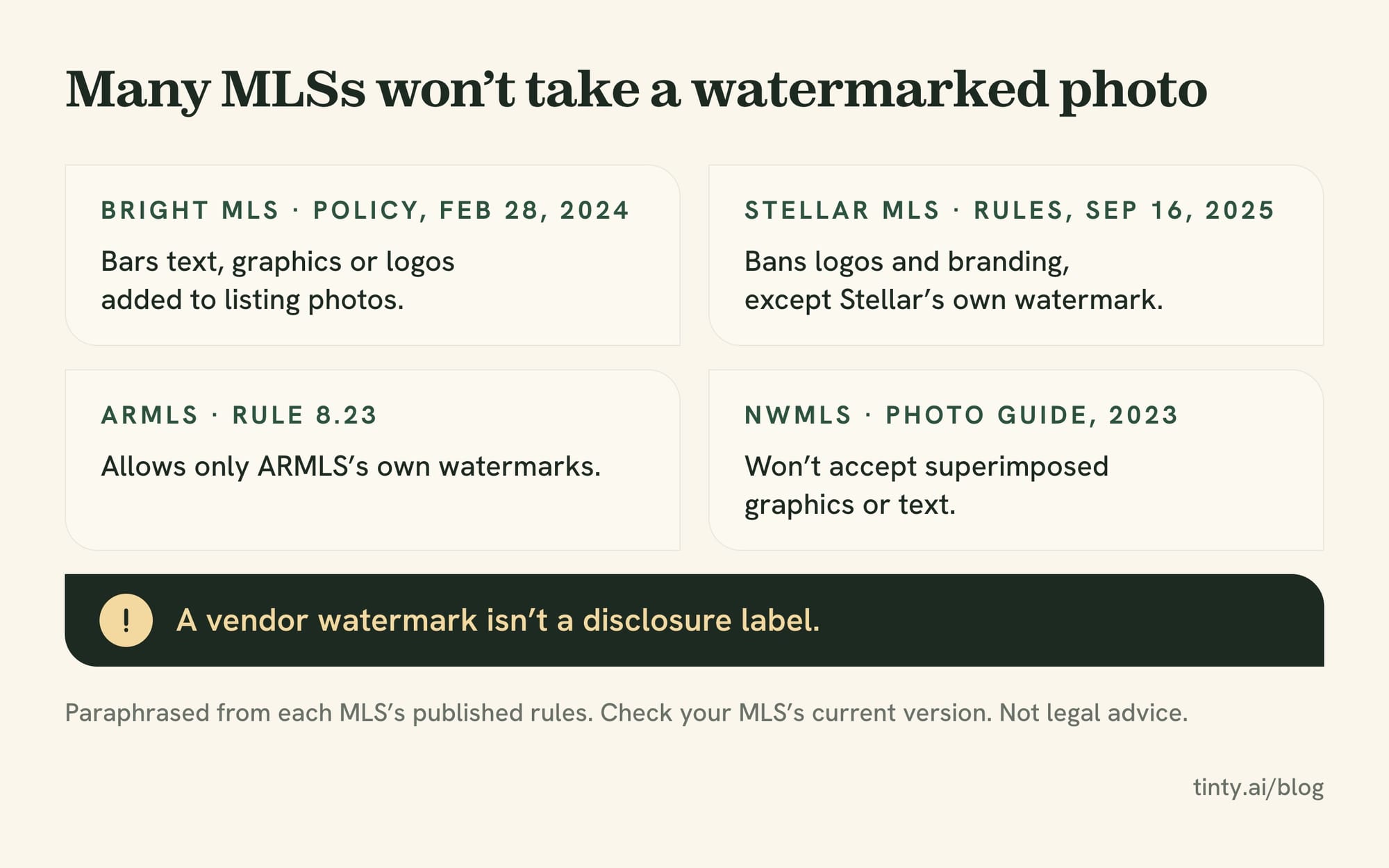
Disclose, even when it was free. A vendor’s watermark isn’t a disclosure label, and NAR’s Code of Ethics requires a true picture in ads. Labels often get skipped: Coraly reviewed about 40,000 listing photos and found roughly 11% altered. Over 90% of those had no visible disclosure, per Real Estate News.
California’s AB 723, in force since January 1, 2026, has no exception for free tools. CRMLS fines $250 if an unlabeled photo isn’t fixed after a warning.
Where free staging tools fall short
Even with the fine print sorted, the images can let you down. These are problems reported in forums, news stories and the vendors’ own docs.
- Retries eat the allowance. A member of the We Get Around Network, a photographers’ forum, compared paid or trial accounts of Virtual Staging AI and Collov for agent clients. Chairs landed in front of a refrigerator, and a dining set replaced a washer and dryer. Some rooms took 10 or more regenerations, more than most free tiers give.
- Structure drifts. OpenAI’s image docs say its masking is prompt-based, so parts outside the mask can change. New York’s Department of State tells buyers that inconsistent window views are a sign of AI-altered photos.
- Features appear. Real Estate News reported an AI edit that added a fireplace that doesn’t exist.
- Scale is off. Stellar MLS bans small furniture used to make a room look larger. Oversized pieces make it look cramped.
When free stops being worth it
Free is fine for choosing a tool. Plan to pay when you need any of these:
- a clean file for the MLS, with no watermark;
- more photos than one free tier gives;
- a license that clearly covers commercial use;
- a bigger file than 1K;
- a room the free tool keeps getting wrong.
Then a small purchase usually costs less than redoing photos or answering an MLS citation. Our guide to what virtual staging costs per photo puts a five-photo listing at about $12 to $50 with AI software.
TINTY’s free plan (we make it)
What’s free: a free account gets 3 finished photos, once, plus 6 previews per photo, up to 20 previews a month. No card needed.
The limits:
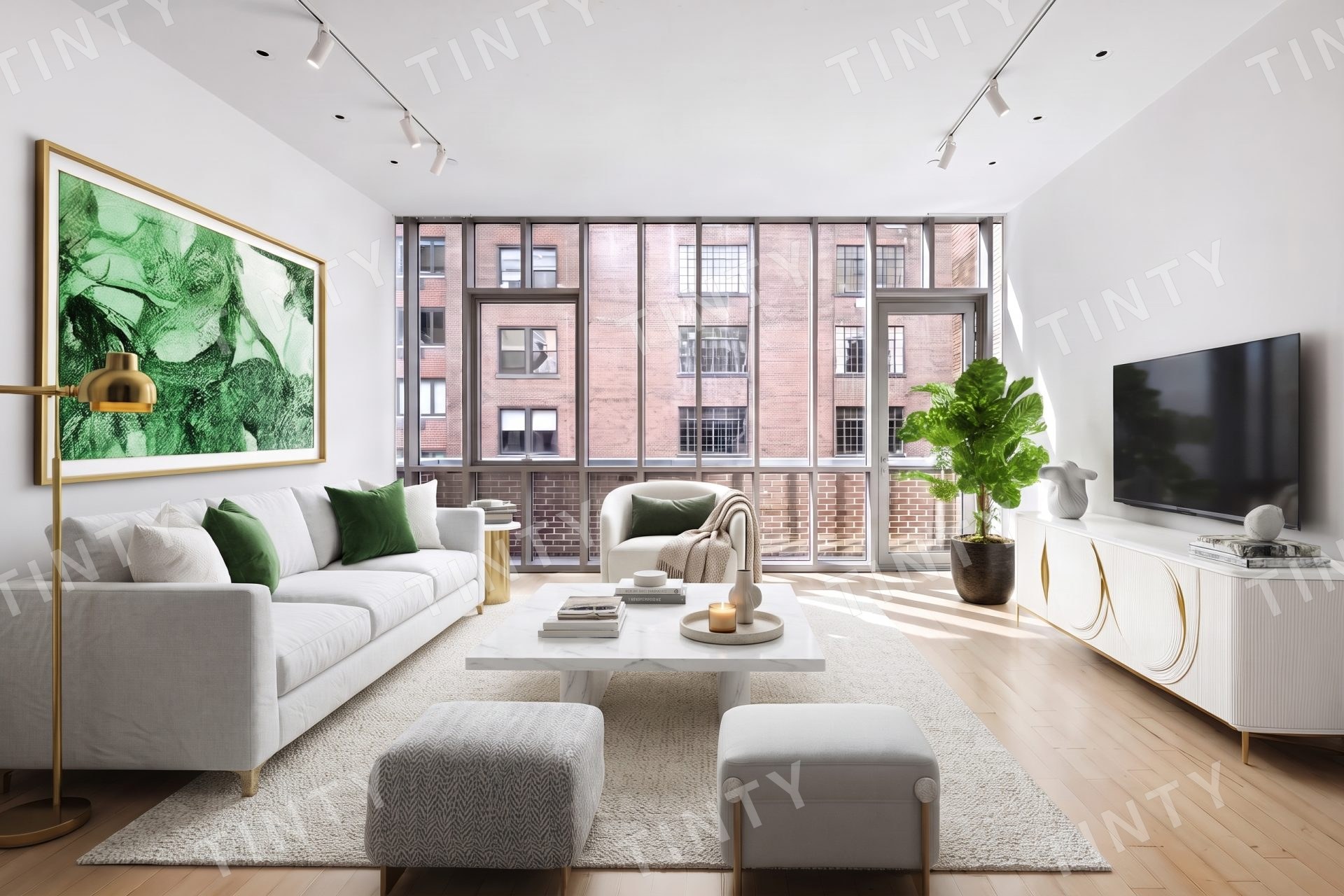
- Every free image carries a TINTY watermark, so free output isn’t MLS-ready. Our terms say watermarked images are for review and sharing, and the watermark must stay.
- Output tops out at 2K, about 2,500 px on the long side.
- No kitchen, bathroom or exterior room types.
- No furniture removal or decluttering.
Our cheapest clean step: Base at $9 a month for 4 photos, or a $29 one-time pack of 10.
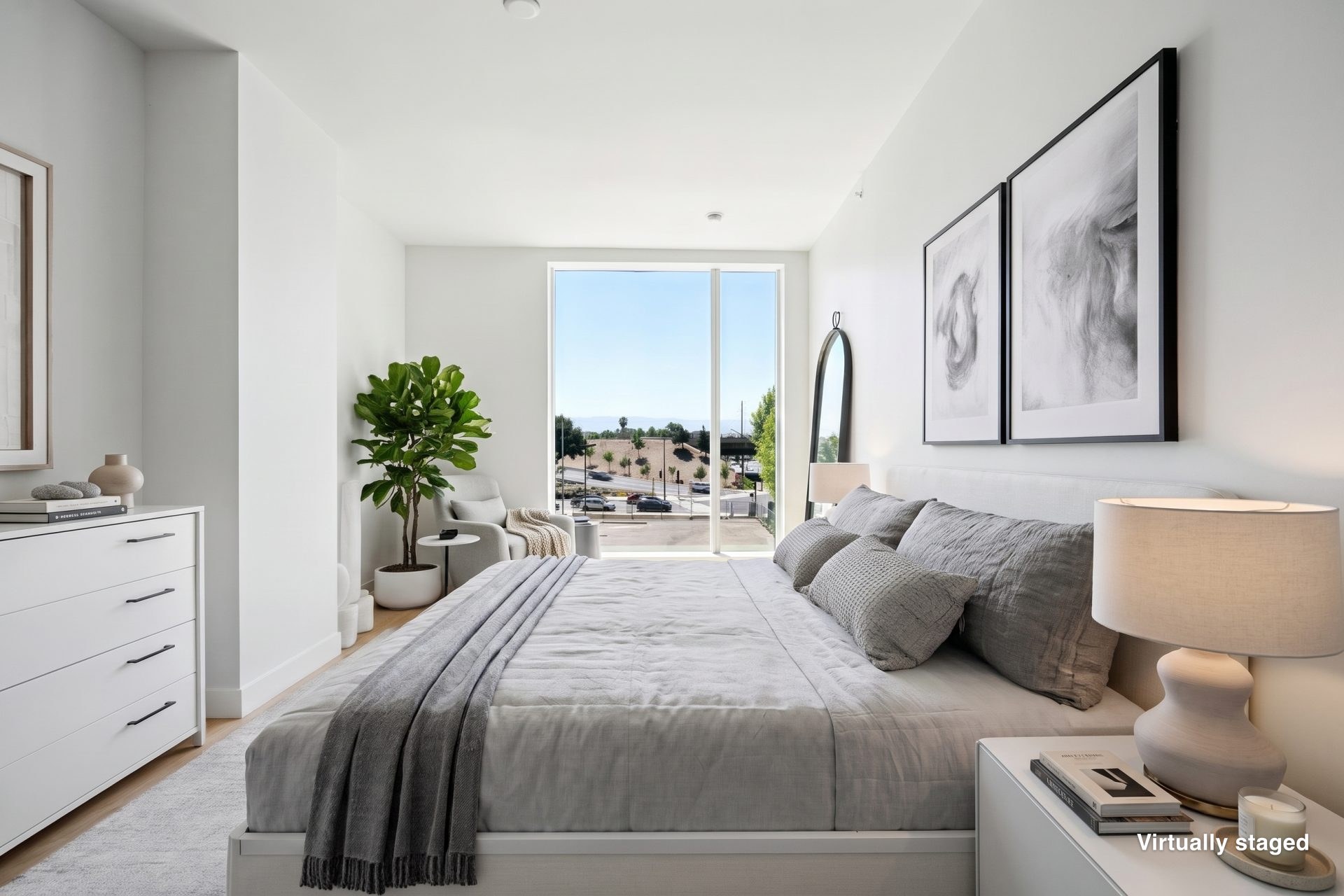
See how TINTY stages your own photo, free.
How we checked
On October 1, 2026, we read each vendor’s pricing pages, FAQs, terms and app-store listings, plus page code where text loads by script. Then we re-checked each claim and marked it confirmed, corrected or unverifiable.
The count is 39 apps, services and programs with some free option, plus three we name with no free staging: Stageflow, Interior AI and BoxBrownie. We didn’t create accounts, upload photos, run renders or fill in forms. When a vendor’s pages contradict each other, we quote the terms and say so.
Free tiers change fast. We plan to re-check this page monthly. If something has changed, email hello@tinty.ai and we’ll fix it.
Best free virtual staging app FAQ
Is virtual staging free?
It can be, for a test. Most AI staging apps give a few free images, often watermarked. VirtualStaging.com and Styldod stage your first photo free. Clean, licensed photos for a whole listing almost always cost money, but a clean AI pack can cost under $20.
Is there a free virtual staging app with no watermark?
A few say so, but we couldn’t verify them. Edensign and Pedra’s sign-up trial say their free output has no watermark, and RoomStage promises one clean low-res photo. ChatGPT adds no visible mark, and Gemini lets you turn its mark off. Among human services, only Bella says its free sample is watermark-free.
Show 6 more questionsShow fewer questions
Is virtual staging AI free?
Trying it is. Nearly every AI staging app offers free credits or previews, and ChatGPT and Gemini have free plans. Publishing it usually isn’t. Free output tends to be watermarked, capped near 1K, or licensed only for personal use or evaluation.
Can I use free virtually staged photos on the MLS?
Only if the file is clean, licensed and labeled. Bright, Stellar, ARMLS and NWMLS reject added logos or watermarks in their rules or photo guides. Some free tiers restrict use, like StageHQ (“for evaluation”) and Spacely (no commercial license). Whatever the tool, label the photo as virtually staged and keep the original.
Can I stage a whole listing for free?
Not with clean photos from one app. On zero budget, stage the rooms that sell the home, often the living area and main bedroom. Use VirtualStaging.com’s and Styldod’s free first photos, or Bella’s sample, and ask each for the same style and no watermark. Ask your MLS about staging credits, and shoot the other rooms empty and bright.
Is there virtual staging software I can download for free?
Yes, but it won’t stage a photo for you. Blender, Sweet Home 3D, GIMP and Krita are free downloads, and Photopea runs free in a browser. You place and light the furniture yourself, which takes hours per room. Download only from each project’s official site.
Can ChatGPT or Gemini do virtual staging for free?
They can furnish a room on their free plans, but neither says how many images you get. Expect changed windows, floors or fixtures, so compare every result with the original. OpenAI’s terms say you own ChatGPT output.
Do I have to disclose virtual staging if it was free?
Yes, price doesn’t change the rules. California’s AB 723 covers any digitally altered listing image, free or paid, and NAR’s Code of Ethics requires a true picture in ads. A vendor’s logo doesn’t count as a disclosure. Add the label your MLS requires and keep the original.
Sources
All vendor pages read October 1, 2026, unless a date is given. Verbatim quotes come from these pages.
AI and DIY staging apps:
- AI HomeDesign: aihomedesign.com/pricing · aihomedesign.com/terms-and-conditions · aihomedesign.com/virtual-staging · aihomedesign.com/blog/services/virtual-staging…
- Apply Design: applydesign.io/our-pricing · applydesign.io/tos · help article (last updated March 7, 2023): support.applydesign.io/general-info/hRerVCARxF…
Show 63 more sourcesShow fewer sources
- Collov AI: collov.ai · collov.ai/pricing · collov.ai/terms
- Edensign (pay-per-use price checked September 30, 2026): edensign.io/pricing · edensign.io/terms-of-service · edensign.io/virtual-staging-by-city · edensign.io/alternatives/reimagine-home
- InstantDecoAI: instantdeco.ai · instantdeco.ai/pricing · instantdeco.ai/terms-of-service
- Lift My Place: liftmyplace.com/en/pricing · liftmyplace.com/en/terms · apps.apple.com/us/app/lift-my-place-ai-home-st…
- ListingAI: listingai.co/pricing · listingai.co/faq/image-credits · listingai.co/terms-conditions
- Pedra: pedra.ai/pricing · pedra.ai/free-tools/free-virtual-staging · pedra.ai/legal
- PhotoUp: photoup.net/pricing · photoup.net/terms · support.photoup.net/en/articles/11428711-ai-vi…
- REimagineHome: reimaginehome.ai/pricing · reimaginehome.ai/faqs · reimaginehome.ai/terms-of-use · play.google.com/store/apps/details?id=ai.reima… · CRMLS member offer: reimaginehome.ai/partners/crmls
- Roomagen: roomagen.com/pricing · roomagen.com/terms
- RoomStage: roomstage.ai/pricing · roomstage.ai/terms
- Spacely AI: spacely.ai/pricing · spacely.ai/consent/terms-and-conditions
- StageHQ: stagehq.ai/pricing · stagehq.ai/terms
- Stageflow (no free option): getstageflow.com/pricing · getstageflow.com/legal/terms
- Stager AI: stagerai.com/pricing · play.google.com/store/apps/details?id=com.stag… (developer reply, July 23, 2024) · apps.apple.com/us/app/stager-ai-real-estate-ed…
- TINTY (ours): tinty.ai · pricing · terms (last updated September 25, 2026)
- Virtual Staging AI: virtualstagingai.app · virtualstagingai.app/prices · virtualstagingai.app/terms-of-service
- virtualstaging.ai: virtualstaging.ai/pricing · virtualstaging.ai/terms
- VisualStager: visualstager.com
- Interior AI (no free plan): interiorai.com
Human services:
- VirtualStaging.com: virtualstaging.com/faq
- Styldod: styldod.com/free-trial · styldod.com/terms
- Bella Virtual Staging: bellavirtual.com/pages/sign-up · bellavirtual.com/pages/pricing · bellavirtual.com/products/virtual-staging · bellavirtual.com/pages/terms-of-service
- PadStyler: padstyler.com/ai-virtual-staging · padstyler.com/promo
- BoxBrownie (no free staging): boxbrownie.com/us/pricing
Showcase images (each vendor’s own examples, October 1, 2026):
- AI apps: collov.ai/real-estate · stagehq.ai · applydesign.io/#gallery · roomagen.com/tools/virtual-staging
- Human services: virtualstaging.com/virtual-staging · bellavirtual.com · styldod.com/virtual-staging
General AI apps and room planners:
- OpenAI: openai.com/policies/terms-of-use (effective January 1, 2026) · help.openai.com/en/articles/9275245-chatgpt-fr… · developers.openai.com/api/docs/guides/image-ge…
- Google Gemini: support.google.com/gemini/answer/14286560 · support.google.com/gemini/answer/17405358 · gemini.google/subscriptions · policies.google.com/terms
- Canva: canva.com/policies/ai-product-terms · canva.com/help/ai-access
- Adobe: helpx.adobe.com/creative-cloud/apps/generative… · adobe.com/products/firefly/plans.html · adobe.com/legal/licenses-terms/adobe-gen-ai-us…
- Microsoft: microsoft.com/en-us/microsoft-copilot/for-indi… · designer.microsoft.com/termsOfUse.pdf
- RoomGPT: roomgpt.io · roomgpt.io/buy-credits
- Homestyler: homestyler.com/pricing · homestyler.com/about/agreement
- Planner 5D: planner5d.com/pricing · planner5d.com/pages/terms
- IKEA: ikea.com/us/en/customer-service/terms-conditions · ikea.com/us/en/customer-service/knowledge/arti…
- DecorAI: decoraihome.com/terms
Free software and models:
- Blender: blender.org/about/license · blender.org/download · blender.org/download/requirements · docs.blender.org/manual/en/latest/render/cycle…
- fSpy: fspy.io · github.com/stuffmatic/fSpy-Blender
- Time estimate (AI staging vendor): virtualstaging.art/articles/blender-virtual-st…
- SketchUp Free: help.sketchup.com/en/admin/sketchup-free · help.sketchup.com/en/sketchup-web/web-features · trimble.com/en/legal/offering-terms/terms/engl… · forum, January 23, 2022: forums.sketchup.com/t/camera-match-new-photo/1…
- Sweet Home 3D: sweethome3d.com/faq · sweethome3d.com/download · sweethome3d.com/users-guide
- GIMP: gimp.org/docs/userfaq.html · gimp.org/downloads
- Photopea: photopea.com/privacy.html
- Krita: krita.org/en/about/license
- Poly Haven: polyhaven.com/license
- Blendkit: blendkit.com/docs/licenses · blendkit.com/plans/pricing
- 3D Warehouse: help.sketchup.com/en/3d-warehouse-download-pol… · help.sketchup.com/en/3d-warehouse/3d-warehouse…
- FTC on fake AI software ads (April 2023): consumer.ftc.gov/consumer-alerts/2023/04/ads-f…
Rules, MLS policies, forums and news:
- 17 U.S.C. §1202: law.cornell.edu/uscode/text/17/1202
- Bright MLS Policy on Images and Documents (February 28, 2024): assets.ctfassets.net/1g8q1frp41ix/57NAS71dVeHq…
- Stellar MLS Rules and Regulations (September 16, 2025 PDF, Articles 04.04 and 04.05; hosted on a third-party site): irp.cdn-website.com/3d0f9886/files/uploaded/9…
- ARMLS watermarks: armls.com/watermarks
- NWMLS photography guide (April 18, 2023): nwmls.com/real-estate-photography-101
- CRMLS digitally altered image FAQ (updated July 24, 2026): kb.crmls.org/knowledgebase/digitally-altered-i…
- CRMLS and REimagineHome announcement (January 29, 2025): go.crmls.org/crmls-evolves-to-virtual-staging…
- California AB 723: leginfo.legislature.ca.gov/faces/billTextClien…
- NAR 2026 Code of Ethics: nar.realtor/about-nar/governing-documents/code…
- New York Department of State trend alert (November 13, 2025): dos.ny.gov/news/new-york-department-state-issu…
- We Get Around Network forum thread: wegetaroundnetwork.com/topic/21311/virtual-sta…
- Real Estate News (June 18, 2026, Coraly study): realestatenews.com/2026/06/18/how-should-mlss…
- Real Estate News (September 8, 2026): realestatenews.com/2026/09/08/ai-modified-list…
Our related guides:
- Five-photo cost estimate: Virtual staging cost
- What virtual staging is: What is virtual staging?