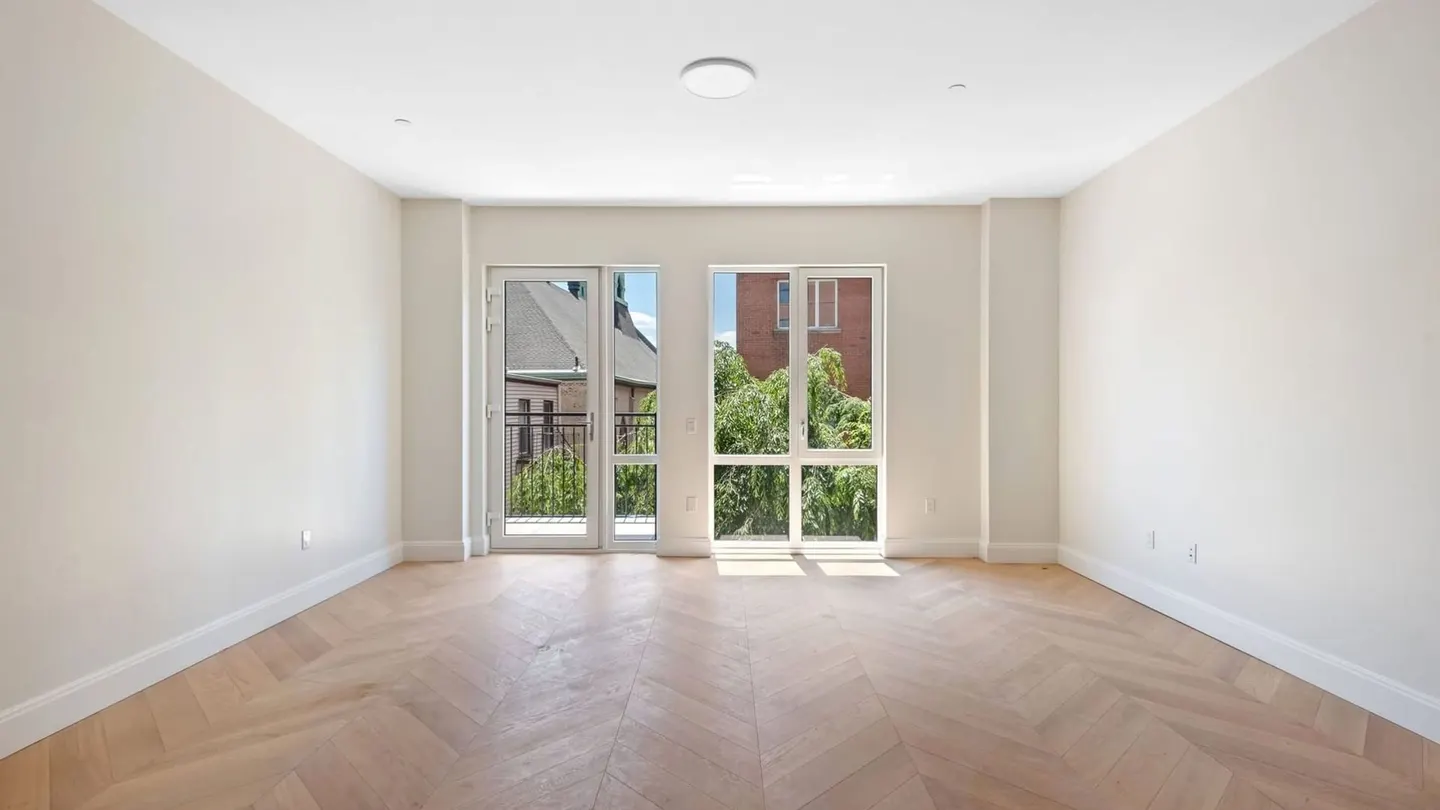
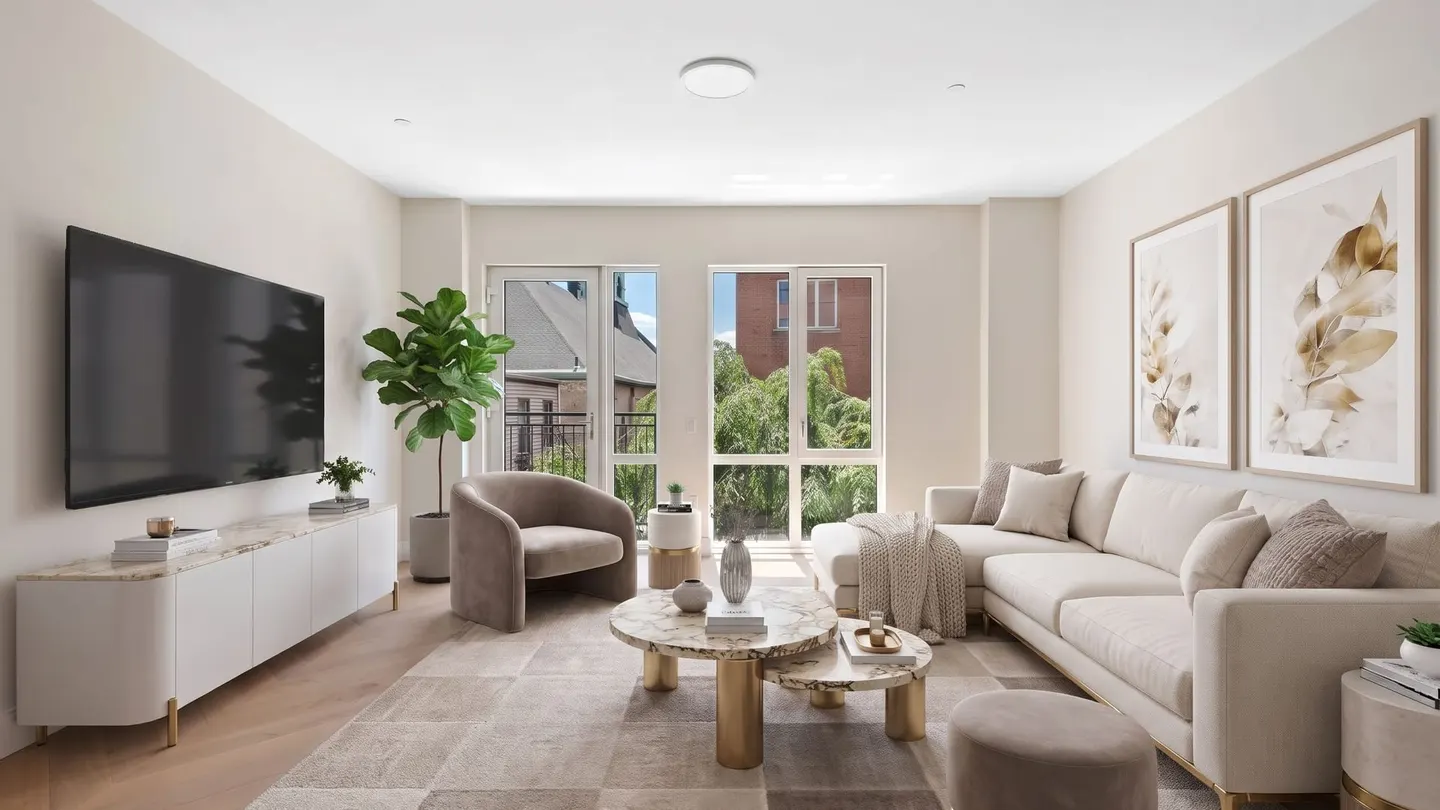
What is virtual staging for rentals? It adds digital furniture to photos of an empty apartment or rental home, so renters can read the layout. At the median asking rent of a vacant US rental, an empty day costs about $51 (our estimate), and an AI-staged listing usually costs less. Label each staged photo and include the original, as California requires from January 1, 2027.
Rent data, laws and TINTY prices checked October 28, 2026.
We make TINTY, an AI virtual staging app, so we have a stake in this topic. Rent figures come from the Census Bureau, Zillow and company filings, and every calculation we made is labeled as ours. Laws here are general information, not legal advice.
Key takeaways
- Fit: stage empty living rooms and bedrooms between tenants. Shoot kitchens, bathrooms and the outside as they are.
- Math: at $1,541, the median asking rent of a vacant US rental, an empty day costs about $51. An AI-staged listing usually costs less (our estimate).
- Labels: caption each staged photo “Virtually staged,” post the empty original next to it and say the unit is rented unfurnished (our suggestion).
- California: Assembly Bill 2025 (AB 2025) requires the label and the original in rental ads from January 1, 2027, landlords included. New York’s proposals aren’t law yet.
On this page: When it helps · Vacancy math · Photos · Labels · AB 2025 and New York · TINTY · FAQ
When virtual staging helps a rental, and when it doesn’t
Virtual staging helps most with an empty unit that renters judge from photos, often before they ever visit. Virtual apartment staging adds furniture to the photo, not to the unit. Our guide to virtual staging explains how it works and what it costs.
In a survey by Apartments.com of over 15,000 US adults planning to rent, run in November and December 2025, 77% wanted photos of the specific unit. For half of all respondents, a listing without such photos is a deal-breaker, and 40% said they’re likely to rent sight unseen.
The author of California’s AB 2025 noted the same in the Assembly committee analysis: it’s not uncommon for renters to commit to a unit without visiting it. Our reading: a staged photo shows scale and what each room is for, and the empty original shows condition.
Which rentals to stage and which to skip
Stage empty units, and skip anything where the photo would promise something the unit doesn’t have. In our view, the best fits are an empty unit after cleaning and a studio, where renters can’t tell if a bed and a sofa fit. A vacant rental house whose rooms look alike when empty gains too.
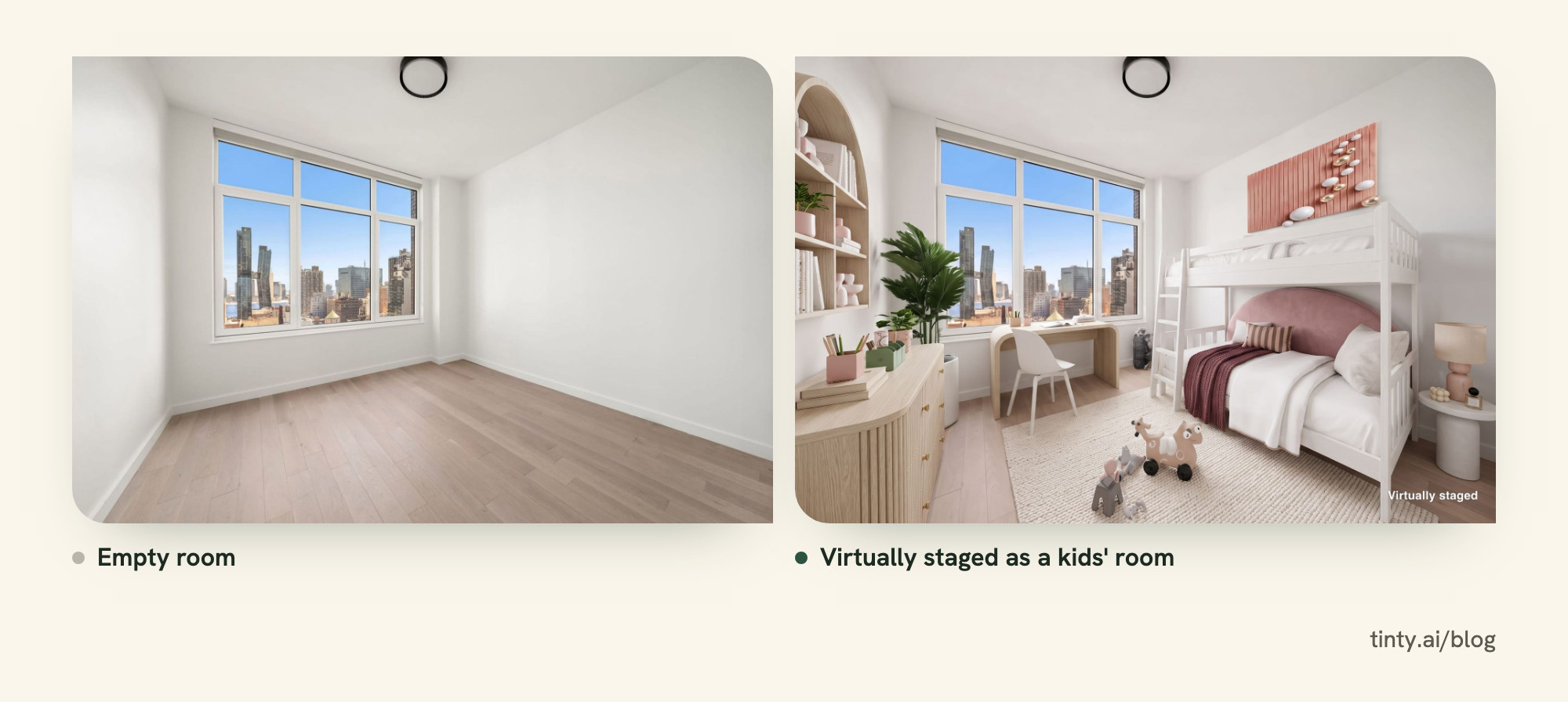
Skip or wait in these cases:
- Occupied units: if you can, wait until the last tenant’s things are out, then shoot the empty rooms (our view).
- Furnished rentals: renters need to see the real furniture they’ll live with (our view).
- Kitchens, bathrooms and exteriors: shoot them as they are.
- Hidden wear: never use an edit to cover damage. AB 2025 counts changes to walls, flooring and fixtures as alterations, and TINTY’s terms ban hiding a property’s condition.
For property managers: one turnover after another
For a property manager, staging is a repeat job, because a big share of units come back to market every year. RealPage data, reported by LeaseLock, shows 56% of market-rate apartment residents with leases expiring in the first half of 2026 renewed. So about 44% didn’t renew (our arithmetic).
At Invitation Homes, a big single-family rental operator, same-store turnover was 22.8% in 2025, with more move-outs in summer, per its 2025 annual report.
Our advice for a portfolio: stage each unit’s own photos, keep one style per building, reuse one shot list and label the photos on every channel. To fill each unit, our guide on how to find tenants covers rental sites, fast replies and fair screening.
Vacancy loss vs the cost of staging a rental
At the median asking rent of a vacant US rental, one empty day costs about $51 (our estimate). Staging a listing with an AI tool usually costs less than that one day.
In the third quarter of 2026, 7.6% of the US rental inventory was vacant for rent, per the Census Bureau’s vacancy survey. The median asking rent of those vacant units was $1,541. Divided by 30 days, that’s $51.37 a day (our arithmetic). Here’s what one vacant day buys, set against the cost of staging one listing:
Our estimate at $51 a vacant day ($1,541 Census median asking rent, Q3 2026, ÷ 30). TINTY launch prices checked October 28, 2026; other services September 30, 2026.
| Cost | Amount | Equals this much vacancy |
|---|---|---|
| One vacant day | $51 | 1 day |
| One vacant week | $357 | 7 days |
| TINTY (ours): a month of Base (10 photos) or a Listing pack (30 photos) | $9-$29 | About 4-14 hours |
| AI self-serve tools, five-photo listing | $12-$50 | About 6-24 hours |
| Human design service, five photos | $96-$328 | About 2-6 days |
Other AI tools charge from under $1 to about $5 a photo, and human design services $14.40 to $70, per our comparison of 29 staging services.
How to calculate vacancy loss on your unit
Vacancy loss is the rent a unit doesn’t earn while it sits empty. To estimate it for your own unit:
- Daily rent: divide the monthly rent by 30. The calendar-exact version, rent × 12 ÷ 365, gives a little less: $50.66 at $1,541 (our arithmetic).
- Empty days: count from move-out to the start of the new lease.
- Vacancy loss: multiply the daily rent by the empty days.
Houses rent higher. Zillow’s typical asking rent for single-family rentals in the US was $2,266 in September 2026, or about $76 a day (our arithmetic).
At Invitation Homes, a same-store home sat empty 47 days on average between residents in 2025, up from 40 in 2024. American Homes 4 Rent says turnover typically takes about 20 to 60 days. Both are large single-family operators with their own crews, so a small landlord’s numbers can differ either way.
Example: at about $51 a day, two empty weeks cost about $714 in rent. A $25 AI-staged listing, the median five-photo price in our cost guide, is about 3.5% of that (our arithmetic).
Why it’s a break-even, not a promise
We found no independent study that measures how much virtual staging shortens a rental vacancy. So read the table as a break-even, not a forecast.
Staging touches only the marketing days. Invitation Homes’ annual report calls the time to market and lease a home “a component” of the days it sits empty. Repairs and cleaning take the same time either way.
Brokers disagree on whether staging speeds up a lease, and our virtual vs physical staging comparison collects their views.
Watch out: staging pays for itself if it saves a few hours to a day of vacancy with AI, or a few days with human services (our estimate). Nobody has shown it does, so don’t budget on a faster lease.
Rental listing photos: what to shoot and what to stage
Shoot every room empty, clean and wide, then stage only the rooms where furniture explains the space: living areas and bedrooms.
Take your rental property photos once the unit is cleaned and repaired (our view). If you list before the make-ready work ends, reshoot after, so the photos match what renters will see.
Our iPhone listing photo guide covers phone settings, camera height and an empty-room checklist.
Tip: keep every empty-room file before you stage anything. They’re your originals, and California rental ads must include them, or link to them, from January 1, 2027.
Rental shot list: stage these rooms, shoot the rest as is
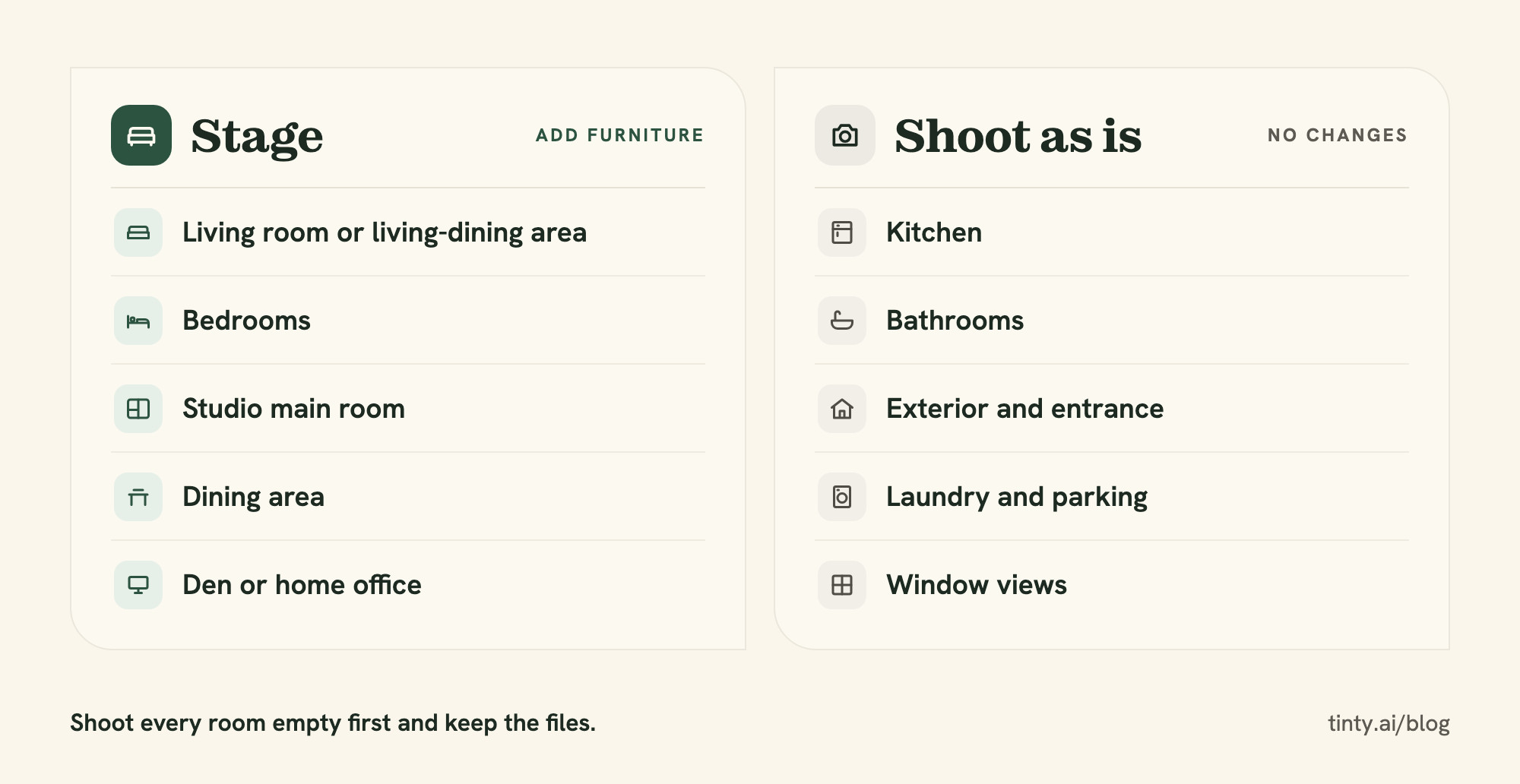
Stage the rooms renters can’t picture empty, and photograph everything else exactly as it is. Stage these:
- Living room or living-dining area
- Each bedroom
- The main room of a studio
- Dining area
- Den or home office
Shoot these as they are:
- Kitchen, with its real appliances
- Bathrooms
- Building exterior, entrance and yard
- Laundry, parking and storage
- Window views, untouched: AB 2025 treats changed views through windows as an alteration
How to label virtually staged rental photos
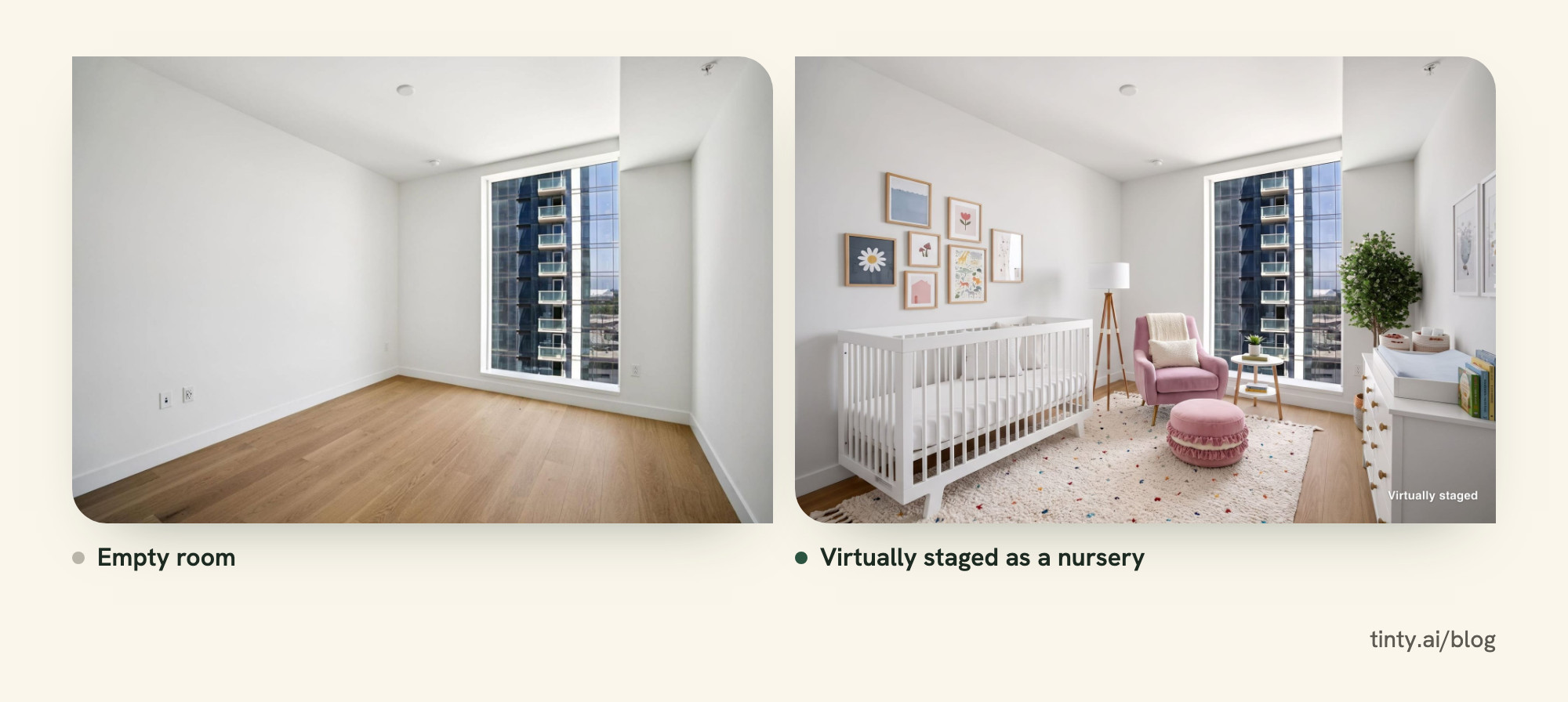
Caption each staged photo “Virtually staged,” put the unaltered original next to it and say in the description that the unit is rented unfurnished. That’s our suggestion for every state. In California, the label and the original become law on January 1, 2027.
For every rental listing with staged photos:
- Caption it: write “Virtually staged” under or next to each staged photo. AB 2025 wants the label “on or adjacent to the image,” and Apartments.com requires captions.
- Pair it: post the empty original right before or after the staged photo. AB 2025 asks for the original in the posting, or a link to it.
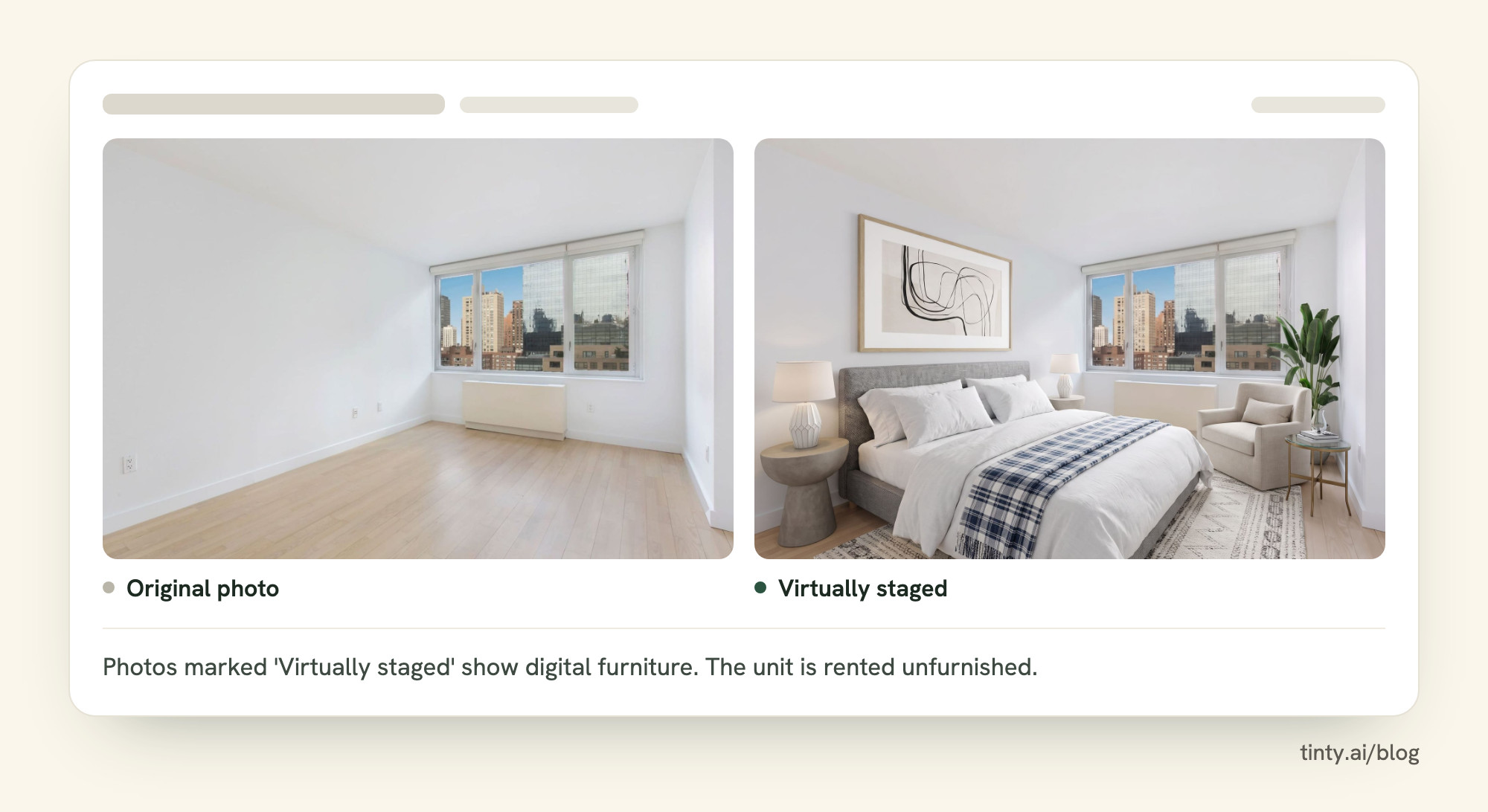
- Say “unfurnished”: add one line to the description: “Photos marked ‘Virtually staged’ show digital furniture. The unit is rented unfurnished.” (our wording)
- Furniture only: don’t change walls, floors, fixtures, windows or views, and don’t hide wear.
- Keep records: save the originals and a note of what changed (our suggestion). California’s Department of Real Estate (DRE) advises licensees to keep “records showing how AI outputs were reviewed and verified.”
- Label everywhere: flyers, social posts and your own site. AB 2025 covers “an advertisement or other promotional material.”
Our listing description guide has a rental example that leads with the move-in date, rent and what’s included.
Where the label goes on rental sites
None of the rental sites we could read has a rule written for virtual staging, but all of them ban misleading listings.
Apartments.com’s photo terms, last updated February 25, 2025, require a caption on every photo. Whoever submits photos warrants they’re “true and accurate.”
Realtor.com rentals run through Avail, and both sets of terms ban misleading content. Meta’s commerce policies for Facebook Marketplace ban misleading offers. Zillow Rentals and Craigslist blocked our checks, but Zillow told Fortune it supports clear disclosure and showing the original alongside the altered image “wherever possible.”
Watch out: on Apartments.com, don’t put a URL, QR code or other text on the photo. Its photo terms ban text and graphics on images and delete photos that show website URLs. Post the original in the listing instead.
Our suggestion: use the caption where the site has one. Where it doesn’t, name the staged photos in the first line of the description. In California, a description line alone may not count as “adjacent to the image.” Use an on-image label only where the site allows text on photos.
Fair housing: keep staged rooms neutral
A staged photo is part of the ad, so fair housing rules apply to the furniture and décor you add.
Federal law bans rental ads that indicate a preference based on race, color, religion, sex, handicap, familial status or national origin, under 42 U.S.C. § 3604(c). The Department of Housing and Urban Development (HUD) names “photographs, illustrations, symbols” among the ways an ad can do that, in 24 CFR § 100.75.
The small-landlord exemptions in § 3603(b) don’t reach the ad rule, so small landlords aren’t exempt. Our advice: leave people out of staged photos and skip décor that signals who should live there. Many rental ads also carry the fair housing logo, and our Equal Housing Opportunity logo guide has free files and placement tips.
California AB 2025 and New York: rental photo rules
California’s AB 2025 brings photo disclosure to rental ads on January 1, 2027. New York has three proposals that would do the same, and none is law yet.
California AB 2025: what landlords must do from 2027
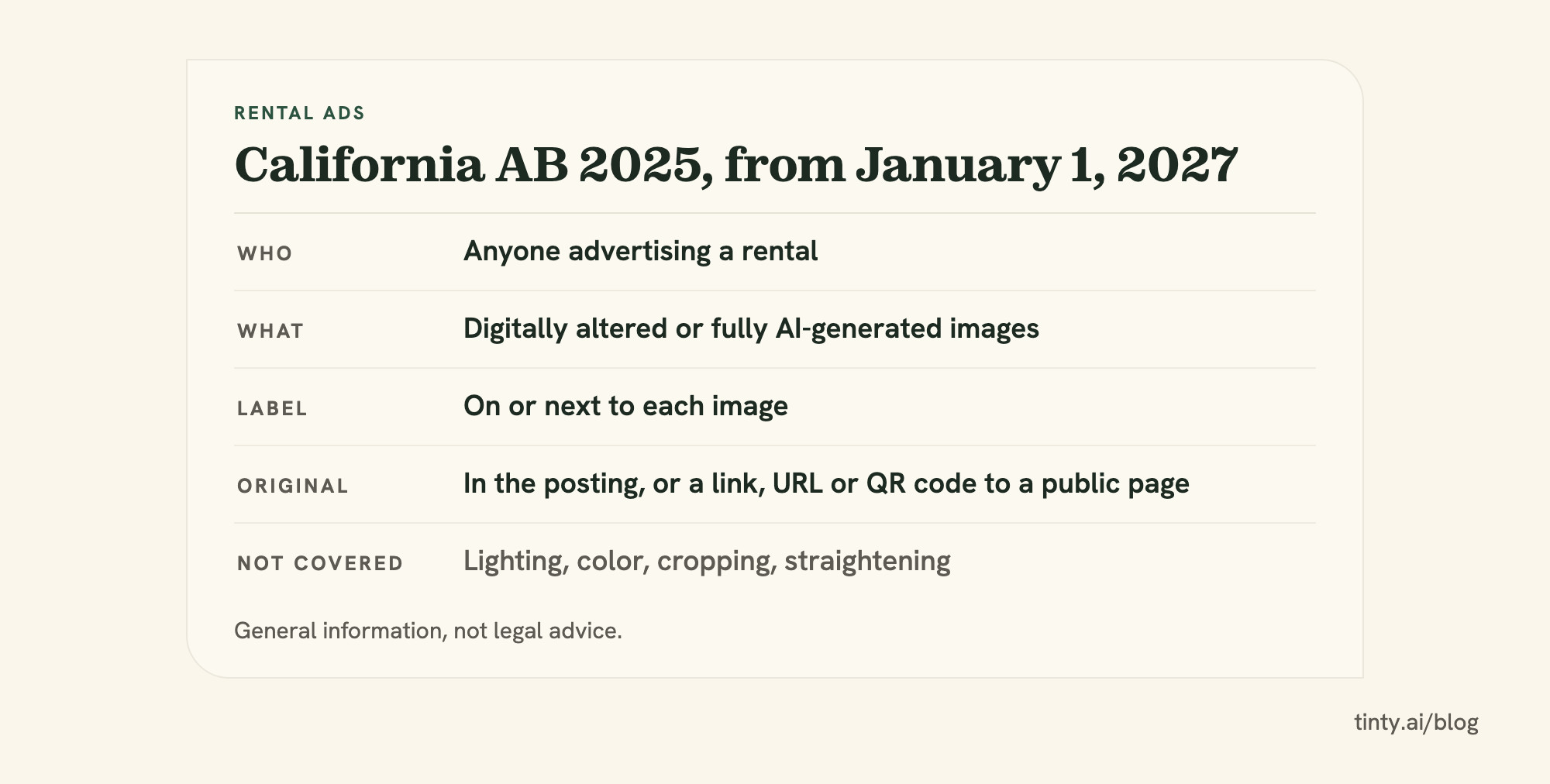
From January 1, 2027, anyone who advertises a California rental with a digitally altered photo must label it and include the original. The governor signed AB 2025 on September 27, 2026, as Chapter 572. It adds Section 1940.11 to the Civil Code.
Rule: anyone who puts “a digitally altered image” in a rental ad must include “a disclosure that the image has been altered.” It must be “reasonably conspicuous and located on or adjacent to the image.” Source: AB 2025, Civil Code § 1940.11.
What the law asks:
- Who: “a person,” so landlords and property managers without a license are covered too.
- What counts: the law names added furniture, and fully AI-generated images count too.
- The label: on or next to each altered image. The law sets no exact wording.
- The original: in the same posting, or a link, URL or QR code to a public page that clearly identifies it. With a link, the label must say the originals are there.
- Exceptions: lighting, white balance, cropping, straightening and exposure fixes don’t count. Images not made with a camera or phone need the label but no original.
For licensed agents, breaking the rule counts as breaking their licensing law. The section sets no separate fine for anyone else, but false-advertising law still applies.
If you’re a licensed agent, ask your broker about leases over one year. AB 2025’s digest says the Real Estate Law counts them as sales, so AB 723 may already cover those ads in 2026 (our reading).
New York: three proposals, none in force yet
New York’s state bills and New York City’s plan would all require labels on altered rental photos, but none applies today. Where each stands on October 28, 2026:
- A11635 (Assembly): covers sale and lease ads by brokers, sellers, owners and property managers. Each altered image would need a statement on or next to it, and online posts the original. In the Housing Committee since July 29, 2026.
- S9584 and A11403: would cover any image used to market real property, rentals included (our reading). Virtual staging would need a note that “furnishings or finishes were digitally added.” Both sit in committee, since April 28 and May 15, 2026.
- New York City: the mayor’s Rental Ripoff Report of July 16, 2026 says the city’s consumer agency will use rulemaking to require disclosure on altered rental photos. We found no proposed or adopted rule.
The six steps above already cover the label and the original these proposals ask for (our reading). Our guide to virtual staging laws tracks AB 2025, the New York bills and fair housing rules for rental ads.
What TINTY can and can’t stage in a rental
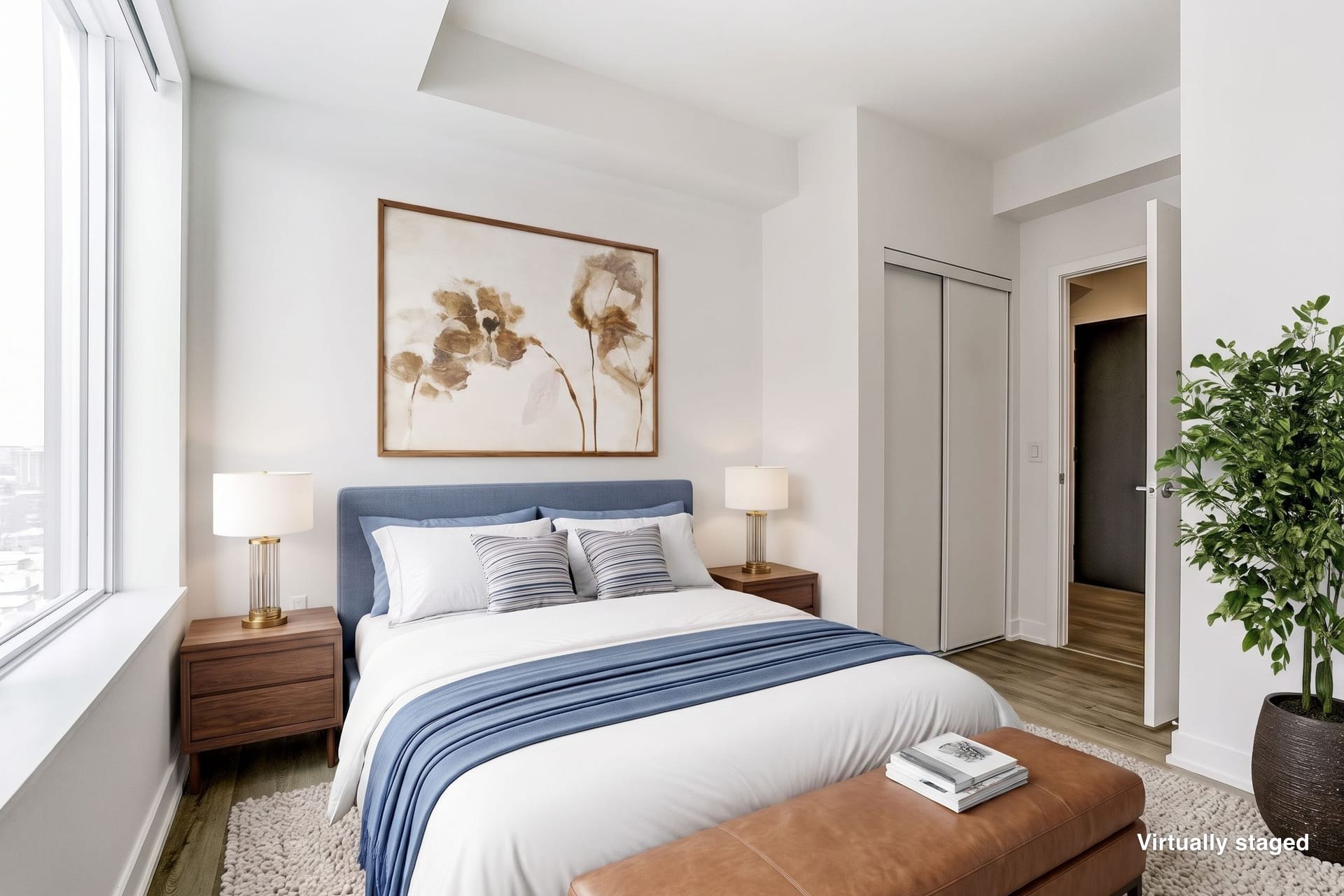
TINTY, our AI web app, stages empty living rooms and bedrooms in about a minute a photo. It can also clear the furniture from an occupied unit’s photos, but it doesn’t do kitchens, bathrooms or exteriors.
What TINTY covers in a rental
What you get:
- Rooms: 9 room types, including studio, bedroom, living room, living-dining, dining room, home office and terrace. A terrace is the only outdoor room type.
- Speed and size: a staged photo takes about a minute. Files are 2K, about 2,500 px on the long side in a 3:2 frame.
- Controls: you pick the room, style and furniture.
- Furniture removal: TINTY can clear the furniture, décor and TV from a photo before staging, while built-ins such as closets and radiators stay. It clears the whole room, not chosen pieces. Each try uses one photo, and a failed one uses nothing.
- Disclosure help: an optional “Virtually staged” label, and project links that show the original next to the staged photo.
Our terms say to share project links only with people you trust. So we don’t claim a project link meets AB 2025 on its own: post the original in the ad itself.
What TINTY can’t do yet
Not yet:
- Kitchens, bathrooms, building exteriors and yards
- Matching furniture across several angles of one room
- Renovation, day-to-dusk edits or 4K files
Stage 6 photos free with TINTY. They’re watermarked, so they’re for testing, not your rental ad. See real before and after examples from the app first.
For one vacancy, a Listing pack is $29 once for 30 staged photos, valid 12 months. Plans start at $9 a month for 10 photos, and Standard ($39 for 45) and Professional ($79 for 100) suit a portfolio, per TINTY’s pricing page. These are launch prices, so they may change. Your first plan payment or pack has a 30-day money-back guarantee.
Short on time between turnovers? Email the photos, empty or furnished, to hello@tinty.ai with the style you want and what each room is for. TINTY Studio, our done-for-you service, clears any furniture, stages them with our AI tools, finishes each by hand and sends a private link in 2 to 24 hours. It’s $10 a photo from 3 photos, with no prepayment: you pay only if you’re happy.
Virtual staging for rentals FAQ
Is it okay to virtually stage a rental listing?
Yes, as long as the photos don’t mislead. We found no US law that bans it, and rental sites ban misleading listings rather than staging. Label each staged photo, show the original and say the unit is unfurnished. California requires the label and the original in rental ads from January 1, 2027.
How much does virtual staging cost for a rental?
Under $1 to about $5 a photo with AI tools, and $14.40 to $70 with human design services (prices checked September 30, 2026). Five AI photos usually cost $12 to $50, because you buy a plan or pack. TINTY’s Listing pack is $29 for 30 photos at launch pricing. Our virtual staging cost guide compares 29 services.
Show 4 more questionsShow fewer questions
Can you virtually stage an occupied rental?
Yes. TINTY can clear the furniture from a photo before staging, and each try uses one photo. Some services sell furniture removal as an add-on, up to $40 more a photo, per our cost guide. Digitally removing a tenant’s things is still an alteration under AB 2025, so label it. The simplest route is to shoot after move-out.
Can I reuse one unit’s staged photos for identical floor plans?
You can, but say so in the caption (our suggestion). In the Apartments.com survey, 77% of renters wanted photos of the specific unit, and for half of all respondents, a listing without them is a deal-breaker. Apartments.com also asks submitters to warrant photos are “true and accurate.” Staging each unit’s own photos is safer.
How many photos should a rental listing have?
Show every room, including the kitchen, bathrooms and exterior, and stage only the two to four main living spaces (our view). StreetEasy’s 2018 analysis of almost 200,000 New York City listings found that contacts pick up once a listing has at least 6 to 7 photos. It’s old, NYC-only and doesn’t separate sales from rentals.
What photo size do rental listing sites want?
Apartments.com recommends at least 2,048 pixels on the longest side and may reject smaller photos. It also wants color photos with minimal filters. We couldn’t read Zillow’s photo rules. TINTY’s 2K files are about 2,500 px on the long side, so they clear Apartments.com’s mark (our comparison).
How we researched this
We read every source on October 28, 2026. Rent and vacancy data come from the Census Bureau, Zillow and two big operators’ 2025 annual reports. Laws come from AB 2025’s official text, New York bill pages, the NYC report and federal fair housing law.
The California Legislature’s site blocked automated access, so we read AB 2025 on CalMatters Digital Democracy, which copies the official text. We couldn’t confirm Zillow Rentals’ or Craigslist’s photo rules, a draft NYC rule or any independent study of virtual staging for rentals and vacancy.
Our math uses the Census Bureau’s third-quarter 2026 data, the latest release when we checked. If something here is wrong, email hello@tinty.ai and we’ll fix it.
Sources
All pages read October 28, 2026. Dates in parentheses are publication or update dates.
Vacancy data and California law:
- U.S. Census Bureau: Quarterly Residential Vacancies and Homeownership, Third Quarter 2026 (release CB26-161, October 28, 2026; historical tables): 7.6% rental vacancy, $1,541 median asking rent of vacant-for-rent units
- AB 2025, Tenancy: digitally altered images: disclosure (CalMatters Digital Democracy) (official text, digest and history; Chapter 572, Statutes of 2026; adds Civil Code § 1940.11)
Show 24 more sourcesShow fewer sources
- Governor of California: legislative update of September 27, 2026 (signing list)
- California Legislature: 2026 legislative calendar (PDF) (statutes take effect January 1, 2027)
- Assembly Privacy and Consumer Protection Committee: AB 2025 analysis (PDF) (hearing April 16, 2026)
- AB 723 (CalMatters Digital Democracy) (Chapter 497, Statutes of 2025)
- California DRE: Artificial Intelligence in California Real Estate advisory (March 17, 2026)
Renters, rents and turnover:
- Apartments.com: Survey: How Today’s Renters Choose a Place (February 21, 2026) and the National Apartment Association’s summary (May 29, 2026)
- LeaseLock (RealPage data): Resident Retention Fuels Renewal Lease Pricing Power (July 30, 2026)
- Invitation Homes: Form 10-K for 2025 (turnover 22.8%; 47 and 40 days between residents in 2025 and 2024)
- Zillow Observed Rent Index, single-family series (September 2026, United States: $2,266.25) and ZORI methodology
- American Homes 4 Rent: Form 10-K for 2025 (about 20 to 60 days per turnover)
- StreetEasy: 7 Tips to Make Your Listing More Successful (September 25, 2018)
Staging prices:
- TINTY: virtual staging cost guide, 29 services compared (prices checked September 30, 2026; per-photo bands, five-photo listings, removal add-ons)
Rental sites:
- Apartments.com: Terms and Conditions for Submitting Photos/Videos (last updated February 25, 2025)
- Realtor.com: List your rentals · Realtor.com: Terms of Use · Avail: Terms of Use (last modified March 4, 2025)
- Meta: Commerce Policies
- Fortune: New York’s push for AI-altered rental listing disclosures (July 22, 2026; Zillow spokesperson quote)
Fair housing:
New York:
- New York Assembly: A11635
- New York Assembly: S9584 · A11403
- NYC Mayor’s Office: Rental Ripoff Report press release (July 16, 2026) and the report (PDF)
TINTY (ours):
- tinty.ai · TINTY pricing (launch pricing, checked October 28, 2026) · examples · virtual staging for real estate (room types and limits) · terms (last updated October 19, 2026)
Related guides on our blog: