

What is the best AI for real estate agents? It depends on the task. For writing, a general assistant such as ChatGPT, Claude, Gemini or Copilot covers most jobs. Then add a specialist where it saves real time: AI lead follow-up, a staging app for empty rooms or a note taker for calls.
Prices checked on each vendor’s own site on October 19, 2026.
We make TINTY, an AI virtual staging app, so we have a stake in the photo section. We didn’t test any tool for this guide, ours included. Prices, free plans and features come from each vendor’s own pages, and our picks are opinions. Notes on laws are general information, not legal advice.
Key takeaways
- Start with one assistant: ChatGPT, Claude, Gemini and Copilot all have free plans. The paid plans we list cost $4.99 to $20 a month.
- Add specialists by task: listing copy, photos, social video, lead follow-up, transactions and call notes each have tools built for agents.
- Free plans are for testing: expect watermarks, usage caps or a limit of a few listings.
- You answer for the output: check facts and fair housing wording, and label AI-altered listing photos.
- Protect client data: check each tool’s training setting and your brokerage’s AI policy first.
On this page: Top picks · How we chose · Assistants · Listing copy · Photos · Social and video · CRM · Documents and notes · Free tools · Risks · FAQ
Best AI for real estate agents: our pick for each task
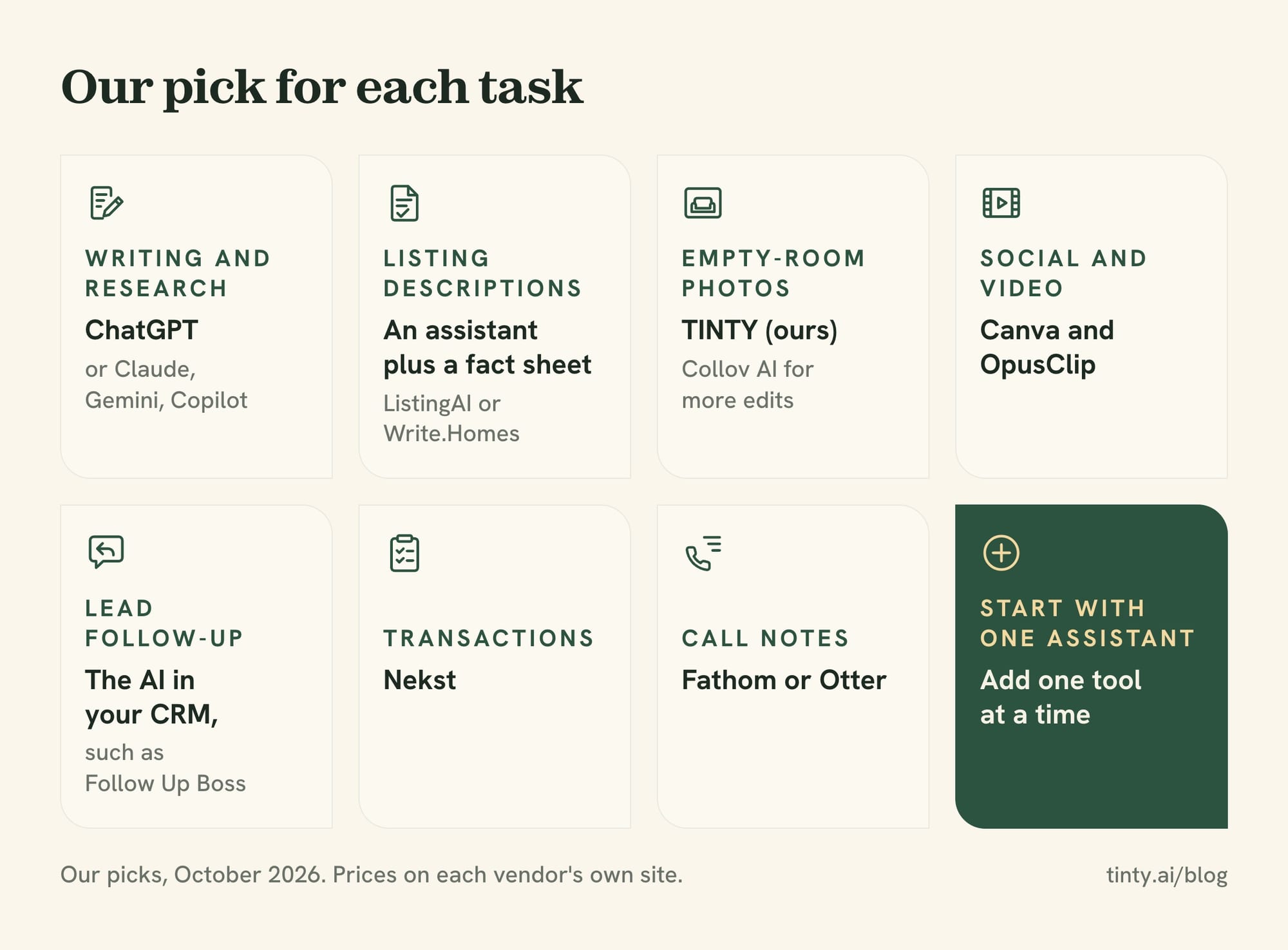
The best AI for real estate agents is the one that fits a task you do every week. Here’s our pick for each job, with prices from the vendors’ sites as of October 2026:
- Writing and research: ChatGPT, with a free plan and Plus at $20 a month. Claude, Gemini and Copilot are close alternatives.
- Listing descriptions: an assistant plus a fact sheet. ListingAI (from $19 a month) or Write.Homes (from $25 a month) add agent templates.
- Photos of empty rooms: TINTY for AI virtual staging (ours), or Collov AI if you also need edits such as furniture removal.
- Social media and video: Canva for graphics and OpusClip for short clips cut from longer videos.
- Lead follow-up: the AI in your customer relationship management (CRM) system. Follow Up Boss includes it in every plan, from $69 per user a month.
- Transactions: Nekst reads a signed contract and builds the task list. Its free plan covers up to 5 transactions.
- Calls and meetings: Fathom (free plan) or Otter (300 free minutes a month) for notes.
Tip: add one tool at a time and use it for a month before you add the next. A tool you open every day does more than five you forget about (our view).
How we chose the best AI tools for realtors
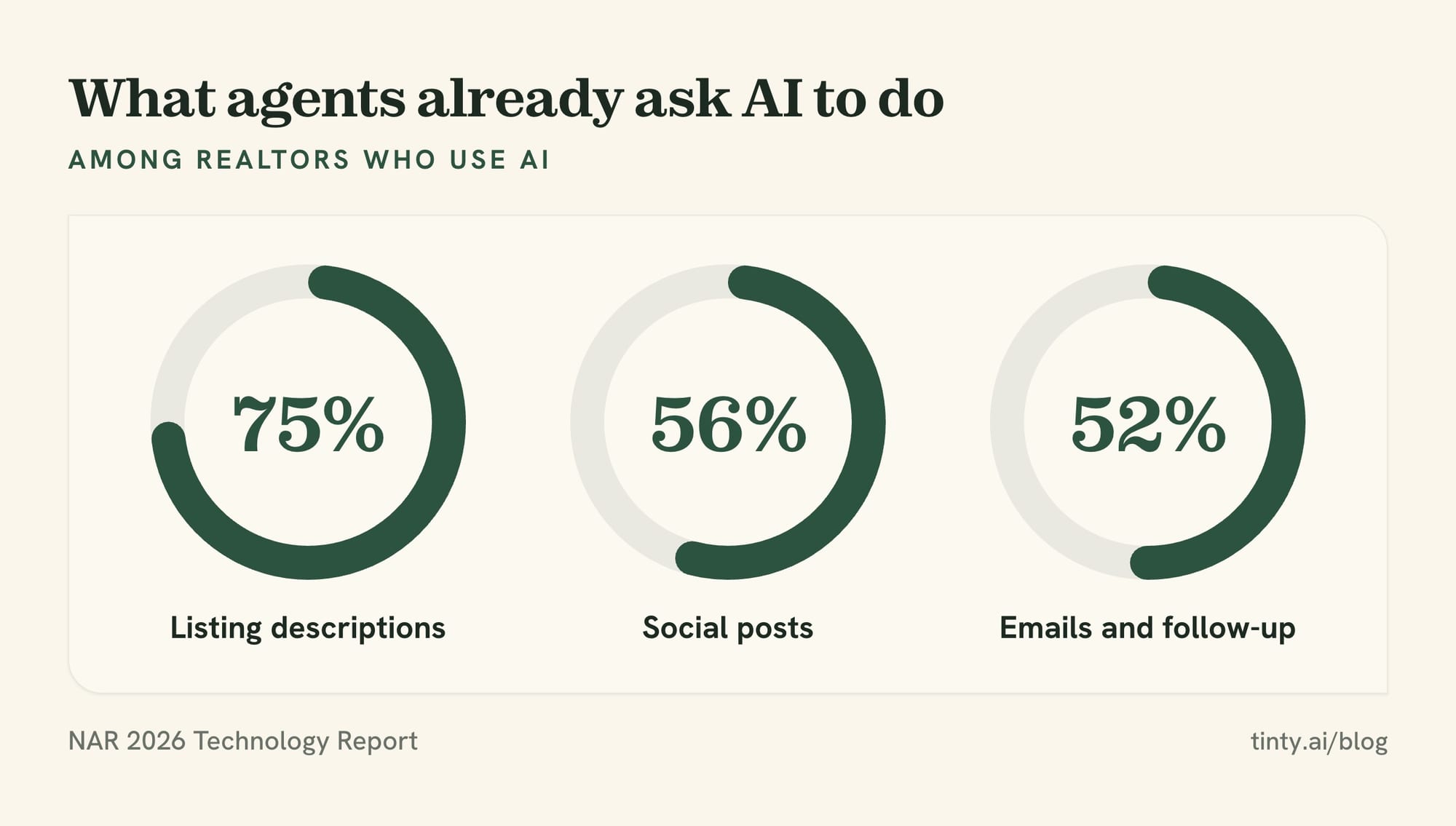
We started from what agents already ask AI to do. Among Realtors who use AI, 75% use it for listing descriptions, 56% for social posts and 52% for emails and follow-up. That’s from the National Association of Realtors (NAR) 2026 Technology Report.
Then we judged each tool on five points:
- Task fit: it does a real agent job, such as copy, photos, leads or contracts.
- Price: the starting price on the vendor’s own site, checked October 19, 2026.
- Free option: a free plan or trial, and what it leaves out.
- Data privacy: whether your chats can train a model, and whether you can turn that off.
- Fair housing and disclosure risk: whether the output could word an ad badly or alter a listing photo.
We didn’t test these tools. Where a feature comes from a vendor’s page, we say so, and prices change often. For how brokerages are rolling AI out, see our look at AI adoption in real estate.
General AI assistants: ChatGPT, Claude, Gemini and Copilot
A general assistant is the first AI tool most agents need. It drafts listing copy, emails, posts and market summaries from the facts you give it. All four below have a free plan, so give two of them the same task before you pay.
ChatGPT
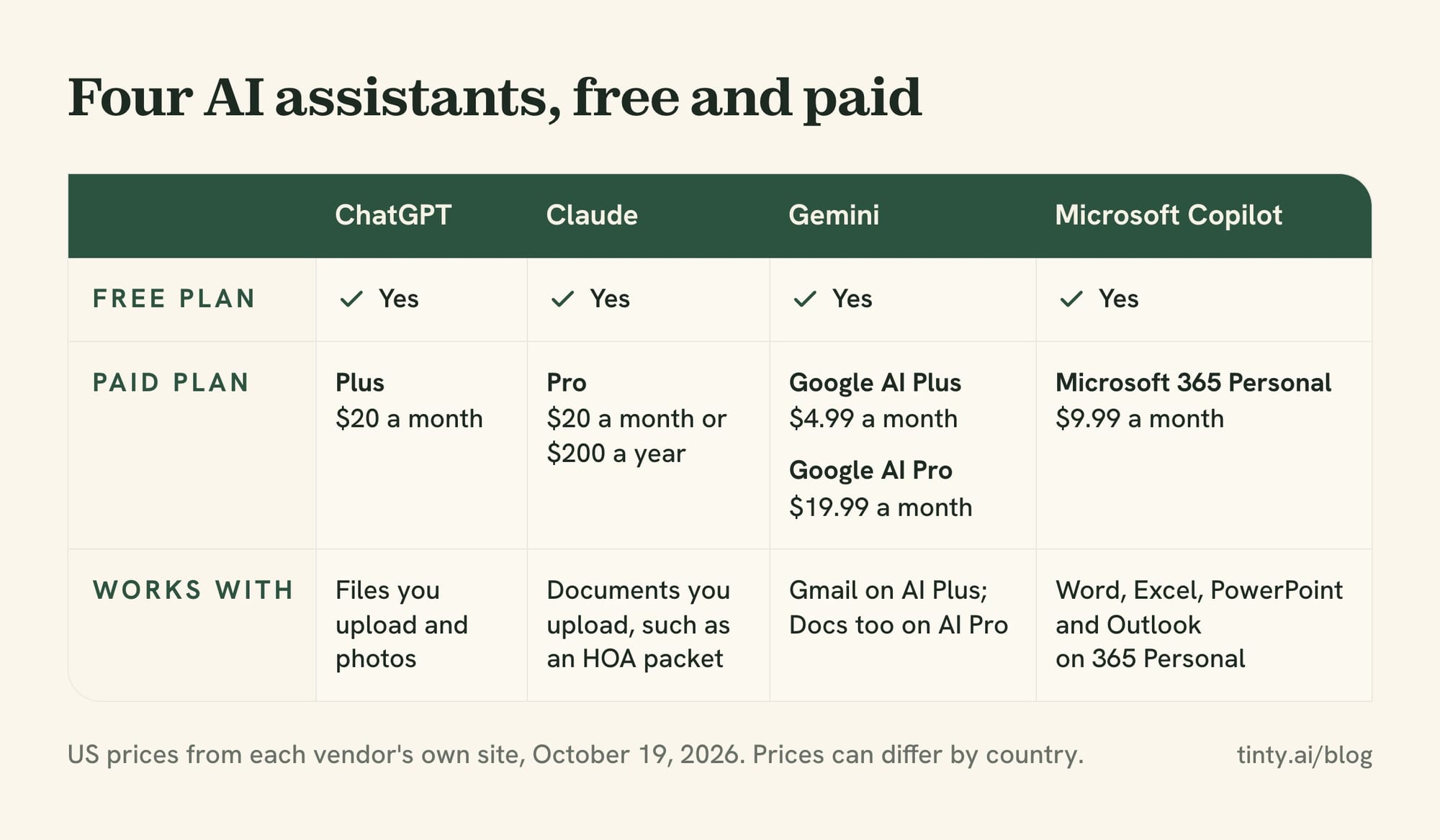
ChatGPT from OpenAI is our default pick for most agents. It writes, summarizes files you upload and reads photos. Plus costs $20 a month, per OpenAI’s help center, and the free plan has lower limits.
Limit: like every assistant, it can state features a home doesn’t have. ChatGPT’s pricing page also says chats on its Free, Go, Plus and Pro plans train its models, with an opt-out available.
Claude
Claude from Anthropic handles the same writing jobs and works with documents you upload, such as a homeowners association (HOA) packet. Pro costs $20 a month, or $200 a year paid up front. The free plan covers everyday questions.
Limit: usage resets on a rolling five-hour window, so a heavy day can hit the cap. Claude’s pricing page lists model training as opt-out on the Free, Pro and Max plans. Turn it off under Settings > Privacy.
Gemini and Microsoft Copilot
These two suit agents who already live in Google or Microsoft apps. Gemini has a free plan. Google AI Plus ($4.99 a month) adds Gemini in Gmail, and Google AI Pro ($19.99) adds Docs too.
Microsoft Copilot has a free version. Microsoft 365 Personal, at $9.99 a month or $99.99 a year, adds Copilot in Word, Excel, PowerPoint and Outlook.
Limit: cheaper plans give lower usage, and features differ by plan. Check the plan page for the app you use most.
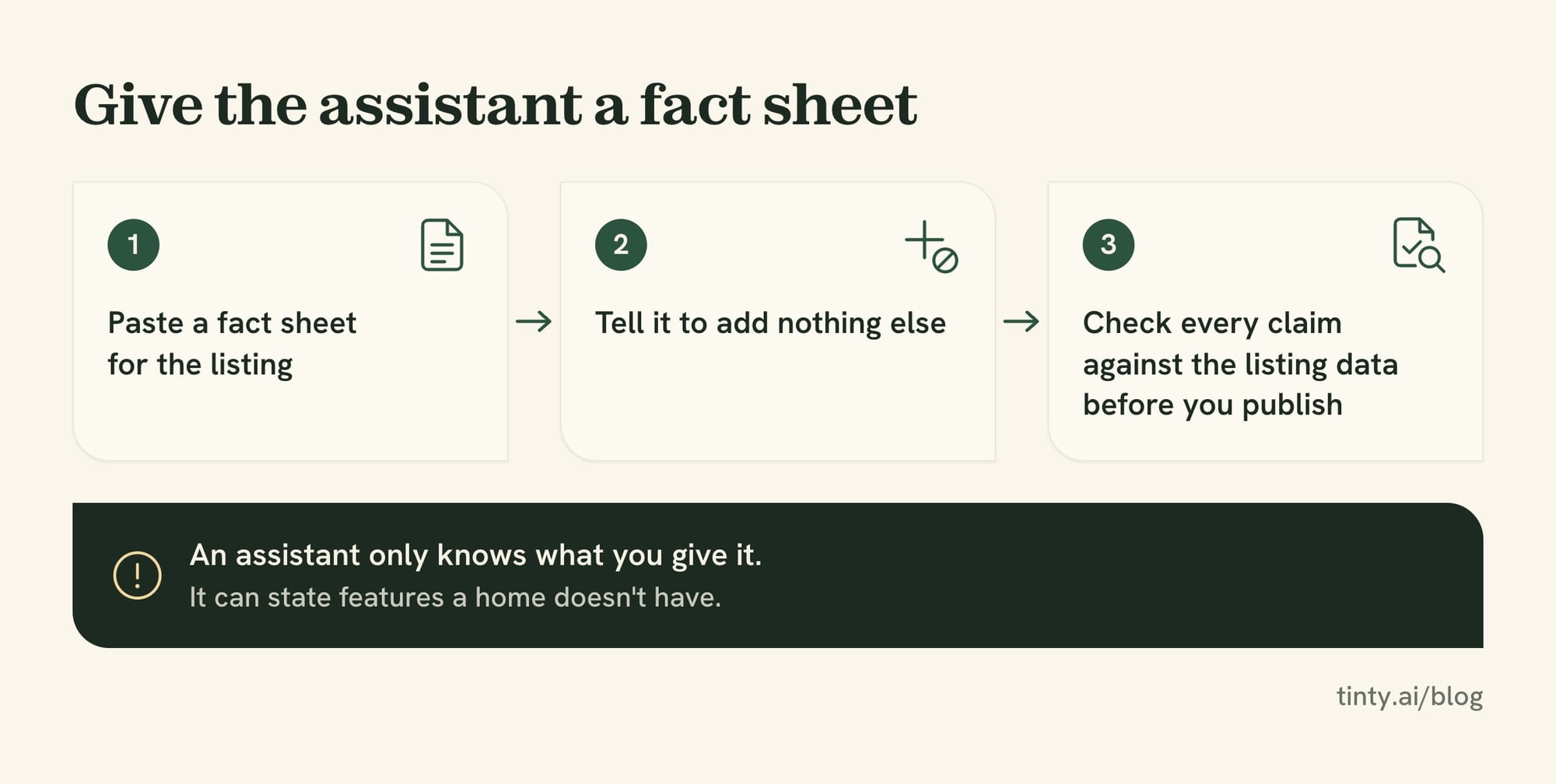
Watch out: an assistant only knows what you give it. Paste a fact sheet for the listing and tell it to add nothing else. Then check every claim against the listing data before you publish.
AI listing description generator tools and marketing copy
An AI listing description generator turns your listing details into a first draft. A general assistant does the same job with a good prompt, so a dedicated tool earns its price through agent templates or extra features.
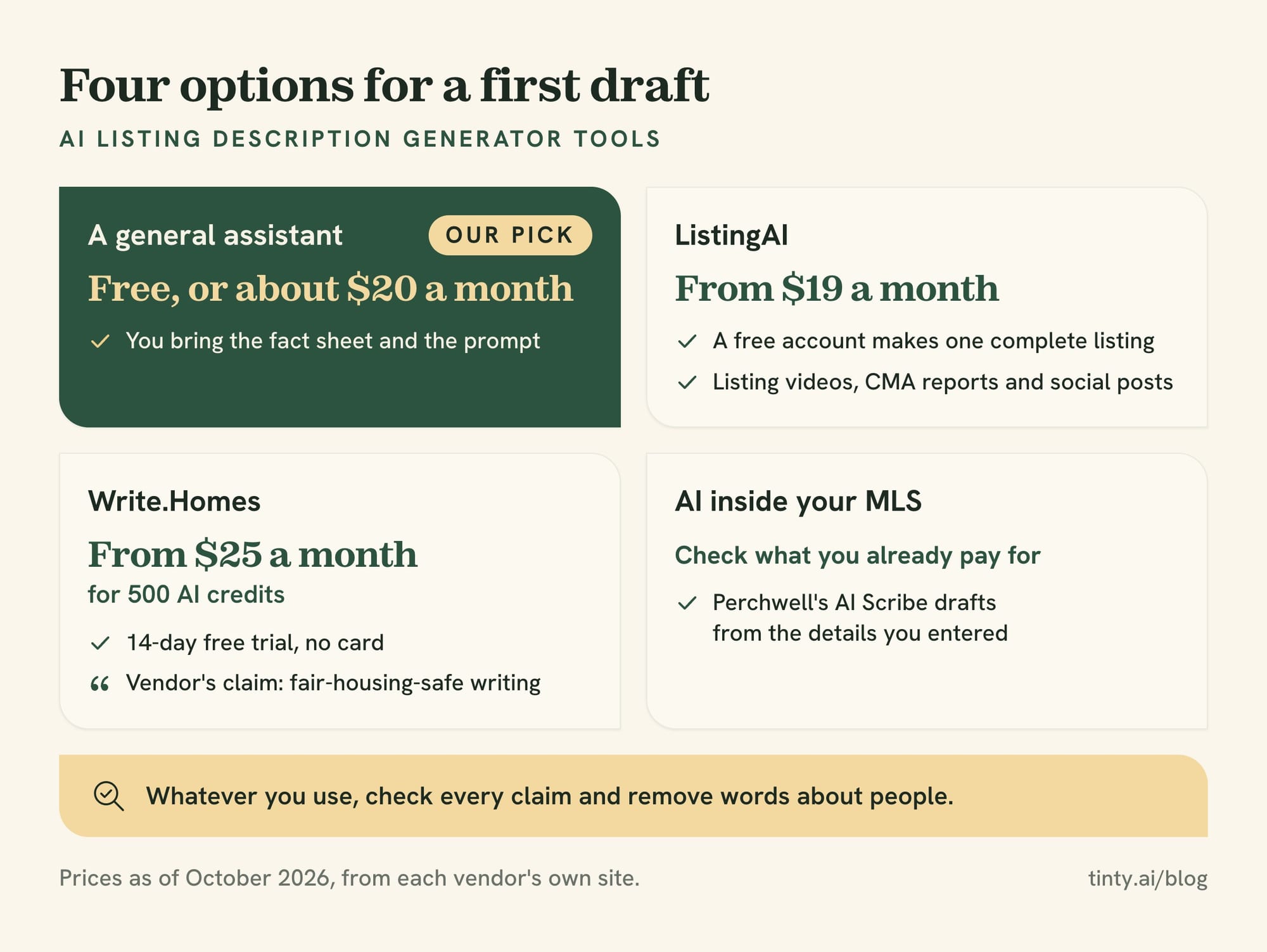
Dedicated listing tools: ListingAI and Write.Homes
Two tools built for agents, with prices as of October 2026:
- ListingAI: a free account makes one complete listing. Paid plans start at $19 a month and add listing videos, comparative market analysis (CMA) reports and social posts.
- Write.Homes: from $25 a month for 500 AI credits, with a 14-day free trial and no card. Its site also has a free listing generator.
- A general assistant: free, or about $20 a month on a paid plan. You bring the fact sheet and the prompt.
Write.Homes says every plan includes “fair-housing-safe writing.” That’s the vendor’s claim, so still read every draft for words about people. ListingAI adds AI staging credits from its $36 plan.
AI inside your MLS
Check what you already pay for before you buy. Some multiple listing service (MLS) systems now draft the description inside the listing form. Perchwell’s AI Scribe, for example, writes a first draft from the details you entered, and you edit it before you submit.
Our guide to writing a listing description has three prompts and a fact check for every AI draft.
Listing photos and virtual staging
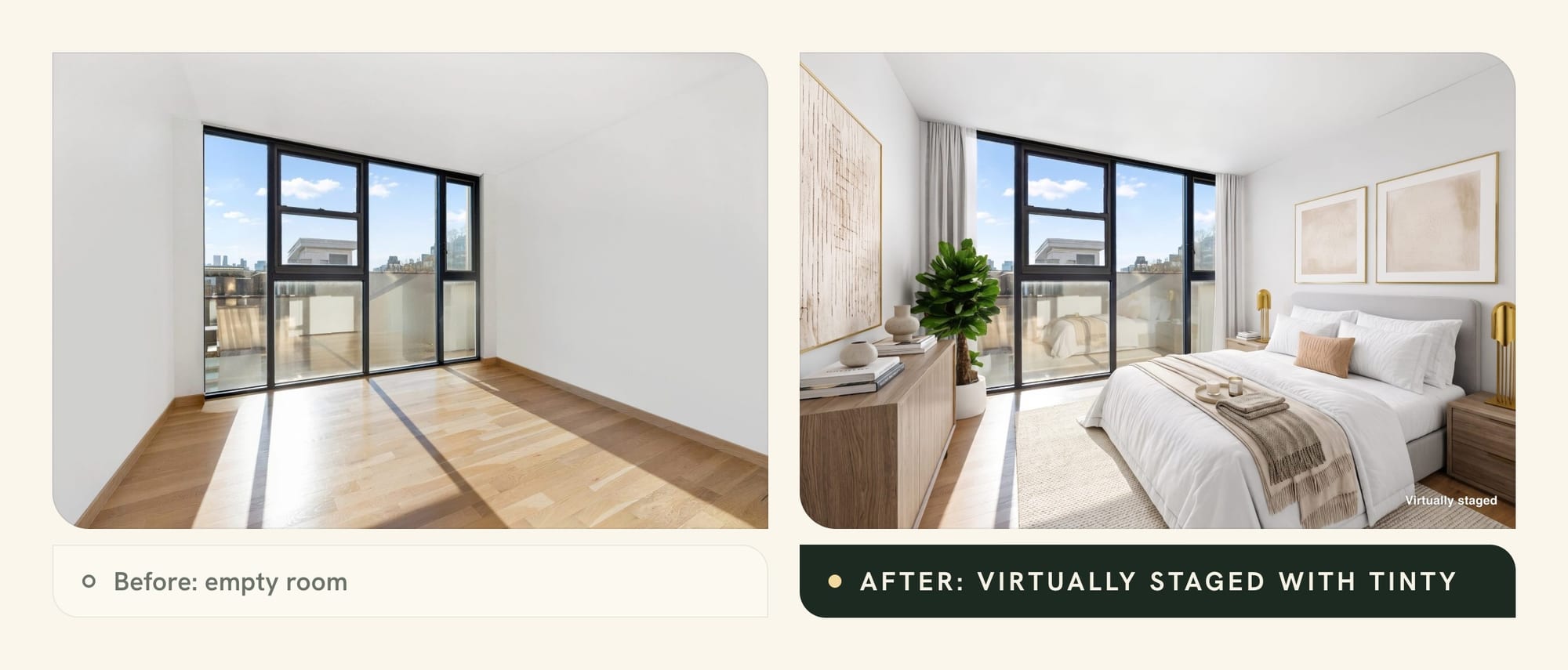
AI photo tools pay off most on vacant listings, where the other option is physical staging. They furnish photos of empty rooms, and some also remove furniture or turn day shots into dusk. Our comparison of virtual staging software covers 11 tools in depth.
TINTY: staged empty rooms in about a minute (we make it)
TINTY is our AI virtual staging web app for photos of empty rooms. You upload a photo and pick the room type, style, furniture and an accent color. Then you sign in with Google or an email code and stage it. A staged photo takes about a minute.
What you get, per our live site:
- Free: 6 staged photos per account with a light watermark, no card. Watermarked photos are for testing, not your listing.
- Paid: Base is $9 a month for 10 photos, Standard $39 for 45 and Professional $79 for 100. A one-time Listing pack is $29 for 30, valid 12 months.
- Per photo: $0.66 to $0.97, from yearly Professional to the pack, with downloads included. These are launch prices and may change, so check TINTY pricing.
- Quick edit: write a note on a staged photo to get a new version. It uses one photo, and so does staging the same photo again.
- Label: you can add a “Virtually staged” label when you download.
The limits: TINTY stages 9 room types, but no kitchens, bathrooms or exteriors. Files are 2K, not 4K. It doesn’t remove furniture or match furniture across angles.
No time to stage yourself? TINTY Studio does it for you: email photos to hello@tinty.ai. Our team stages them with TINTY’s AI tools and finishes each by hand in 2 to 24 hours. It’s $10 a photo from 3 photos, and you pay only if you’re happy.
Or try TINTY free on one of your empty rooms.
Collov AI and REimagineHome: more edits, credit pricing
Collov AI goes wider than TINTY on edits. Standard costs $27 a month for 60 photo credits, or $19 a month billed yearly, as of October 2026. It lists furniture removal, and higher plans add twilight and multi-angle staging.
REimagineHome starts at $19 a month for 30 credits, though that plan uses older tools without high-resolution output. New users get 5 free designs with no card, and its plans list exterior edits.
REimagineHome charges a credit per generation, so retries use up the plan. Collov says regenerating an uploaded photo is free, and a new account gets 2 free staging designs with a watermark. For free tiers across 39 apps and services, see our best free virtual staging apps guide.
Social media and video tools
For posts and short videos, two tools cover most agents: one for graphics and one for clips. Prices are as of October 2026.
Canva has a free plan for one person, and Pro costs US$144 a year with more AI features. Its AI tools draw on a shared allowance that advanced tools use up faster.
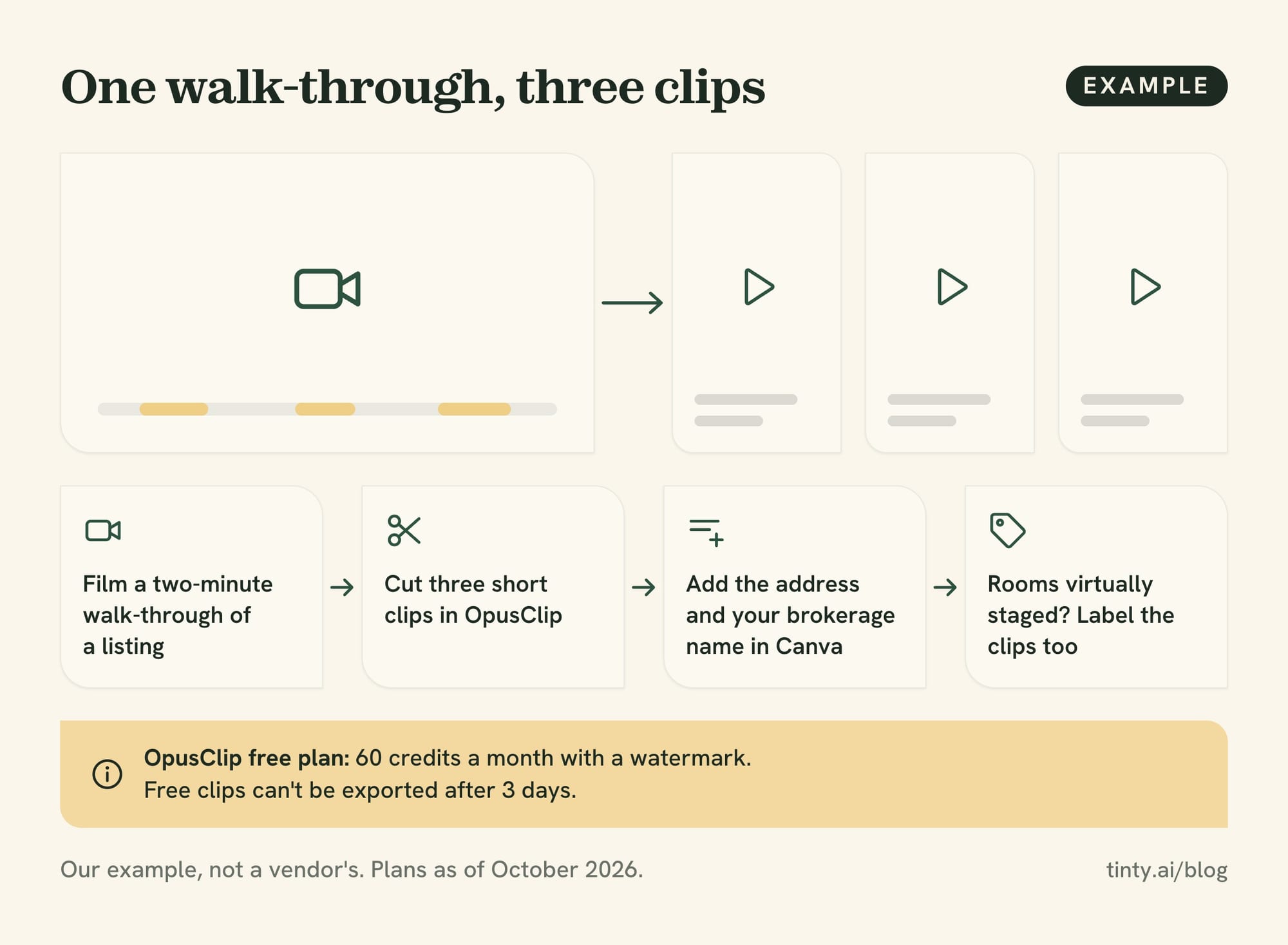
OpusClip cuts a long video, such as a listing tour, into short clips with captions. The free plan gives 60 credits a month with a watermark, and Starter costs $15 a month. Free clips can’t be exported after 3 days.
Example: film a two-minute walk-through of a listing, cut three short clips in OpusClip, then add the address and your brokerage name in Canva. If the rooms are virtually staged, label the clips too. This workflow is our example, not a vendor’s.
For what to post, our guide to real estate social media posts has 45 ideas with example captions.
CRM and lead follow-up with AI features
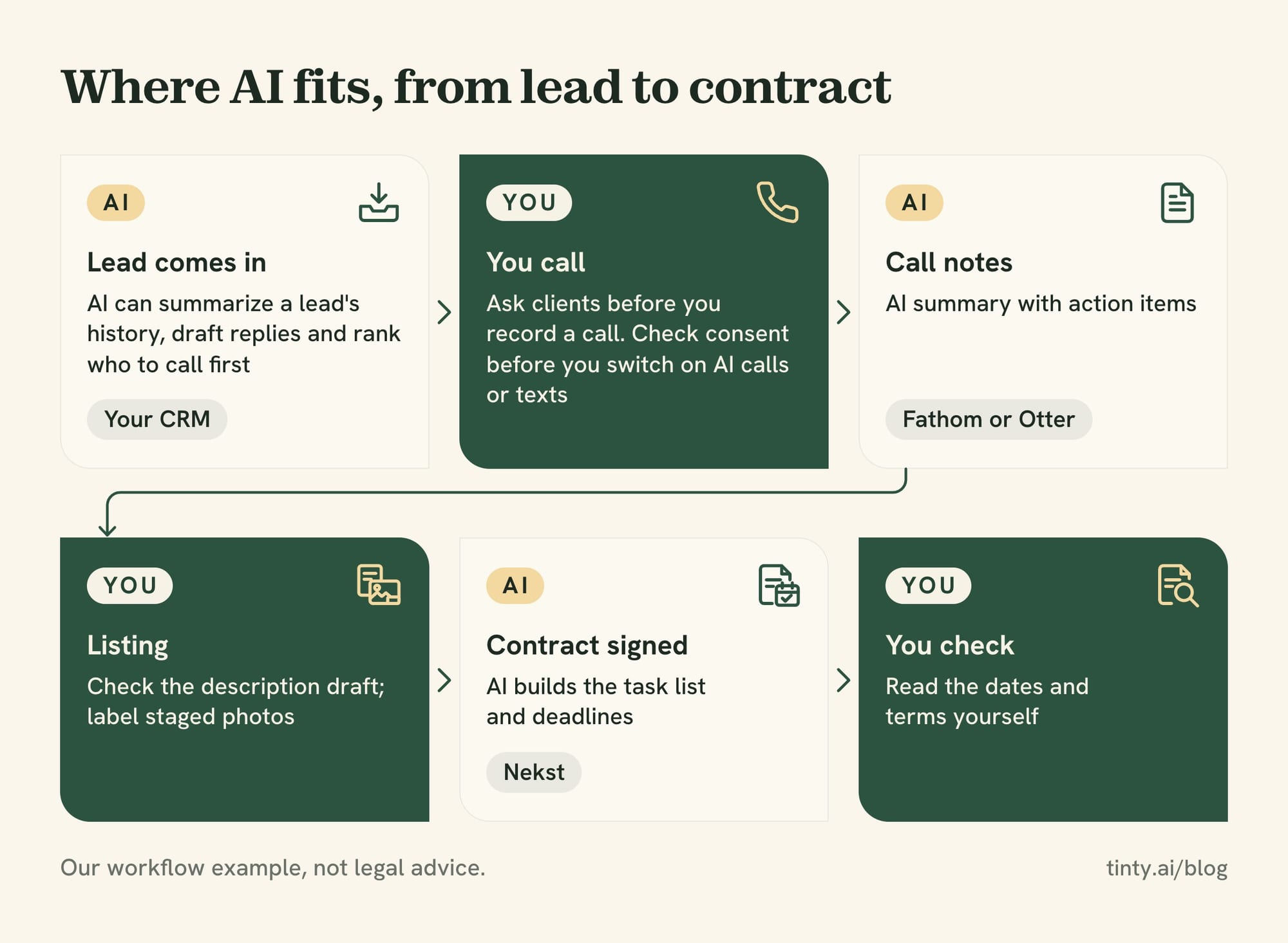
For leads, the best AI usually sits inside your CRM. Next to your contacts, it can summarize a lead’s history, draft replies and rank who to call first.
Follow Up Boss
Follow Up Boss includes AI features at no extra charge. Grow costs $69 per user a month, or $58 billed yearly, with a 14-day free trial. Pro costs $499 a month for 10 users.
Its Pro plan lists smart summaries, smart messages, suggested tasks and predictive lead prioritization. Limit: some AI features use data from its calling add-on, which costs $39 per user a month on Grow.
Lofty, BoldTrail and Ylopo
Lofty lists AI lead scoring, AI task prioritization and custom AI agents in its CRM. It doesn’t publish prices, and every plan says “Request Pricing.”
BoldTrail is Inside Real Estate’s platform built from kvCORE, BoomTown and Brokermint. It describes an “AI-empowered Smart CRM,” and its pricing isn’t public either. Ylopo sells AI text follow-up for leads, with AI voice on higher tiers, and doesn’t publish prices. Ask your broker first, because your brokerage may already pay for one of these (our suggestion).
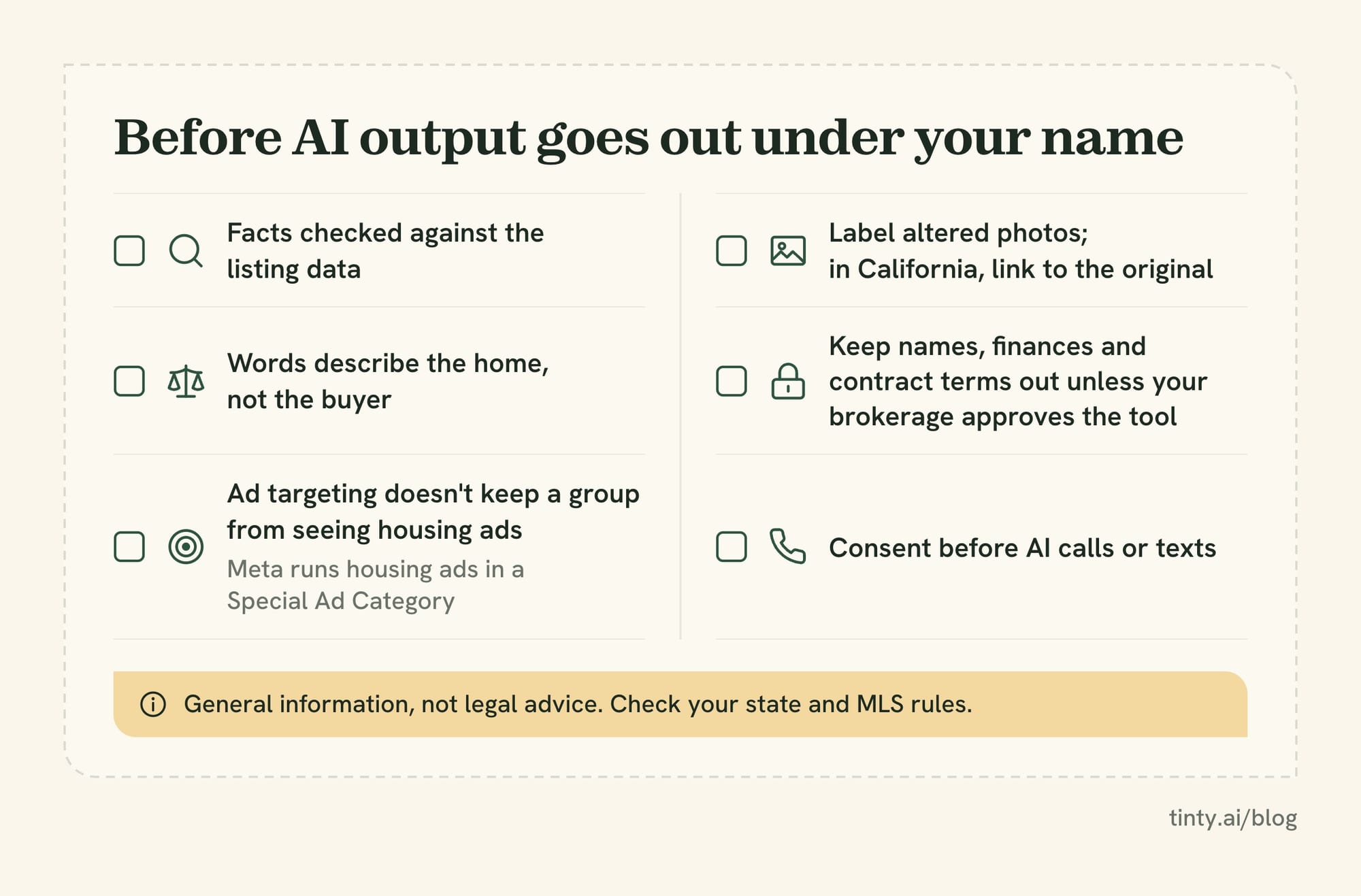
Watch out: the Federal Communications Commission (FCC) says AI-generated voice calls are illegal unless the person agreed to get them or the caller is exempt. Commercial texts sent with an autodialer need written consent. Check consent before you switch on AI calls or texts.
Documents, scheduling and meeting notes
Use AI to organize deadlines and capture calls, not to interpret contracts. A summary isn’t legal review, so read the dates and terms yourself.
Transaction help: Nekst
Nekst creates a transaction when you upload a signed contract, then builds the task list and syncs deadlines to your calendar. Per Nekst, the tasks adjust to the contract terms.
The free Solo Lite plan covers up to 5 transactions in total. Solo Pro costs $79 a month or $790 a year, plus a $299 onboarding fee, for unlimited transactions.
A general assistant can also summarize a disclosure packet. Use one your brokerage approves, and check every date against the original.
Meeting notes and scheduling: Fathom and Otter
Note takers record a call or video meeting and turn it into a summary with action items. Prices are as of October 2026:
- Fathom: a free plan with unlimited recordings and instant AI summaries. Premium costs $20 a month for one person, and Team costs $19 per user a month with a 2-user minimum.
- Otter: the free Basic plan gives 300 transcription minutes a month. Pro costs $16.99 a month, or $8.33 a month billed yearly.
- Gemini and Copilot: for email and calendar work, they run inside Gmail and Outlook on their paid plans.
Ask clients before you record a call. In California, Penal Code 632 bans recording a confidential call without the consent of everyone on it. Check your own state’s rule too.
Free AI tools for realtors
You can build a basic AI kit for $0, but free plans come with caps, watermarks or limits on use. These free AI tools for realtors cover the main tasks:
Free options and starting prices, checked on vendors’ sites on October 19, 2026.
| Task | Tool | Starting price | Free option |
|---|---|---|---|
| Writing and research | ChatGPT | $20 a month (Plus) | Free plan with lower limits |
| Listing copy | ListingAI | $19 a month | One complete listing |
| Empty-room photos | TINTY (ours) | $9 a month or $29 pack | 6 staged photos, watermarked |
| Social graphics | Canva | US$144 a year (Pro) | Free plan |
| Transactions | Nekst | $79 a month or $790 a year | Up to 5 transactions |
| Call notes | Fathom | $20 a month (Premium) | Unlimited recordings |
Claude, Gemini and Copilot have free plans too, and Otter’s free Basic plan gives 300 minutes a month. Collov AI and REimagineHome offer free staging trials.
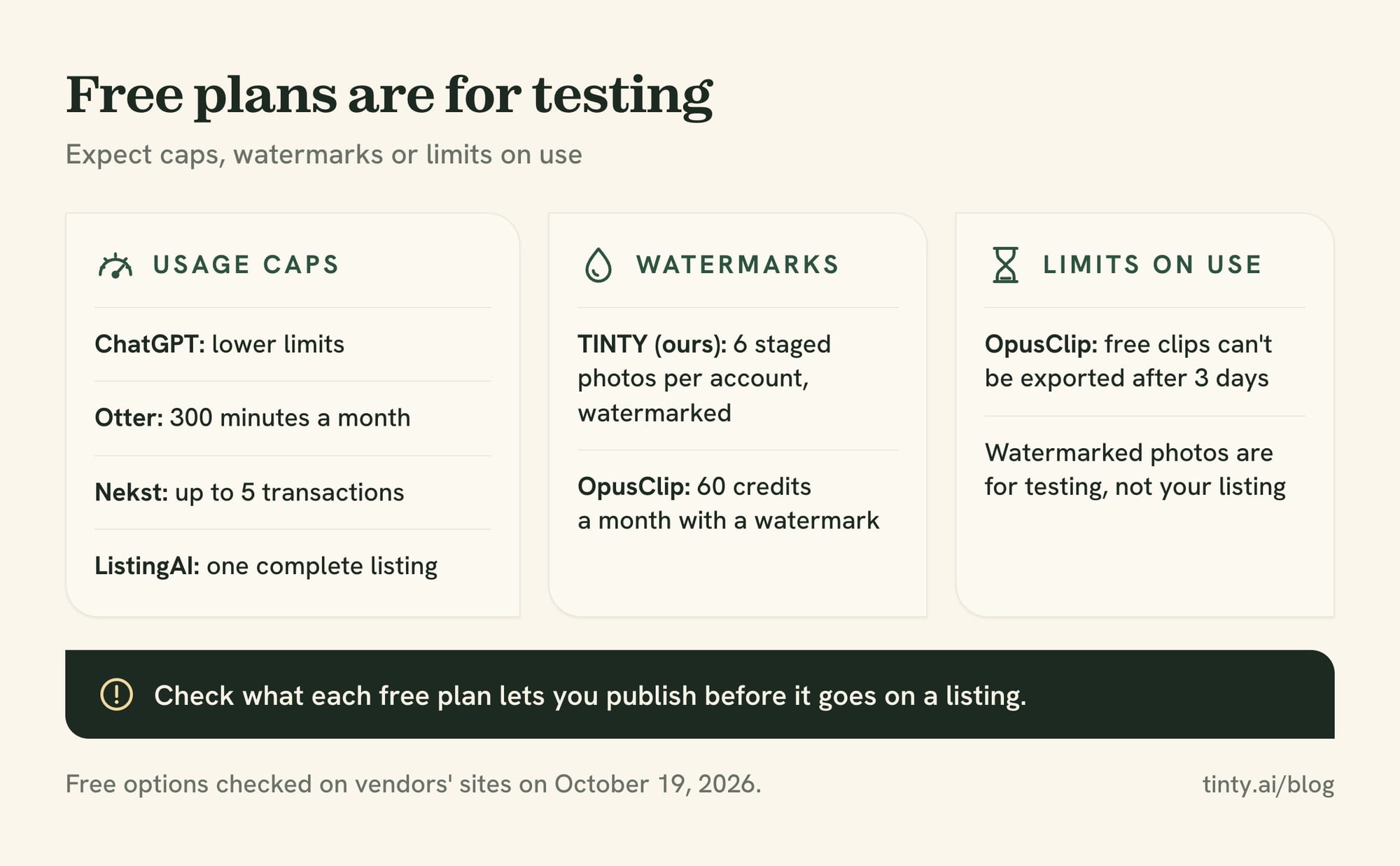
Watch out: free output is for testing. Free staging photos often carry a watermark, and OpusClip’s free clips expire for export after 3 days. Check what each free plan lets you publish before it goes on a listing.
Risks and rules: fair housing, disclosure, privacy, accuracy
AI changes how you work, but not who answers for the result. NAR’s page on AI policy says businesses “should remain responsible for how they use AI.” Four risks need a person’s check.
Fair housing in AI copy and ad targeting
A federal housing rule, 24 CFR 100.75, bans ad words, phrases or photos that signal a home is or isn’t available to a protected group. It also bans picking media or locations that keep a group from seeing housing ads.
An AI draft can describe the buyer instead of the home, such as “perfect for young families” (our example). Meta runs housing ads in a Special Ad Category with limited audience selection. In 2022 the Justice Department settled its first algorithmic bias case under the Fair Housing Act with Meta.
Our social media guide’s fair housing section has safer wording to copy.
Label AI-altered listing photos
Rule: in California, an agent’s sale ad with a digitally altered image must say so and link to the original. Business and Professions Code 10140.8 (AB 723) names AI edits that add or remove furniture. It took effect January 1, 2026.
Lighting, cropping and color fixes don’t count as altered under that law. Many MLSs have their own label rules, and our guide to whether virtual staging is legal compares them.
Client data privacy
Check each tool’s training setting before you paste in client details. ChatGPT and Claude both list model training as opt-out on their consumer plans, per their pricing pages, so turn it off first.
Keep names, finances and contract terms out of public chatbots unless your brokerage approves the tool (our suggestion). NAR offers members a starting point for a brokerage AI policy, behind a member login.
Accuracy and liability
NAR’s Code of Ethics asks Realtors to “present a true picture” in their advertising (Article 12). If an AI draft calls laminate “hardwood” and you publish it, the mistake is yours (our reading).
For what AI can and can’t take over in the job itself, see will AI replace real estate agents.
Best AI for realtors: FAQ
What is the best AI for real estate agents?
For most agents, a general assistant comes first: ChatGPT, Claude, Gemini or Copilot. Then add a tool for the task that takes the most time, such as AI lead follow-up in your CRM or a staging app for vacant listings.
Are there free AI tools for realtors?
Yes. ChatGPT, Claude, Gemini and Copilot have free plans, and so do Canva, Fathom and Otter. Nekst is free for up to 5 transactions, and TINTY gives 6 watermarked staged photos. Free plans have caps, so they suit testing.
Show 4 more questionsShow fewer questions
What is the best AI listing description generator?
A general assistant with a fact sheet works for most listings. Dedicated tools such as ListingAI and Write.Homes add agent templates and other marketing features. Whatever you use, check every claim and remove words about people.
How much do AI tools for real estate agents cost?
The assistant plans we list cost $4.99 to $20 a month. Agent tools’ monthly starting prices run from $9 (TINTY Base) to $79 (Nekst Solo Pro), and some CRMs don’t publish prices. In NAR’s 2026 survey, 36% of agents spent $50 to $250 a month on technology.
Is it safe to put client information into AI tools?
Only with care. ChatGPT’s and Claude’s consumer plans can both train on your chats unless you turn that off in settings. Keep names, finances and contract terms out unless your brokerage approves the tool and its settings.
How do I start using AI as a real estate agent?
Pick one task you do every week, such as listing drafts or follow-up emails, and try a free assistant on it for a month. In NAR’s 2026 Technology Report, nearly half of agents use AI daily (23%) or weekly (25%).
How we researched this
On October 19, 2026, we searched for “best ai for real estate agents” and close variants. We read the ranking articles we could open: Jotform, Spacely, ClickUp, The Close, HousingWire, Retell and TicNote. Callin’s two ranking pages returned “page not found,” and we skipped Reddit, YouTube and tool directories.
Most of those lists come from vendors that rank their own tool first. We read every price on the vendor’s own site the same day, using US pages where prices vary by country. We didn’t test any tool for this guide, and TINTY facts come from our live site. If something here is out of date, email hello@tinty.ai.
Sources
All pages read October 19 and 20, 2026. Prices are US list prices before tax.
Data and rules:
- NAR: Realtors adopt technology to save time and improve the client experience (September 22, 2026; 2026 Technology Report)
- FCC: Stop unwanted robocalls and texts (last reviewed February 27, 2026)
Show 25 more sourcesShow fewer sources
- California Penal Code 632 (recording confidential calls)
- NAR: Artificial Intelligence (AI) in Real Estate
- eCFR: 24 CFR 100.75, Discriminatory advertisements (up to date as of October 15, 2026)
- Meta Business Help Center: How to choose a Special Ad Category
- Justice Department: settlement with Meta over discriminatory housing ads (June 21, 2022; archived page)
- California Business and Professions Code 10140.8 (AB 723) (effective January 1, 2026)
- NAR 2026 Code of Ethics and Standards of Practice (Article 12)
General AI assistants:
- OpenAI Help Center: What is ChatGPT Plus? · ChatGPT pricing
- Claude pricing · Anthropic Privacy Center: How do I change my model improvement privacy settings? (August 3, 2026)
- Google: Gemini subscriptions (US)
- Microsoft 365 plans for individuals
Agent tools (pricing pages):
- ListingAI pricing · Write.Homes pricing · Perchwell Help Center: AI Scribe
- Collov AI · Collov AI pricing · REimagineHome pricing
- Canva pricing (US) · OpusClip pricing
- Follow Up Boss pricing · Lofty price packages · BoldTrail by Inside Real Estate · Ylopo pricing
- Nekst pricing · Fathom pricing · Otter pricing
Articles that rank for this topic:
- Jotform: 15 best AI tools for real estate agents (updated October 23, 2025)
- Spacely AI: 5 best AI tools for real estate agents (March 26, 2026)
- ClickUp: 15 best AI tools for real estate agents (August 2, 2025)
- The Close: The 10 best AI tools for real estate (August 7, 2026)
- HousingWire: 16 indispensable AI tools for real estate agents (October 2, 2026)
- Retell AI: Best AI tools for real estate agents (updated October 11, 2026)
- TicNote: Best AI tool for real estate agents
TINTY and related guides: