

How do you use ChatGPT for real estate? Give it your facts, ask for a draft, check every claim, check it for fair housing and rewrite it in your voice. It’s good at listing drafts, emails, posts, summaries and role-play. It can’t see your multiple listing service (MLS), and pricing and legal advice stay with you.
We make TINTY, an AI virtual staging app, so one section covers listing photos. We don’t sell a chatbot. Every ChatGPT real estate prompt below is an example we wrote, so adapt it and check what comes back. Notes on rules are general information, not legal advice.
Key takeaways
- Facts in, draft out: paste your own facts and ask for a draft. ChatGPT can invent details, so check every claim.
- Fair housing: describe the property, never the buyer. You answer for every word you publish.
- Privacy: keep client names, finances and contracts out of a personal account unless your brokerage approves.
- Limits: it can’t see your MLS, and pricing and legal advice stay with you (our view).
- Free is often enough: the free plan handles text drafts (our view). Plus costs $20 a month as of October 2026, per OpenAI.
On this page: 5-step process · What agents use it for · 12 prompts · Privacy · Accuracy · Fair housing · Limits · Plans · FAQ
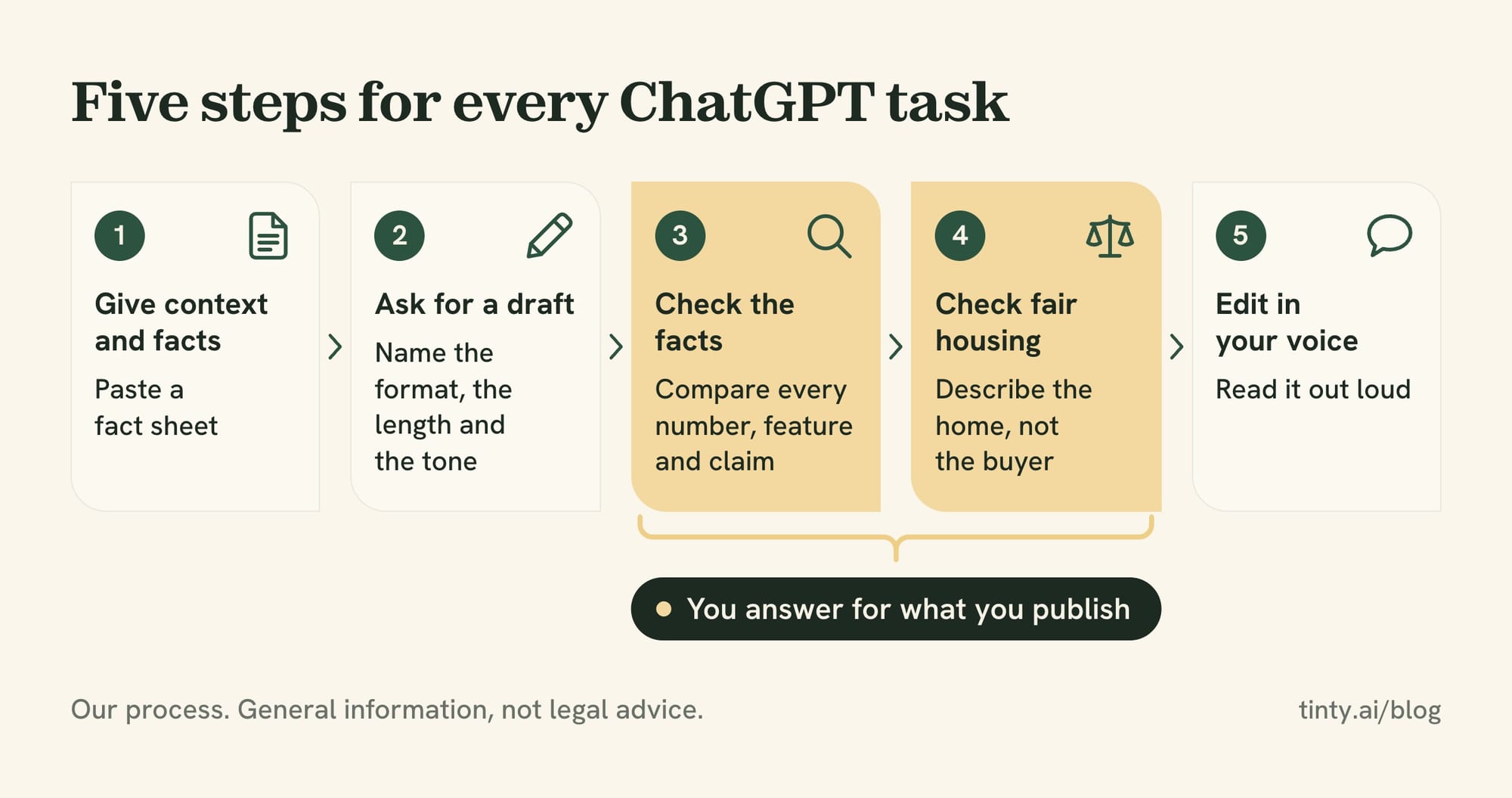
How to use ChatGPT for real estate: a 5-step process
Good output starts with good input. ChatGPT writes best from what you give it, and OpenAI’s page on ChatGPT’s accuracy tells users to treat it “as a first draft, not a final source.”
Run these five steps for every task (our process):
- Give context and facts: say who you are, your market and your audience. Paste a fact sheet instead of asking from memory.
- Ask for a draft: name the format, the length and the tone. Ask for two versions when you’re unsure.
- Check the facts: compare every number, feature and claim with your listing data and notes.
- Check fair housing: cut any word that describes who should live there. Describe the home and the places nearby.
- Edit in your voice: rewrite the opening, cut stock phrases and read it out loud before it goes out.
A short context block saves typing. Save it once in custom instructions, which OpenAI says apply to all your chats, on every plan. Or paste it at the top of a new chat:
Example context block: I’m a real estate agent with [brokerage] in [city, state]. I mostly list [type of homes] in [areas]. Write in plain American English with short sentences and no exclamation points. Use only the facts I give you. If a fact is missing, ask me instead of guessing.
The last line matters most. A model that’s told to ask fills fewer gaps with guesses (our view), and you see what’s missing before a client does.
What real estate agents use ChatGPT for
Mostly for writing. In the National Association of Realtors (NAR) 2026 Technology Report release, 41% of Realtors surveyed said they use AI content tools such as ChatGPT, Copilot or Gemini. Nearly half use AI daily or weekly.
Among Realtors who use AI, the top tasks were:
- Listing descriptions: 75%.
- Social media posts: 56%.
- Emails and follow-up: 52%.
- Market summaries: 30%.
- Marketing content in a personal tone: 30%.
- Document review and summaries: 27%.
The prompts below follow the same tasks, plus objection practice and research. For how brokerages are rolling AI out, see our look at AI adoption in real estate.
ChatGPT real estate prompts: 12 examples to copy
Each prompt below is an example we wrote, not a tested formula. Fill in the brackets, paste your facts and read the “Check” line before you use the result.
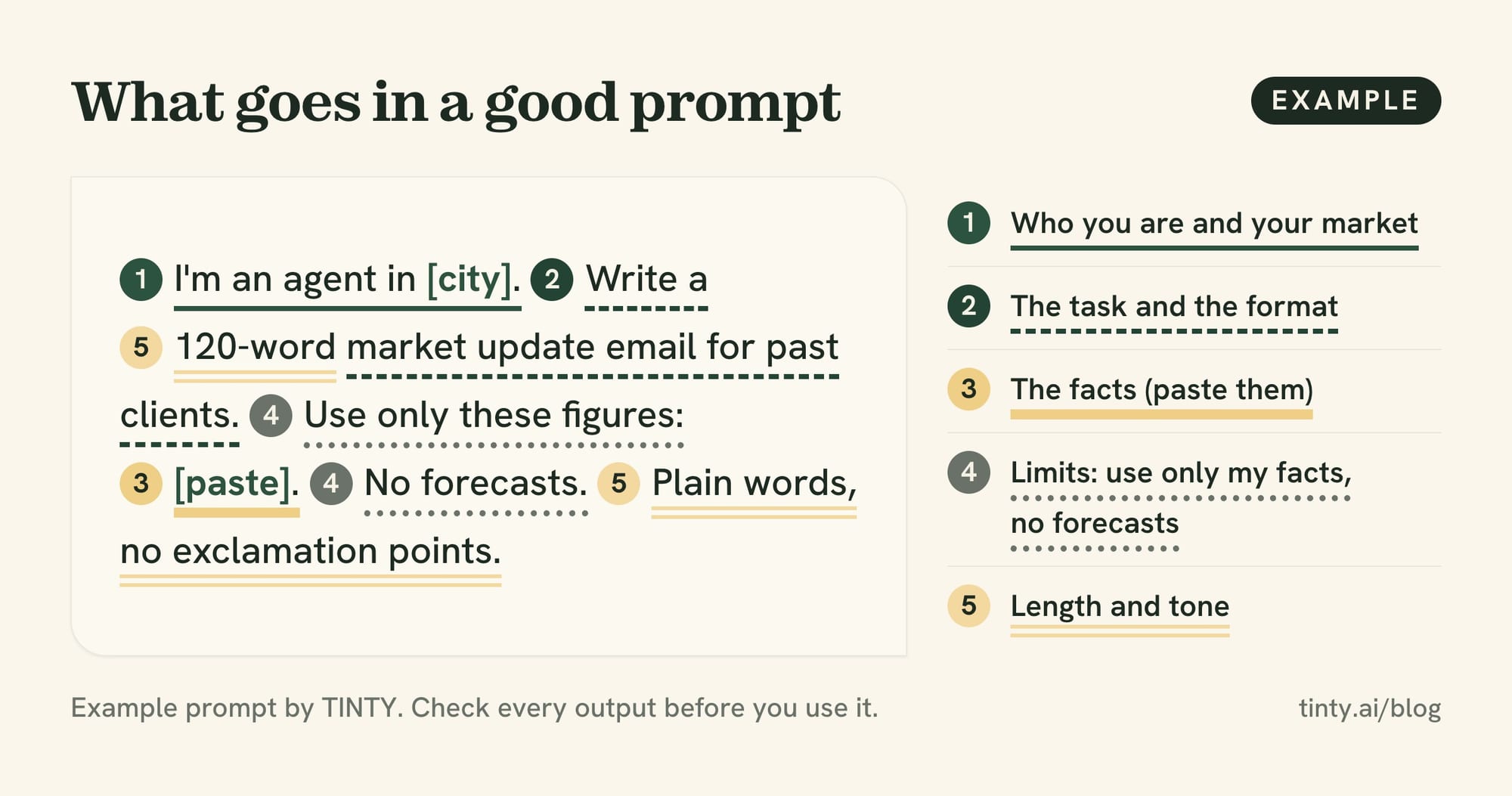
Listing descriptions: let ChatGPT ask first
Our listing description guide has three prompts and a fact check. This one adds a step: ChatGPT asks before it writes.
Example prompt 1: Here are my notes on a listing: [paste fact sheet]. Before you write, ask me up to five questions about facts a buyer would want that are missing. Then write a 150-word description using only my notes and answers. Don’t describe who should live there.
Check: every feature, number and distance against your fact sheet. Delete anything you didn’t give it.
Emails and follow-ups
Example prompt 2: Write a short reply to an online lead who asked about [address]. Answer their question, [question], using only these facts: [facts]. Offer two showing times, [time 1] and [time 2]. Keep it under 80 words and sound like a person, not an ad.
Check: the facts, the times and the lead’s name. Reply by the channel the lead used or agreed to (our suggestion).
Example prompt 3: Write three follow-up emails for buyers who signed in at my open house at [address]. They go out on day 1, day 4 and day 10. Each gives one useful thing, such as [nearby sales, the disclosure packet or a similar listing]. No pressure, under 100 words each.
Check: a marketing email needs your physical postal address and a clear way to opt out, per the Federal Trade Commission’s CAN-SPAM guide. Honor opt-outs within 10 business days.
Example prompt 4: Write a short check-in email to a past client who bought a home in [neighborhood] in [year]. Mention one useful thing: [a fall maintenance reminder or a local event]. End with one question, not a sales pitch.
Check: the name, the year and the event date. Repeat clients and referrals bring in most listings, as our guide on how to get listings shows.
Social media posts
Example prompt 5: Turn these listing facts into three posts: Instagram (under 100 words), Facebook and LinkedIn. Facts: [paste]. If the photos are virtually staged, add a line that says so and where to see the originals: [link]. Describe the home, not the buyer. Add my brokerage name: [name].
Check: people words, the staged-photo line and anything your brokerage requires in ads. In California, that line also goes on or next to each staged photo. Our guide to real estate social media posts has captions for each listing stage.
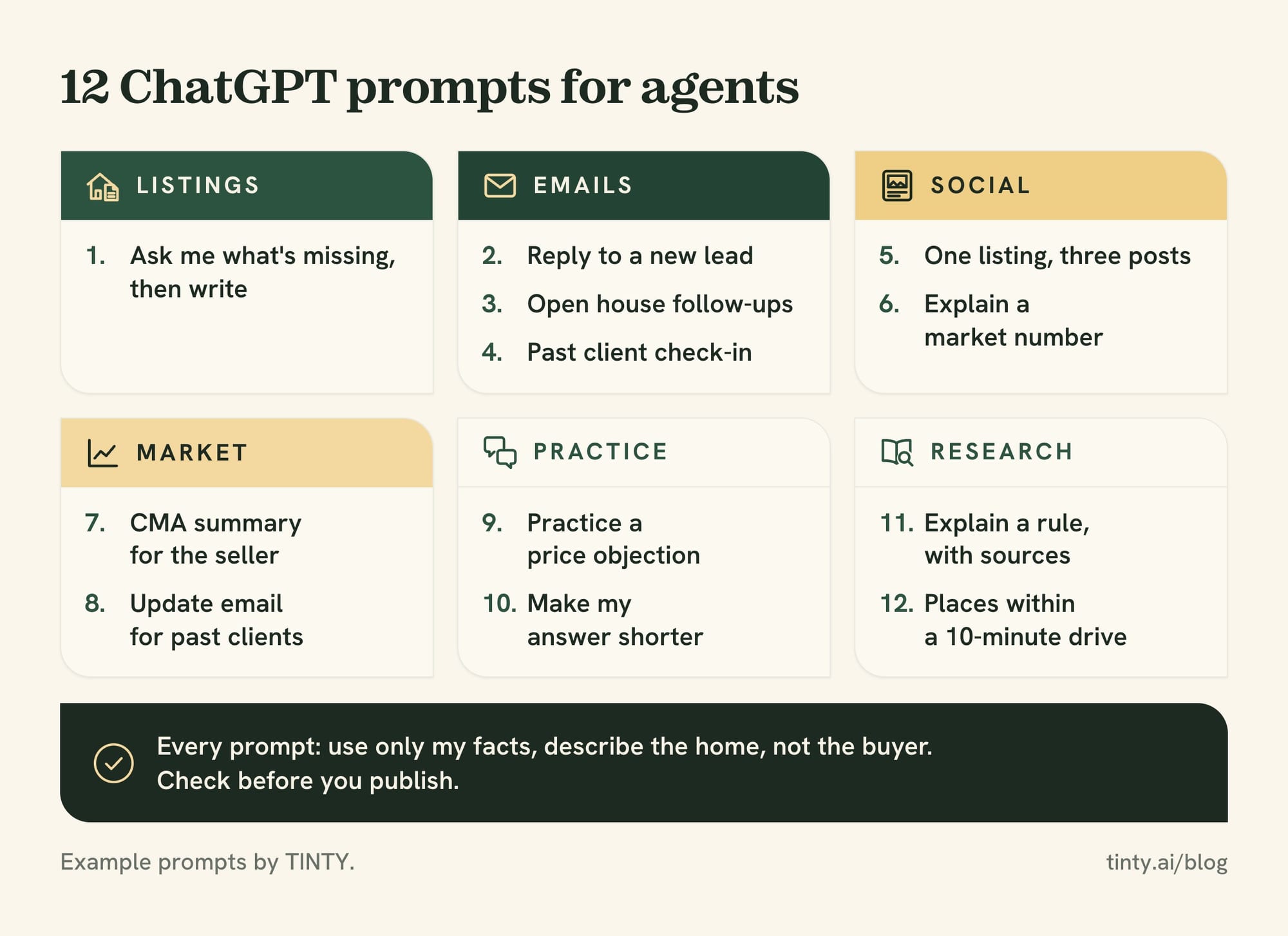
Example prompt 6: Here’s a market number with its source and date: [figure, source, date]. Write a 60-word post that explains what it means for sellers in [area], in plain words. Don’t predict prices. Keep the source and date in the post.
Check: the number against its source, and that the post makes no forecast you can’t support.
Market updates and CMA summaries
A comparative market analysis (CMA) is where ChatGPT saves time on wording, not on judgment (our view).
Example prompt 7: Here are the comparable sales from my CMA, without owner names: [beds, baths, square feet, sale price, sale date, notes]. Write a plain-language summary for the seller in under 150 words. Explain the range these sales show. Don’t recommend a list price.
Check: every number against your MLS export. Before you paste an export into any outside tool, check your MLS’s rules on sharing its data (our suggestion).
Example prompt 8: Here are this month’s figures for [area] from [source], each with last month and last year: [median price, days on market, new listings, closed sales]. Write a 120-word update email for past clients. Say what changed, in plain words, with no forecasts.
Check: each figure, its source and its date. Investors can use the same pattern for rent comps, then check the math in a spreadsheet (our suggestion).
Objection practice and role-play
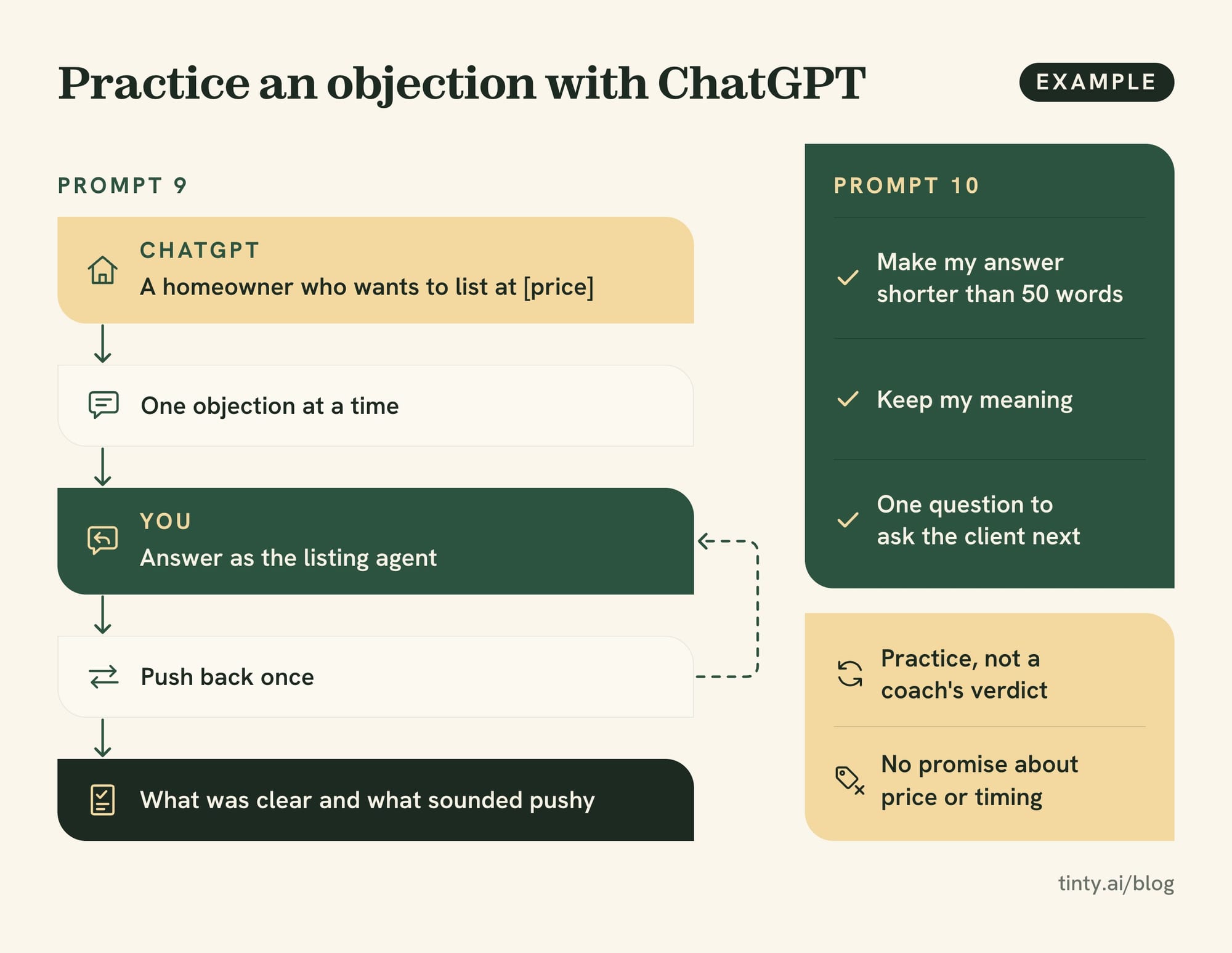
Example prompt 9: Act as a homeowner who wants to list at [price], about [X]% above what recent sales support. I’m the listing agent. Raise one objection at a time and push back once after my answer. Then tell me what was clear and what sounded pushy.
Check: the feedback is practice, not a coach’s verdict. Our objection handling scripts have 22 example answers to rehearse.
Example prompt 10: Here’s my answer to the objection “[objection]”: [paste]. Make it shorter than 50 words, keep my meaning and suggest one question to ask the client next.
Check: it still sounds like you, and it makes no promise about price or timing.
Research and plain-language explainers
Example prompt 11: Explain [a rule, such as written buyer agreements] in plain words for a first-time buyer. Then list the official sources I should read to confirm it, with links.
Check: open every link. OpenAI warns that ChatGPT can make up citations and references to sources that don’t exist.
Example prompt 12: List places within a 10-minute drive of [address]: parks, grocery stores, transit stops, libraries and gyms. Give each name and distance, and tell me which ones you couldn’t confirm.
Check: every place and distance on a map yourself. Describe places, not the people who live nearby (our reading of fair housing rules).
What never to paste into ChatGPT
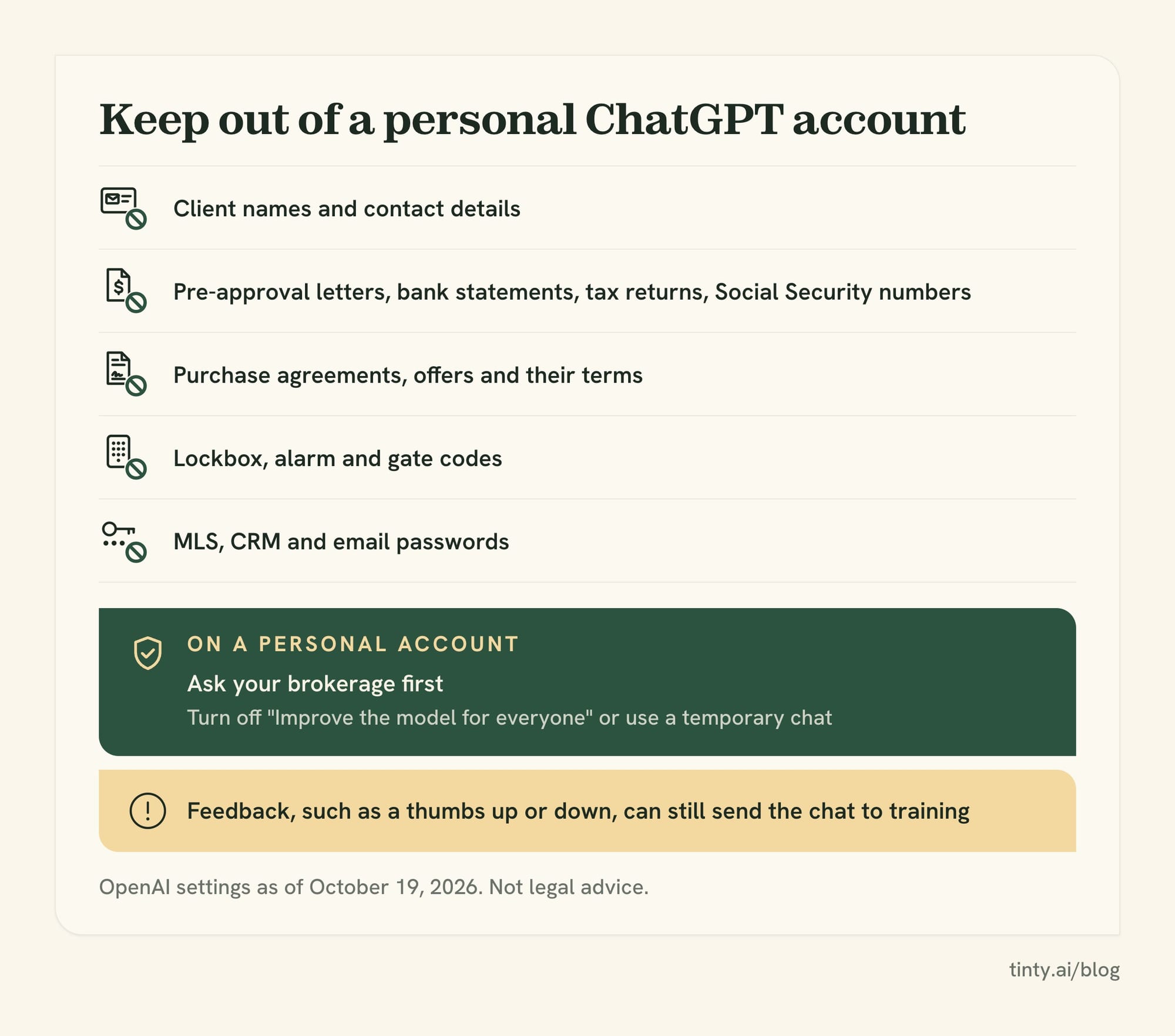
Keep client personal data out of a personal ChatGPT account unless your brokerage approves the tool (our suggestion). Write around it: “the buyer” instead of a name, “pre-approved” instead of the letter.
Leave these out (our list):
- Names and contact details: of clients and leads.
- Financial documents: pre-approval letters, bank statements, tax returns and Social Security numbers.
- Contracts and offers: purchase agreements, counteroffers and their terms.
- Access details: lockbox, alarm and gate codes, and showing instructions.
- Logins: passwords for your MLS, customer relationship manager (CRM) or email.
OpenAI’s settings help, but they don’t replace your brokerage’s policy. Here’s what OpenAI’s data controls page said on October 19, 2026:
- Training opt-out: turn off “Improve the model for everyone” under Settings, then Data controls. New chats then aren’t used to train OpenAI’s models.
- Temporary chat: it stays out of your history and isn’t used for training, but may be kept for up to 30 days for safety.
- Business plans: by default, OpenAI doesn’t train on content from ChatGPT Business and Enterprise workspaces.
Watch out: opting out has a gap. If you give feedback, such as a thumbs up or down, OpenAI says the whole conversation may be used to train its models.
How to check ChatGPT’s work for accuracy
Check every draft against your own records, because you answer for what you publish. NAR’s 2026 Code of Ethics asks Realtors to “present a true picture” in their advertising (Article 12).
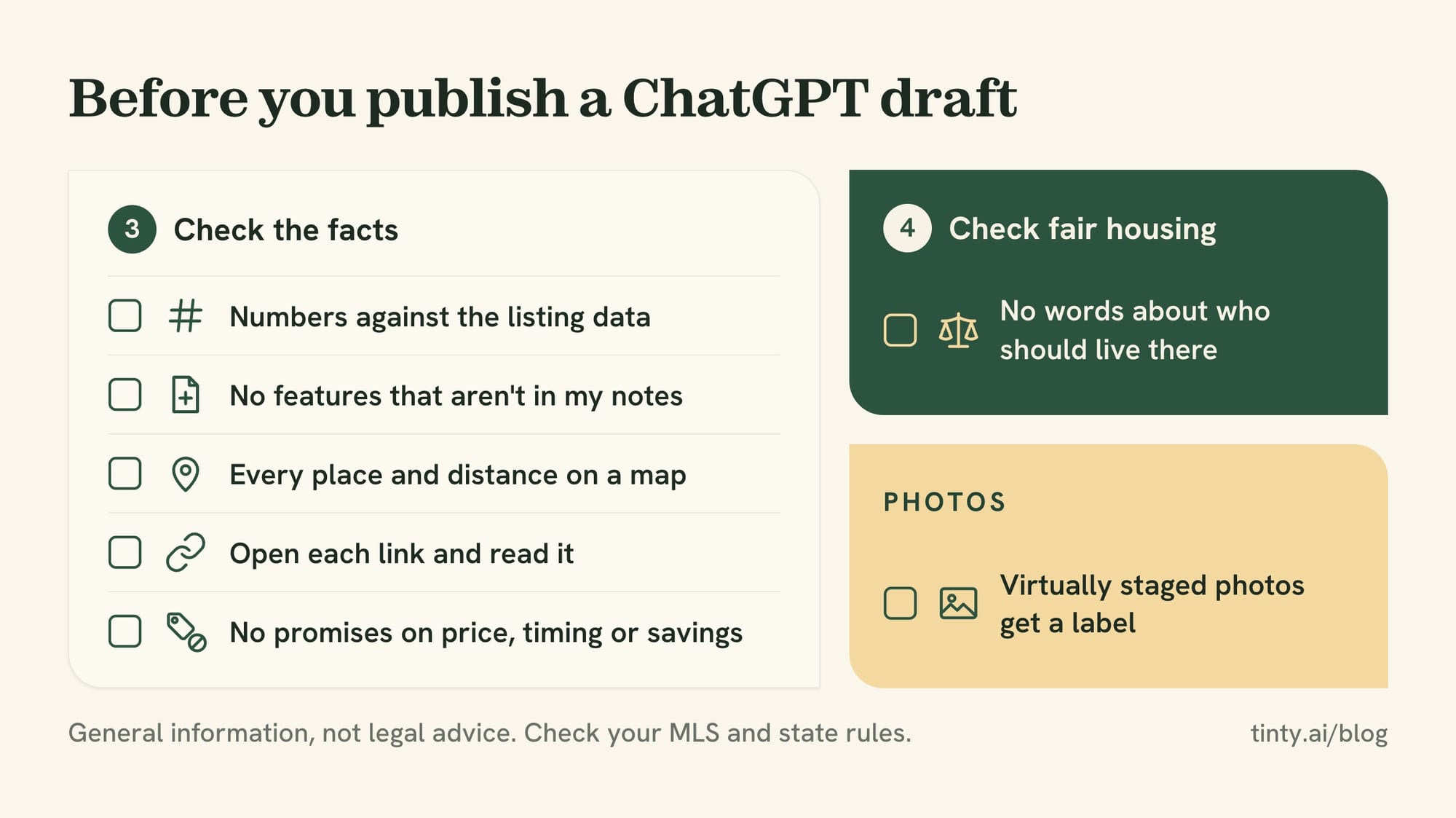
OpenAI’s accuracy page also says ChatGPT can sound confident even when it’s wrong. Five checks catch most of it (our list):
- Numbers: square footage, lot size, year built, prices and dates against the listing data.
- Features: anything not in your notes, such as a renovated kitchen or a “top-rated” school.
- Places and distances: every named park, school or commute time.
- Sources: open each link and confirm it says what the draft claims.
- Promises: cut any line that promises a price, a sale date or savings.
Example: a draft for a 1970s ranch calls the floors “original hardwood” because you mentioned wood floors. Your notes say engineered wood, added in 2019. This example is made up, but the rule holds: your notes win.
Fair housing: describe the property, not the buyer
Fair housing rules cover what an ad says and who sees it. A federal rule, 24 CFR 100.75, bans housing ads that indicate “any preference, limitation or discrimination” based on a protected class.
Rule: 24 CFR 100.75 covers words, phrases and photos that signal a home is or isn’t for a group. Its protected classes are race, color, religion, sex, disability, familial status and national origin. For Realtors, NAR’s Standard of Practice 10-3 adds sexual orientation and gender identity, and state laws may add more.
The same rule covers choosing media or locations that keep a group from learning about housing. So keep ad audiences broad, too.
In practice, three habits keep a ChatGPT draft on the right side (our suggestions):
- Tell it up front: add “describe the home, not who should live there” to every prompt.
- Ask for a flag list: have it list every word about people, then decide yourself.
- Read it last yourself: its check isn’t legal review, and it can miss things.
Our listing description guide lists fair housing words to avoid, with what to write instead.
What ChatGPT can’t do for real estate agents
ChatGPT drafts and explains. It doesn’t replace your data, your judgment or your license (our view).
Know where it stops:
- See your MLS: OpenAI says it can search the web, and the Zillow app in ChatGPT shows public listings. It can’t see MLS-only data, such as private remarks, unless you paste it in (our reading).
- Price a home: it can summarize comps you give it. The pricing advice stays with you.
- Give legal advice: it can explain a rule in general terms. Contract questions go to your broker or a real estate attorney.
- Guarantee accuracy: a fluent answer can still be wrong, so every claim needs a check.
- Replace a photo tool: it writes copy well, but listing photos are a separate job.
Listing photos need a staging tool, not a chatbot
ChatGPT writes the words. OpenAI’s plans include image creation, but a general chatbot isn’t built to furnish a listing photo and leave the room as it is (our view).
We make TINTY, an AI web app that stages photos of empty rooms. You upload a photo, pick the room type, style, furniture and an accent color, and get a staged photo in about a minute. Try TINTY on one of your empty rooms: sign in with Google or an email code and get 6 free staged photos, no card.
Free photos carry a light watermark, so they’re for testing, not the listing. Plans start at $9 a month for 10 staged photos, and a Listing pack is $29 once for 30, per TINTY’s pricing page.
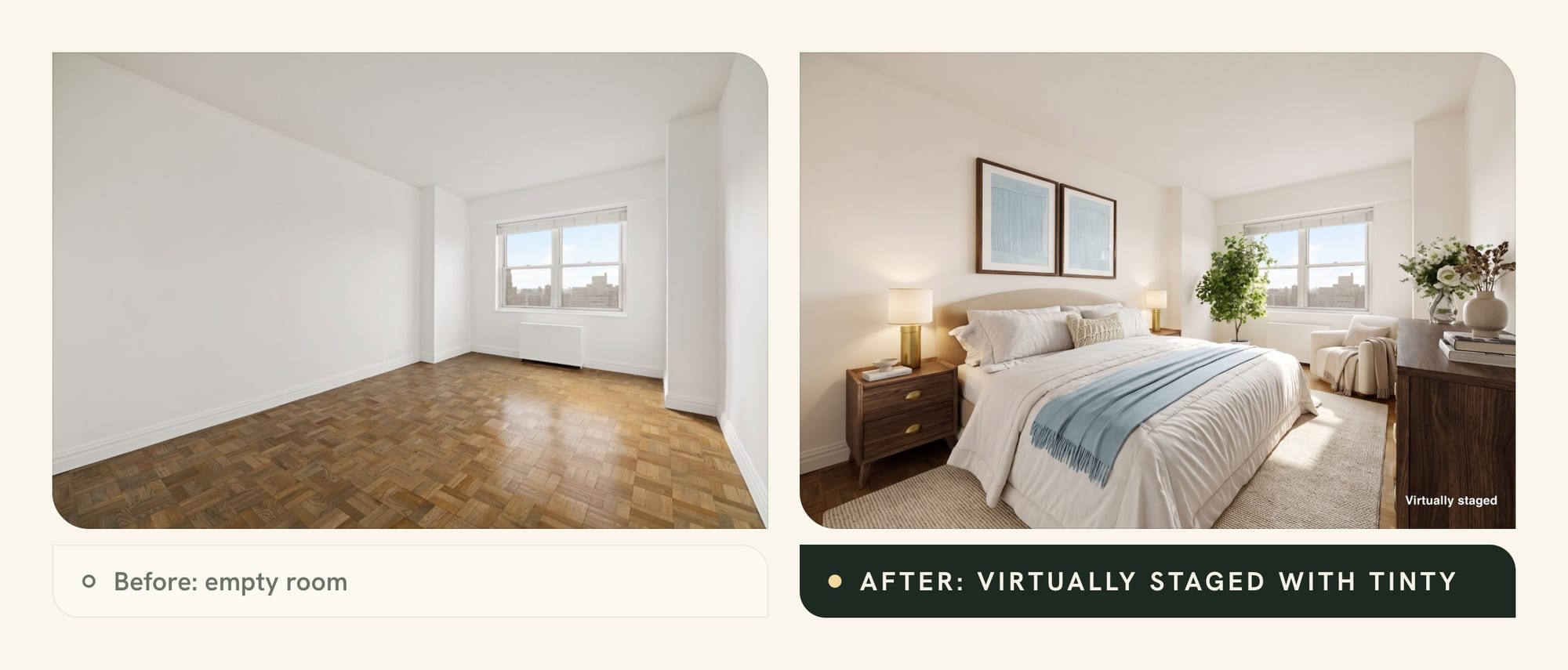
TINTY has 9 room types and doesn’t stage kitchens, bathrooms, building exteriors or yards. It doesn’t remove furniture either, and its files are 2K. You can switch on a “Virtually staged” label for your photos.
Watch out: a staged photo shows furniture that isn’t there. In California, an agent’s sale ad with an altered photo needs a disclosure and a link to the original, per Business and Professions Code 10140.8. Our guide to whether virtual staging is legal covers MLS rules.
Free or paid: which ChatGPT plan agents need
For drafting emails, posts and descriptions, the free plan is often enough (our view). OpenAI’s ChatGPT pricing page listed these individual plans on October 19, 2026:
- Free: unlimited everyday text chats, with limited uploads, image creation, memory and context. It may show ads, per OpenAI’s ads help page.
- Go: more messages with tools, more uploads and longer memory. It launched in the US at $8 a month in January 2026, per OpenAI’s Go announcement, and may show ads too.
- Plus: $20 a month, per OpenAI’s Plus help page. It adds advanced reasoning models and more uploads, with no ads.
- Pro: the top individual tier, in three levels at $100, $200 and $500 a month as of October 2026, per OpenAI’s Pro help page.
Prices can differ outside the US, so check the pricing page for yours.
A paid plan earns its cost when you often upload long files, such as homeowners association (HOA) documents, or hit the free limits (our view).
Gemini and Claude for real estate
The same five steps and prompts work in other AI assistants, such as Google’s Gemini and Anthropic’s Claude (our view). Each has its own plans and privacy settings, so check them before you paste anything.
ChatGPT for real estate agents: FAQ
Can ChatGPT write real estate listing descriptions?
Yes, and it’s the top use: 75% of Realtors who use AI write descriptions with it, per NAR’s 2026 report. Use prompt 1 above, so it asks for missing facts before it writes. Then check every claim and every word about people before it goes in the MLS.
Is ChatGPT free for real estate agents?
Yes, there’s a free plan with unlimited everyday text chats and limited uploads, and it may show ads, as of October 19, 2026. Plus costs $20 a month, per OpenAI’s help center. For drafting emails, posts and descriptions, the free plan is often enough (our view).
Show 4 more questionsShow fewer questions
Is it safe to put client information into ChatGPT?
Not without your brokerage’s approval (our suggestion). Leave out names, contact details, finances, contracts and access codes. On a personal account, turn off “Improve the model for everyone” or use a temporary chat. Feedback such as a thumbs up can still send that chat to training.
Can ChatGPT do a CMA?
It can summarize comparable sales you paste in and explain the range in plain words. It can’t see your MLS, and it only knows the home’s condition from what you tell it. The list price advice stays yours, and so does the check of every number.
What are the best ChatGPT prompts for real estate agents?
The ones that give context and facts first. A good prompt names your market and audience, pastes the facts, sets the length and tone, and says “use only my facts.” The 12 examples in this guide follow that pattern.
Can ChatGPT replace a real estate agent?
No, not on current evidence (our view). It drafts and summarizes, but pricing advice, negotiation and responsibility for what’s published stay with the agent. Our answer to whether AI will replace real estate agents covers the data and the license rules.
How we researched this
On October 19, 2026, we searched for “chatgpt real estate”, “chat gpt real estate” and three close variants. We read the ranking articles we could open: The Close, AgentFire, HousingWire, Ascendix, Luxury Presence, Nodalview, Kolena, Chatfuel and BiggerPockets. AgentImage blocked our browser, and Dasha’s page was gone. We skipped Reddit and YouTube results.
Only three of the nine mention fair housing. None cites the federal advertising rule or explains OpenAI’s data controls. Plan details come from OpenAI’s pricing page, help center and Go announcement, read the same day. If something here is wrong, email hello@tinty.ai and we’ll fix it.
Sources
All pages read October 19, 2026. Dates in parentheses are publication or update dates.
OpenAI:
- OpenAI Help Center: Does ChatGPT tell the truth?
- OpenAI Help Center: ChatGPT custom instructions (apply to all chats, all plans)
Show 25 more sourcesShow fewer sources
- OpenAI Help Center: Data controls in ChatGPT (training opt-out, temporary chat, feedback, business workspaces)
- ChatGPT plans and pricing (individual plans; prices showed in local currency to our browser)
- OpenAI Help Center: Ads in ChatGPT (Free and Go may show ads; Plus and Pro don’t)
- OpenAI: Introducing ChatGPT Go, now available worldwide (January 16, 2026; $8 a month in the US)
- OpenAI Help Center: What is ChatGPT Go?
- OpenAI Help Center: What is ChatGPT Plus? ($20 a month)
- OpenAI Help Center: About ChatGPT Pro tiers ($100, $200 and $500 a month)
Data, rules and laws:
- NAR: Realtors adopt technology to save time and improve the client experience (September 22, 2026; 2026 Technology Report)
- FTC: CAN-SPAM Act, a compliance guide for business
- NAR 2026 Code of Ethics and Standards of Practice (effective January 1, 2026; Article 12 and Standard of Practice 10-3)
- eCFR: 24 CFR 100.75, Discriminatory advertisements, statements and notices
- California Business and Professions Code 10140.8 (AB 723) (effective January 1, 2026)
Other AI tools:
- Zillow: the Zillow app in ChatGPT (October 6, 2025; updated February 11, 2026)
- Google Gemini · Claude by Anthropic
Articles that rank for this topic:
- The Close: ChatGPT for real estate, the complete guide for agents (April 6, 2026)
- AgentFire: 23 strategies to use ChatGPT in real estate (updated March 16, 2025)
- HousingWire: 11 clever ways to use ChatGPT for real estate (updated December 17, 2025)
- Ascendix: How to use ChatGPT for real estate, 25 use cases (updated July 8, 2026)
- Luxury Presence: ChatGPT for real estate, 12 proven strategies (March 13, 2026; updated October 1, 2026)
- Nodalview: 10 ChatGPT prompts you need as a real estate agent (updated January 5, 2026)
- Kolena: ChatGPT for real estate, use cases and prompts (updated September 3, 2026)
- Chatfuel: How to use ChatGPT in real estate (July 5, 2023)
- BiggerPockets: 7 ways real estate investors can use ChatGPT (updated November 7, 2023)
TINTY and related guides: