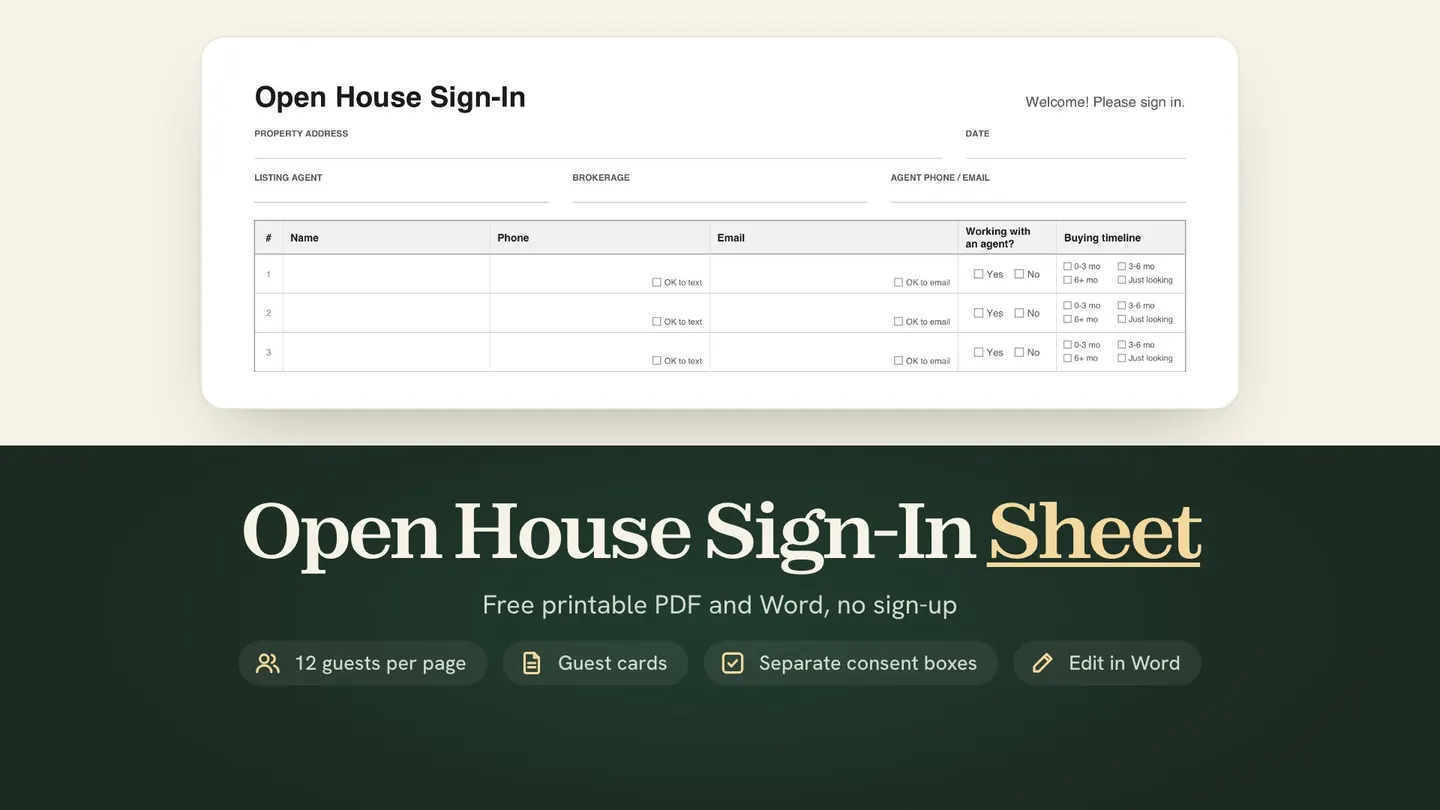
Where can I get a free open house sign-in sheet? Right below, with no sign-up: a printable PDF and an editable Word file. Page 1 fits 12 guests on one US Letter page and asks for name, phone, email, agent status and buying timeline. Page 2 has two one-guest cards, so visitors can’t read each other’s details.
Download free, no sign-up:
Both files are US Letter, set horizontally. Type your header into the PDF and print, or change anything in the Word file, including your logo.
We make TINTY, an AI virtual staging app for real estate agents, and we built this sign-in sheet template for realtors who host open houses. The notes on consent and fair housing are general information, not legal advice.
Sheet made October 6, 2026 and rebuilt October 31, 2026. Rules checked October 31, 2026.
Key takeaways
- Free files: a printable PDF with typeable header fields and an editable Word file, US Letter, no sign-up.
- 12 guests per page: name, phone and email, with separate “OK to text” and “OK to email” boxes, plus agent status and buying timeline.
- Guest cards: page 2 holds two one-guest cards, so no one reads the entries above theirs.
- Texts need more: marketing texts sent with an autodialer need signed written consent. A checked box alone isn’t enough.
On this page: What’s on it · How to use it · Paper or digital · After the open house · Privacy and consent · Staged photos · FAQ
What’s on the open house sign-in sheet
Page 1 is the sign-in sheet: 12 rows on one page, set horizontally so each row has room for handwriting. It asks only what you need to follow up:
- Header: property address, date, listing agent, brokerage and your phone or email. You can type them into the PDF before you print.
- Name, phone and email, with an “OK to text” box and an “OK to email” box.
- Working with an agent? Yes or no, so you know who still needs one.
- Buying timeline: 0 to 3 months, 3 to 6 months, 6+ months or just looking.
- Consent line: guests check a box only for the contact they want. For marketing texts, they also sign a guest card.
In its 2012 open house safety tips, the National Association of Realtors (NAR) suggests asking every visitor for full name, address, phone and email. The guest card asks for a city or address. If your broker wants an address on page 1 too, add a column in the Word file.
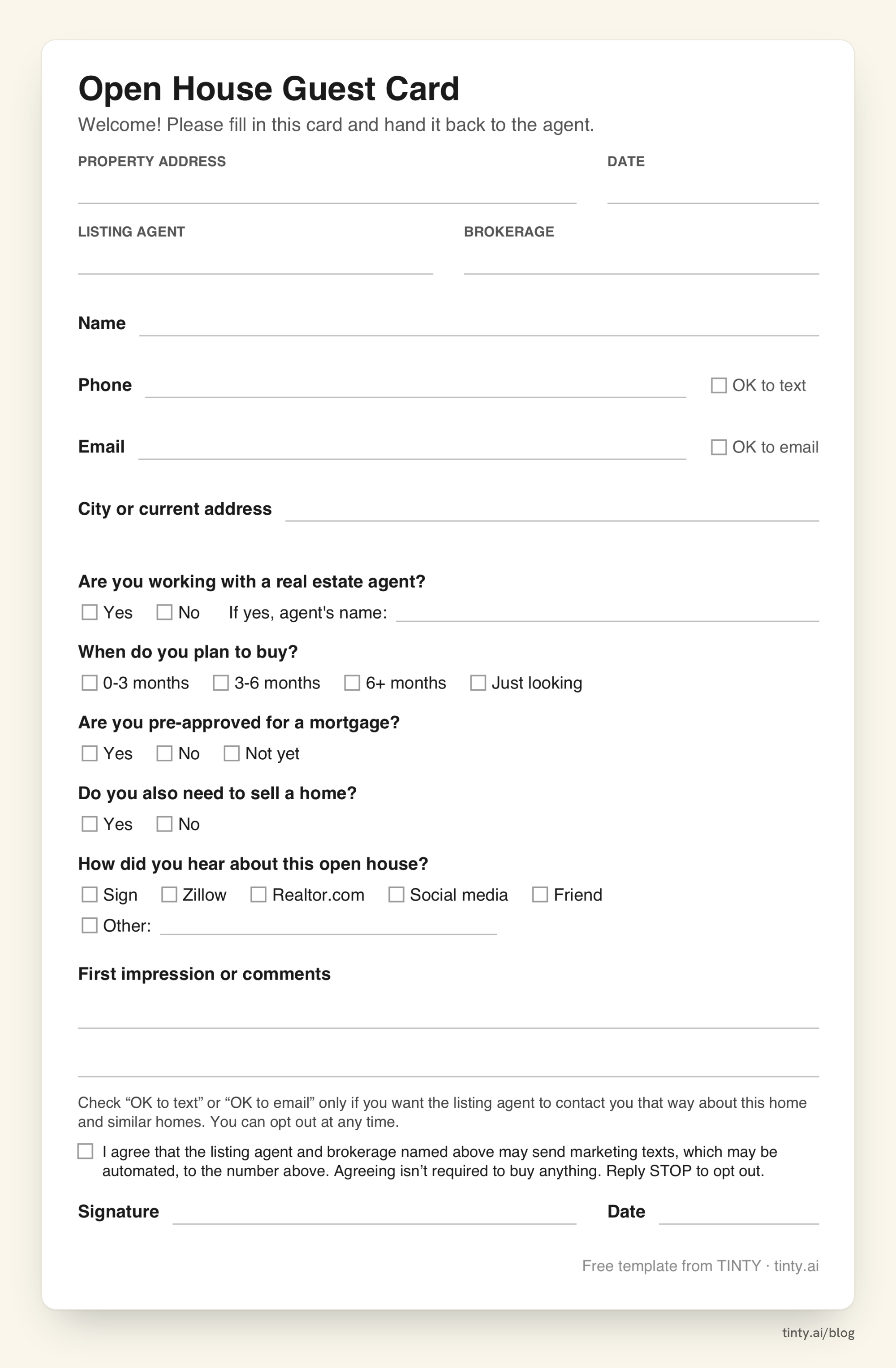
Page 2: one-guest cards
Page 2 holds two guest cards that you cut apart. Each guest fills in their own card and hands it back, so nobody reads the details of the people who signed in before them.
The card asks a few more questions than the sheet. It adds the buyer’s agent’s name, pre-approval, “also need to sell?”, how they heard about the open house and a box for first impressions. The last two feed your seller summary.
What we left off on purpose
We left off income, date of birth, ID numbers and questions about family, religion or other traits that fair housing law protects. Ask every guest the same questions.
Watch out: NAR’s Code of Ethics, Article 10, bars denying equal professional services for protected reasons. Use one sign-in routine for every visitor, and don’t add questions about who will live in the home.
How to use the sign-in sheet at your open house
The sheet works best when guests meet you before they meet the clipboard. Six steps:
- Type the property and your details into the PDF, or edit the Word file, then print.
- Put the clipboard where guests walk in, such as the entry table or kitchen counter, with a good pen.
- Greet each guest first, then ask them to sign in.
- Sign the first line yourself, so the sheet never looks empty.
- Give a reason to sign: the property sheet, listing photos by text or similar homes.
- Check that each entry is easy to read before the guest leaves.
For 24 ways to promote and run the open house itself, see our open house ideas.
Paper or digital open house sign-in?
Paper works anywhere: no Wi-Fi, no tablet and no app. Guests see a pen and know what to do. The cost comes later, when you retype each name and guess at messy handwriting.
A digital sign-in skips the retyping. Put a QR code by the door that opens a free form, such as a Google Form, with the same questions as the sheet. Google Forms can save every answer to a spreadsheet.
If you go digital, keep the same rules as on paper:
- Ask every guest the same questions.
- Use separate boxes for text and email consent, and leave them unchecked.
- Copy the text consent wording from the guest card, and add a signature field.
Keep the paper sheet on the table anyway, for guests who won’t scan a code (our suggestion).
After the open house: follow-up and the seller summary
Follow up the same day or within 24 hours, while guests still remember the home. Sort the sheet and cards first, then:
- Thank-yous: email only guests who checked “OK to email” and text only those who checked “OK to text”. Our open house follow-up email is ready to copy.
- Listings: send the listing link, and similar homes to the “just looking” group.
- Seller summary: tell the seller how many groups came, how many had an agent and what they said. Share comments, not guests’ contact details (our view).
- Future sellers: a guest who checked “also need to sell” may need a listing agent. Our free listing presentation templates help you prepare that meeting.
Privacy and consent on a paper sign-in sheet
Separate boxes for texts and email let each guest choose how you contact them. Keep the sheets somewhere safe, limit who sees them and honor every opt-out right away.
A checked “OK to text” box shows what the guest wants. On its own, it isn’t written consent for automated marketing texts, such as texts sent with an autodialer. That’s why the guest card adds a text consent box and a signature line.
Rule: the Federal Communications Commission (FCC) written consent rule asks for an agreement the guest signs, with the number to text. It must name you, say the texts may be automated and say agreeing isn’t required to buy anything. An e-signature can count.
Some states add rules of their own. Florida’s telephone solicitation law, for example, covers text messages too. So check with your broker before you text new leads.
Example: the card’s statement reads: “I agree that the listing agent and brokerage named above may send marketing texts, which may be automated, to the number above. Agreeing isn’t required to buy anything. Reply STOP to opt out.” Type your name and brokerage on the card first.
Staged photos for the open house flyer and listing
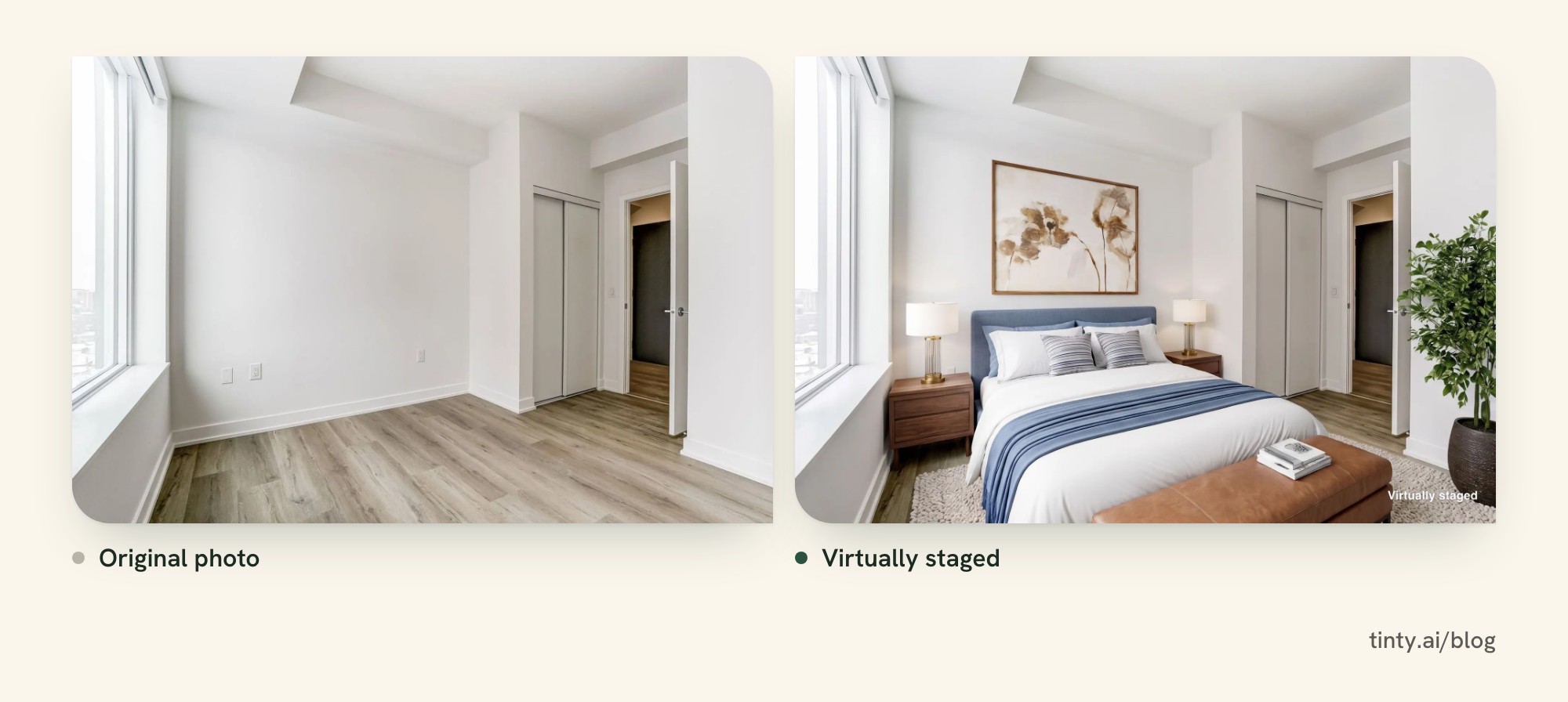
Buyers find your open house through the listing photos and the flyer, and empty rooms can look cold in photos. With TINTY, you can virtually stage a room in about a minute.
Furnished rooms work too. TINTY can remove the furniture and decor first, keep built-ins like cabinets and radiators, then stage the empty room. Each removal uses one photo. TINTY stages living spaces such as living rooms and bedrooms, not kitchens, bathrooms or exteriors.
Stage 6 photos free with TINTY, with a watermark and no card. Free photos are for testing; paid staged photos are clean 2K files for the multiple listing service (MLS) and for flyers up to letter size. See before-and-after examples.
No time to do it yourself? TINTY Studio stages the photos for you and finishes each one by hand. Email them to hello@tinty.ai and get the results in 2 to 24 hours, at $10 per photo from 3 photos. Furniture removal is included, and you pay only if you’re happy.
For a vacant listing, add the staged photos to your follow-up, labeled as virtually staged. TINTY lets you add an optional “Virtually staged” label when you download. More reading: selling a vacant house and staging a house, room by room.
Open house sign-in sheet FAQ
Is this open house sign-in sheet really free?
Yes. Download the PDF or the Word file with no sign-up and no email.
What size is it, and how many guests fit on one page?
It’s US Letter (8.5 x 11 inches), set horizontally. The sign-in page fits 12 guests. Page 2 has two guest cards that you cut apart.
Show 4 more questionsShow fewer questions
Can I add my logo?
Yes. Open the Word file, click the logo box at the top and insert your logo. The PDF lets you type the header fields only.
Can I require visitors to sign in?
Yes, you can make it a rule, and NAR’s 2012 safety tips recommend that every visitor sign in. Check your broker’s policy, and apply the same rule to every visitor.
Do open house visitors have to sign a buyer agreement?
No. NAR’s consumer guide says a visitor who tours an open house on their own doesn’t need a written buyer agreement. The hosting agent doesn’t need one with them either. The agreement comes once a buyer starts working with an agent, before their first tour together. Practices may vary by state and local law.
How long should I keep the sheets?
Follow your broker’s policy and your state’s record rules. Store the sheets securely, and shred them when you no longer need them.
How we researched this
We built the sheet on October 6, 2026 from the fields that ranking sign-in sheets and agent guides use most. On October 31, 2026, we re-read the FCC’s consent rule in the Electronic Code of Federal Regulations (eCFR). We also read NAR’s open house and safety pages, its 2026 Code of Ethics and the pages that rank for “open house sign in sheet.”
We didn’t check state rules on how long to keep sign-in records. If something here is wrong, email hello@tinty.ai and we’ll fix it.
Sources
All pages read October 31, 2026. Dates in parentheses are publication or effective dates.
Consent and fair housing rules:
- eCFR: 47 CFR 64.1200, delivery restrictions (paragraph (f)(9), prior express written consent)
- Florida Statutes 501.059, Telephone solicitation (2026)
Show 6 more sourcesShow fewer sources
- U.S. Department of Justice: The Fair Housing Act
- NAR 2026 Code of Ethics and Standards of Practice (Article 10) (effective January 1, 2026)
Open house guidance from NAR:
- NAR: 10 tips for holding a safe open house (May 24, 2012; NAR archive page)
- NAR: Consumer guide to open houses and written agreements (2024)
TINTY and related guides: